Lamzu Thorn V2 Review: The New King of Ergonomic Mice?
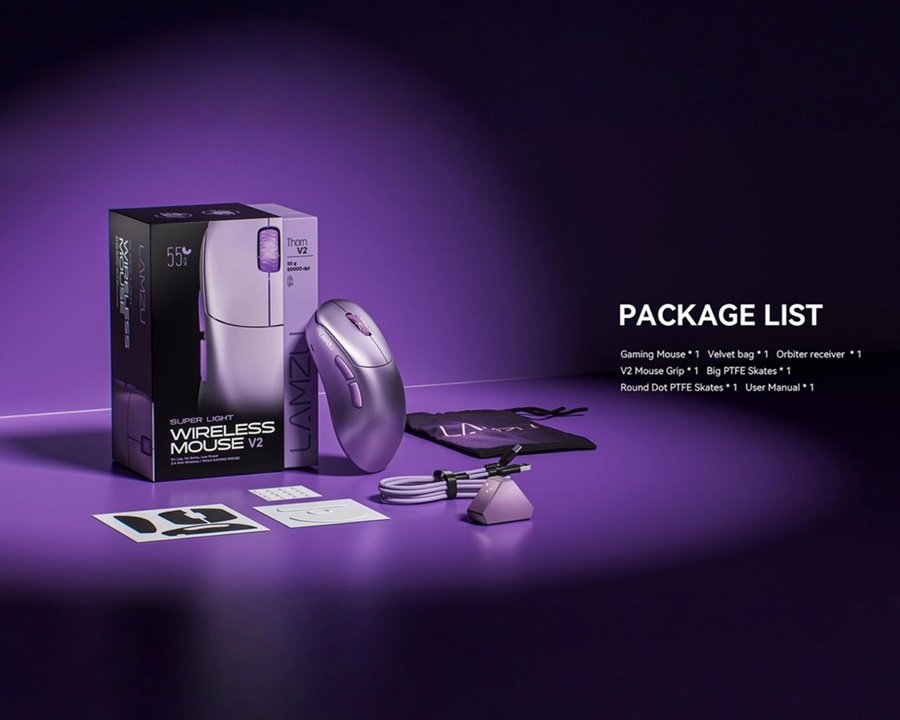
The original Lamzu Thorn quickly established itself as an absolute darling in the ergonomic gaming mouse market. However, in the hyper-competitive world of eSports peripherals, standing still means getting left behind. Enter the Lamzu Thorn V2 .
Lamzu didn’t just give this mouse a minor spec bump; they implemented a staggering eight major upgrades to meet today’s ultra-high competitive standards. Priced at around $130, it targets the absolute enthusiast. Welcome to Gearzon’s in-depth review, where we dissect whether these internal and structural overhauls are enough to reclaim the title of the world’s best ergonomic gaming mouse.

Watch the full hardware breakdown, internal teardown discussion, and gameplay analysis.
⚙️ Quick Specifications
- 🖱️ Sensor: Custom PAW Next (PixArt Collaboration)
- 🎯 Max DPI: Up to 50,000 DPI
- ⚡ MCU: Dual Nordic 54H20 (In mouse & dongle)
- 📡 Polling Rate: Native 8,000Hz (Out of the box)
- 🔘 Main Switches: Kailh Optical Switches
- ⚖️ Weight: ~53g (Only a 1g increase over V1)
- 💰 MSRP: ~$130.00 USD
Specs at a Glance
The quick list covers the headline hardware. This table adds the size, tracking limits and battery capacity listed by retailers, plus the price on Lamzu’s official Thorn V2 page.
| Spec | Lamzu Thorn V2 |
|---|---|
| Price on Lamzu’s store | $129.99 USD |
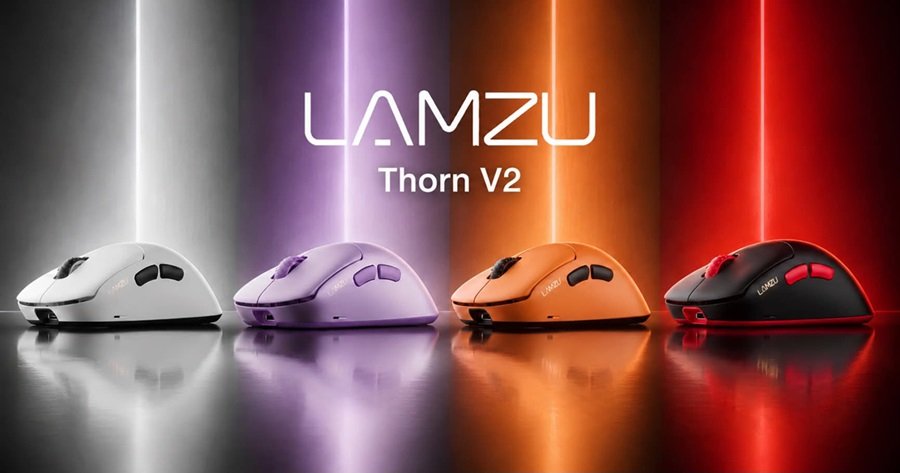
| Colors | Purple, black-red, orange, white |
| Weight | 55g (retailer listing) |
| Size (L x W x H) | 124 x 66 x 42 mm (retailer listing) |
| Sensor | PAW NEXT I, up to 50,000 DPI |
| Tracking speed / acceleration | 880 IPS / 80G (retailer listing) |
| Switches | Optical |
| Polling rate | Up to 8,000Hz |
| Battery | 300 mAh (retailer listing) |
| Connection | 2.4GHz wireless with USB receiver |
| Handedness | Right-handed ergonomic |
Retailers list 55g, which is a little above the roughly 53g quoted in this review. Both sit close to the 54g that TechPowerUp recorded for the original Thorn. Weighing your own unit is the only way to know for sure.
1. Next-Gen Internals: PAW Next & Dual Nordic MCU
Let’s kick things off with the raw internal horsepower. While the original Thorn utilized the industry-standard PixArt 3395 sensor and a Nordic 52840 MCU, the Thorn V2 HERE goes completely overkill. It features a brand-new sensor developed in collaboration with PixArt, dubbed the PAW Next, boosting the ceiling to an insane 50,000 DPI.
Powering the data transmission is a dual Nordic 54H20 MCU setup (one in the mouse, one in the dongle). This allows the Thorn V2 to support a true 8,000Hz wireless polling rate natively out of the box—no separate dongle purchase required. While an 8K polling rate yields diminished real-world returns (think 0.01% gains), it guarantees absolute future-proofing for high-refresh-rate monitors.
2. Shape Shifting: A Controversial Change
The original Thorn was widely celebrated for its safe, unobtrusive asymmetrical shape that let your hand relax naturally. Surprisingly, Lamzu decided to alter these dimensions for the V2, which might cause a bit of a divide in the community.
- Length Increase (+5mm): The mouse is slightly longer, meaning it tucks much deeper into the lower area of your palm. This significantly reduces your palm’s friction against the mousepad.
- Height Reduction (-0.25mm): The highest point of the hump has been flattened and spread out, distributing palm pressure more evenly.
- Grip Width Reduction (-2mm): The mouse is physically narrower at the grip point.
The Ergonomic Verdict: These changes make the Thorn V2 feel incredibly locked-in, secure, and stable compared to the V1. It offers immense aiming stability and recoil control in vertical-heavy tracking titles. However, it loses that ultra-passive “just plop your hand down” freedom of the original model.
Hand Size and Grip Fit
Lamzu markets the V2 as a right-handed ergonomic shape for palm and claw grip, according to retailer listings. Left-handed players are out of luck. The listed 124 mm length compares with 119 mm for the G-Wolves Lyan and 87.5 mm for the Pulsar X2F, so the mouse fills the palm instead of floating above it.
What the Original Taught Us
TechPowerUp described the first Thorn as a slightly longer, lower-profile VAXEE Outset AX. The V2 adds another 5 mm of length, as covered above. In practice this favors players who like the palm to stay supported during long flicks. Pure fingertip users will probably prefer a smaller shell, such as the one in our Pulsar X2F review.
Check Before You Buy
Lamzu does not publish hand-size guidance on the product page we checked. Measure your hand from wrist crease to middle fingertip and compare it with the 124 x 66 mm footprint. If you hover between sizes, our gaming mouse buying guide explains how grip style and hand size interact.
3. Elite Structural Changes and Clicks
Where the Lamzu Thorn V2 absolutely shines is in its structural re-engineering. The previous model felt like a standard gaming mouse with a basic single PCB setup. The V2 elevates the build quality completely:
- Separated PCB Design: The main switches and the scroll wheel are now mounted on a separate PCB attached directly to the top shell. This allows Lamzu to fine-tune the click tension flawlessly.
- Internal Support Cage: A newly integrated structural cage runs inside the shell, completely eliminating side flex and creaking while adding only 1 gram to the overall weight.
- Sealed Bottom: The bottom shell is now fully closed, preventing dust and hair from easily entering the mouse.
“The original Thorn optical switches were notoriously mushy and hollow. The V2 swaps them for premium Kailh Opticals—crisp, tactile, incredibly spammable, and completely free of obnoxious noise.”
Additionally, the scroll wheel has been upgraded to a premium Razer-made optical wheel (the same one found in the Deathadder V4 Pro series), offering vastly superior step-tactility and consistency over the V1.
4. Software, Coating, and In-Game Performance
In real-world competitive grinding across *Overwatch* and *Team Fortress 2*, the Thorn V2 performs flawlessly. The premium coating has been re-formulated to feel less chalky than the original, remaining completely slip-free even when your hands start sweating during intense matches.
⚠️ Fingerprint Warning: While the coating texture is great, the black version is an absolute fingerprint and oil magnet. If you like your setup looking pristine, you might want to opt for a lighter colorway.
Software Caveat: The mouse utilizes an intuitive web-based driver that makes tweaking settings like Motion Sync effortless. However, there is currently a minor software bug involving the “Scroll Bunny Hop Protection” feature. Once enabled, it cannot be toggled off unless you factory reset the device (Lamzu is currently working on a patch).
Driver and Firmware Notes
Lamzu’s download page lists a web driver for its mice and links to a driver FAQ. Some retailers mention a “LAMZU Aurora” driver instead, so the naming may differ by region or firmware. Check which one your unit uses.
The same page carries a firmware warning. It says flashing the wrong firmware may disable your device, and it points users to Lamzu support first. That caution matters here, because the scroll-wheel toggle bug above already requires a factory reset to undo.
Three habits keep things safe. First, update firmware only from Lamzu’s own pages. Second, note your settings before a factory reset, since a reset clears them. Third, keep the receiver connected while you configure the mouse.
5. Pros and Cons Summary
✅ What We Love
- Next-gen PAW Next sensor (50K DPI) & Dual Nordic MCU.
- Native 8,000Hz polling included out of the box.
- Massive upgrade to Kailh Optical switches (no mushiness).
- Premium separated PCB and internal support cage.
- Incredible stability and locked-in control for vertical tracking.
❌ Room for Improvement
- Narrower, longer shape may alienate original V1 purists.
- The black coating accumulates fingerprints/oils rapidly.
- Minor scroll wheel software bug requiring factory resets.
Lamzu Thorn V2 vs Its Rivals
The V2 competes mainly with the original Thorn and with Razer’s flagship ergonomic mouse. The table uses each maker’s listed figures, except for the V1, which comes from TechPowerUp.
| Mouse | Weight | Sensor | Polling | Price |
|---|---|---|---|---|
| Lamzu Thorn V2 | 55g (retailer) | PAW NEXT I, 50,000 DPI, 880 IPS | Up to 8,000Hz | $129.99 |
| Lamzu Thorn (V1) | 54g | PixArt 3395 (per this review) | Tested at 1,000Hz | $91.99 at review |
| Razer DeathAdder V4 Pro | 56g (black) | Focus Pro 45K Gen-2, 900 IPS | Up to 8,000Hz | From $149.99 |
| Logitech G502 X Plus | Not checked | HERO 44K | Not checked | $159.99 |
Thorn V2 vs the Original Thorn
The V2 costs roughly $38 more than the V1 did in TechPowerUp’s review, at $129.99 versus $91.99. In return you get 8K polling, a newer sensor and the structural changes this review describes. If the V1 shape already suits you, the upgrade is mostly about internals. If you loved its relaxed feel, remember the V2 trades some of that for stability. The original won TechPowerUp’s Editor’s Choice award, so it remains a strong buy if you find it discounted.
Thorn V2 vs Razer DeathAdder V4 Pro
Razer lists the DeathAdder V4 Pro at 56g, with up to 150 hours of battery life and 8,000Hz polling. It also uses Razer’s optical scroll wheel and Synapse 4 software. Razer’s page shows it from $149.99, which puts the Thorn V2 about $20 cheaper on that listing. The gap may be larger when Razer prices are at their list level. Read our SteelSeries vs Razer comparison for more on how Razer’s newer mice behave.
Thorn V2 vs the Logitech G502 X Plus
Logitech’s G502 X Plus is a different animal. Its product page lists 13 programmable controls, a HERO 44K sensor and a $159.99 price. It suits players who want many buttons and RGB. Our G502 X Plus review and G502 HERO review cover that style. The Thorn V2 is the cleaner, lighter choice.
For ultra-light symmetrical alternatives, look at the Logitech G PRO X SUPERLIGHT 2 or the G-Wolves Lyan. If you care more about click technology, our Logitech G Pro X2 Superstrike review covers a very different approach. Our VXE R1S by ATK review looks at another high-spec wireless mouse with a different weight balance.
Who Should Buy the Thorn V2 and Who Should Skip It
Buy It If
- You are right-handed and use a palm or relaxed claw grip.
- You want 8K wireless polling without buying an extra dongle.
- You value a rigid shell and crisp optical clicks.
- You have medium hands and like a stable, locked-in feel.
Still unsure about shape and weight? Our buying guide lists the five factors worth checking.
Skip It If
- You are left-handed or want an ambidextrous shape.
- You loved the V1’s relaxed shape and do not want a longer, narrower body.
- You prefer a very light fingertip mouse, such as the ATK U2 V2 Ultimate.
- You dislike fingerprint-prone black coatings, or you cannot risk a firmware bug.
6. Final Verdict: The Best Ergo Mouse on the Market?
Excluding the highly subjective nature of the altered shape, the Lamzu Thorn V2 HERE is a practically perfect gaming mouse. The internal engineering upgrades completely eliminate the flaws of the original model.
At $130, it isn’t cheap, but it easily beats out its main rival, the Razer Deathadder V4 Pro. The Thorn V2 is noticeably more comfortable, features superior optical switch tactility, and sits at around $40 to $50 cheaper while throwing in native 8K wireless functionality for free. If you have medium-sized hands and want the absolute peak of ergonomic eSports performance, this is an easy recommendation.
Dominate Your Lobby with Gearzon
Torn between the Lamzu Thorn V2 and other asymmetrical giants like Vaxee or Zowie? Check out our ultimate ergonomic mouse buyer’s guide to perfect your grip.Explore More at Gearzon
Frequently Asked Questions
What sensor does the Lamzu Thorn V2 use?
It uses a custom PAW Next sensor developed with PixArt, rated up to 50,000 DPI, paired with a dual Nordic 54H20 MCU setup that enables native 8,000Hz wireless polling straight out of the box.
Is the Lamzu Thorn V2 the same shape as the original Thorn?
No. The V2 is 5mm longer, 0.25mm shorter at the hump, and 2mm narrower at the grip. It feels more locked-in and stable, but it loses some of the passive, “just plop your hand down” comfort that made the original so popular.
How does the Lamzu Thorn V2 compare to the Razer DeathAdder V4 Pro?
The Thorn V2 is around $40–$50 cheaper, feels more comfortable to most testers, has crisper optical switch tactility, and includes native 8,000Hz wireless polling at no extra cost.
Does the Lamzu Thorn V2 have any known software issues?
How much does the Lamzu Thorn V2 cost?
Lamzu’s official store lists the Thorn V2 at $129.99 USD. It comes in purple, black-red, orange and white. Retailers outside the US price it differently, with one European shop listing it at EUR 149.90. Shipping and taxes change the final cost.
Is the Lamzu Thorn V2 worth upgrading from the original Thorn?
It depends on how much you value the new internals. The V2 adds 8K polling, a new PAW NEXT I sensor and a sturdier structure. It also changes the shape, which some V1 fans may dislike. If the V1 shape already suits you, the upgrade is optional.
Yes — there’s a minor bug in the “Scroll Bunny Hop Protection” feature that can’t be turned off once enabled without a full factory reset. Lamzu has said a software patch is in the works.

- 【Strong Magnetic Design】The DAREU Sakura Pink gaming mouse features a strong magnetic design that enables automatic and …
- 【Cute Sakura Limited Edition Mouse】Designed for aesthetics and performance, this pink wireless mouse features a symmetri…
- 【Long-Lasting Gaming or Office Hours】The Sakura pink mouse is equipped with a durable, rechargeable built-in battery. It…