In-Depth Logitech G502 X Plus Review: Wireless Precision Meets Vibrant RGB
The G502 lineup from Logitech G is arguably the most recognizable gaming mouse design in history. With the release of the Logitech G502 X Plus, Logitech has modernized this iconic chassis with LIGHTSPEED wireless technology, vibrant LIGHTSYNC RGB lighting, and ultra-smooth glide materials that elevate both gaming performance and daily productivity.
In this comprehensive Gearzon review, we break down everything that makes the G502 X Plus a standout peripheral—from its dual-mode scroll wheel and hidden magnetic dongle garage to its seamless USB-C charging and ergonomic feel.
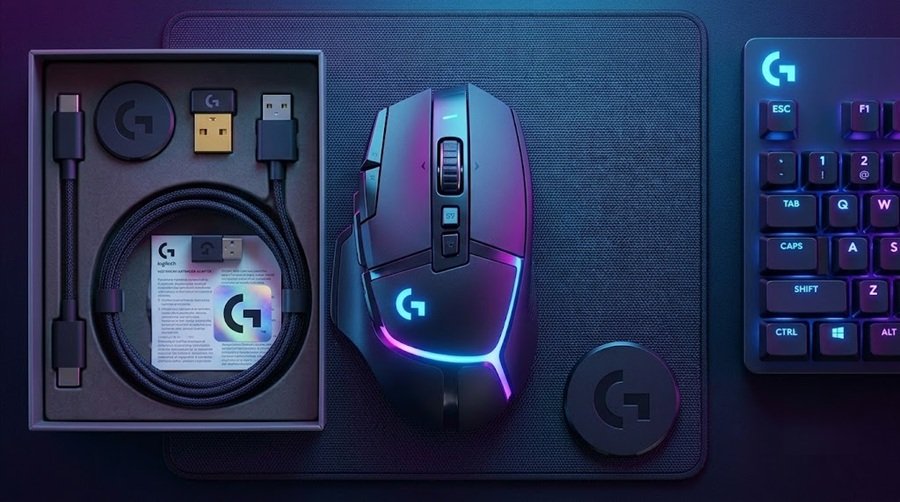
Watch the hands-on feature overview and visual test of the Logitech G502 X Plus.
Link Product: Amazon
⚙️ Quick Specifications
- 📡 Connectivity: LIGHTSPEED Wireless + USB-C Wired
- 🌈 Lighting: 8-LED LIGHTSYNC RGB with dedicated physical toggle button
- 🎡 Scroll Wheel: Dual-mode (Tactile Ratchet & Infinite Free-Spin)
- 🧲 Travel Storage: Internal magnetic dongle compartment
- 🔋 Charging: USB-C rechargeable (Cable included)
- 🖐️ Ergonomics: Sculpted right-handed design with smooth-glide feet
Specs at a Glance
The table pulls the main numbers into one spot. They come from the Tom’s Hardware, TechRadar and Pocket-lint reviews, plus Logitech’s G502 X Plus store page. Reviews quote slightly different battery figures, so we show a range.
| Spec | Logitech G502 X Plus |
|---|---|
| Weight | 106 g (Tom’s Hardware, TechRadar) |
| Dimensions | 131.3 x 79.3 x 41.2 mm (Tom’s Hardware) |
| Sensor | HERO 25K; 400 IPS and 40 G acceleration (Tom’s Hardware) |
| Switches | LIGHTFORCE hybrid optical-mechanical |
| Controls | 13 programmable, including a 4-way scroll wheel |
| Connectivity | LIGHTSPEED wireless; USB-C charging |
| Battery | About 120 to 130 hours without RGB; about 37 hours with RGB (reviews differ) |
| Lighting | 8-zone LIGHTSYNC RGB |
| Onboard memory | Up to 5 profiles |
| Charging pad | Compatible with POWERPLAY |
| Adjustable weights | No (the wired G502 HERO has them) |
| Handedness | Right-handed |
| List price (US) | $159.99 |
1. Design, Build Quality, and Ergonomic Comfort
Right out of the box, the G502 X Plus strikes an impressive balance between futuristic gaming aesthetics and comfortable daily ergonomics. The shell materials feel incredibly smooth to the touch while maintaining enough tactile grip for long, intense gaming sessions.
The mouse is surprisingly lightweight for a feature-packed wireless RGB peripheral, gliding effortlessly across mousepads without resistance. The sculpted thumb rest and contoured side grips fit naturally into palm and claw grip styles, significantly reducing hand fatigue during extended use.
2. Vibrant LIGHTSYNC RGB & Hardware Control
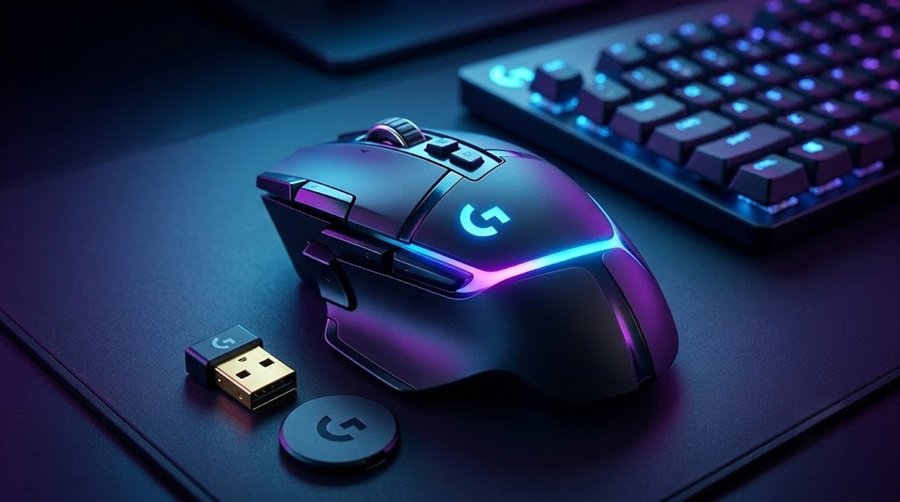
For RGB enthusiasts, the G502 X Plus delivers a mesmerizing lighting array that flows across the palm section of the mouse. The lighting integrates seamlessly into desk setups featuring RGB keyboards, ambient speakers, and PC towers.
A standout physical feature is the dedicated lighting toggle button located directly behind the scroll wheel controls. With a quick press, you can cycle through custom lighting presets and colors on the fly without needing to open software mid-game.
3. The Iconic Dual-Mode Scroll Wheel
One of the most praised features of the G502 series returns with refined mechanical execution: the dual-mode scroll wheel.
- Ratchet Clicky Mode: Pressing the physical mechanical toggle locks the wheel into precise, notched scrolling. This is ideal for weapon switching in First-Person Shooters like CS2 or Valorant.
- Free-Spin Hyper-Fast Mode: Pressing the toggle again unlocks the wheel, letting it spin completely friction-free. This mode is a game-changer for navigating massive spreadsheets, long web pages, or video editing timelines.
4. Programmable Buttons and Everyday Productivity
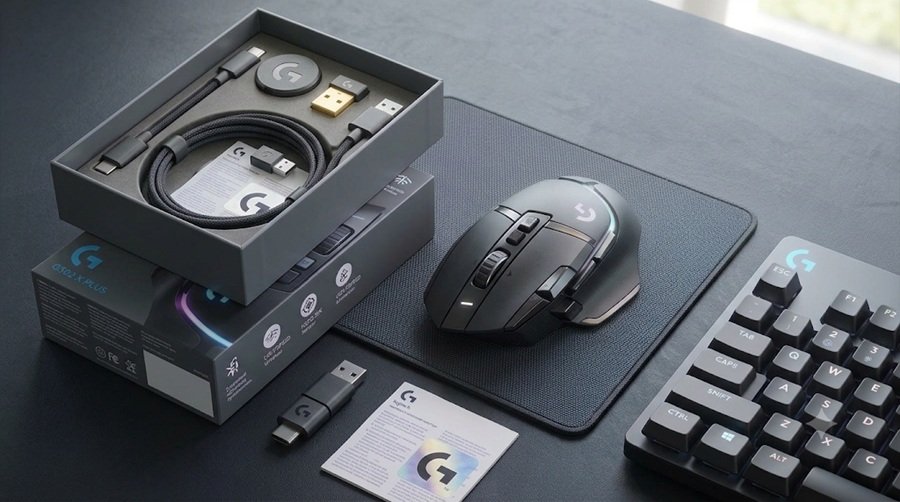
Beyond standard right and left primary clicks, the G502 X Plus offers an array of strategically placed extra buttons:
- Side Navigation Buttons: Easily accessible forward and back thumb buttons for web browsing or assigning critical in-game commands.
- Index Finger Macro Buttons: Positioned alongside the main left click for fast DPI shifting or complex macros.
This button layout makes the G502 X Plus just as effective as a productivity powerhouse for office work and content creation as it is for competitive gaming.
Link Product: Amazon
Hybrid Switches and Click Feel
The main buttons use Logitech’s LIGHTFORCE hybrid switches. They combine the speed of an optical trigger with the tactile feel of a mechanical click. Pocket-lint praised the crisp clicks, and Tom’s Hardware listed low click latency among the strengths. Logitech also says response time is 68 percent faster than on the previous generation.
That makes the mouse a real option for games, not only for office work. However, the weight still limits quick flicks. See the comparison section below for lighter choices.
Scroll Wheel and Button Notes
Pocket-lint likes the free-spinning wheel with its ratchet modes. Tom’s Hardware, in contrast, called the wheel twitchy. Both reviews count 13 programmable controls. Pocket-lint lists two DPI buttons, three side buttons and left and right wheel tilt. One of the side buttons is removable.
Mapping that many controls pays off in MMOs and productivity apps. Fewer players need them in a fast shooter, where a simple mouse is often enough.
5. USB-C Charging & Magnetic Dongle Storage
Logitech addressed essential travel and power needs with clever hardware engineering:
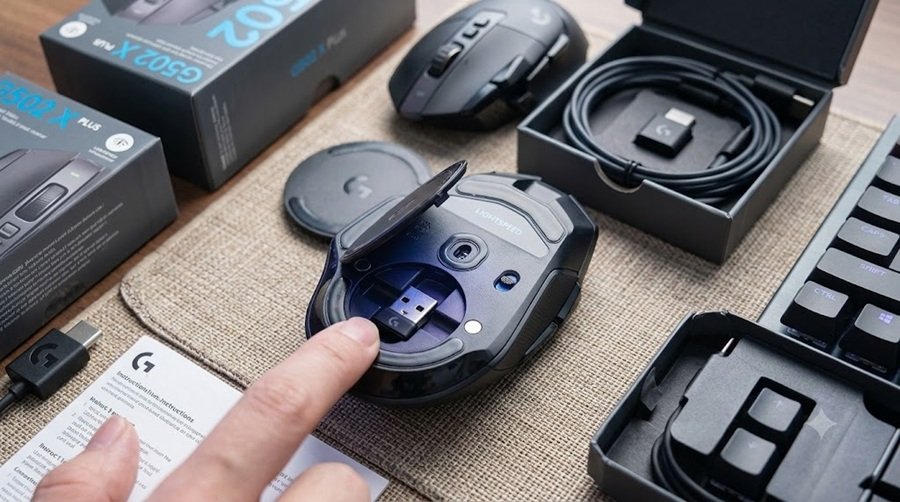
- Modern USB-C Fast Charging: The mouse recharges via a clean USB-C port at the front. It includes a high-quality charging cable right in the box, ensuring quick top-ups so you never run out of battery mid-match.
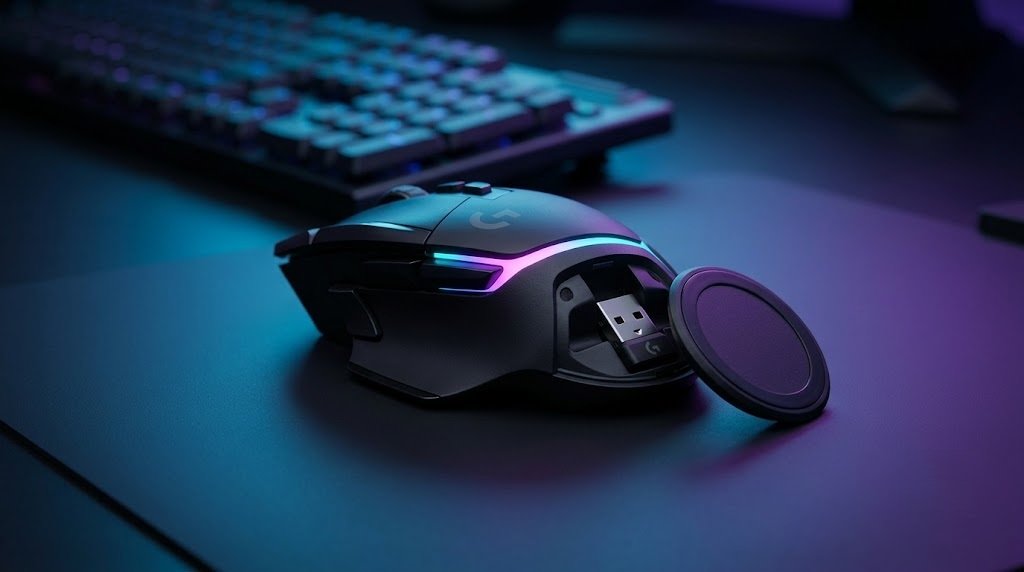
- Hidden Dongle Garage: Flip the mouse over, and you’ll find a circular magnetic cover. Pushing down on the plate pops it open to reveal a secure internal storage slot for your LIGHTSPEED USB wireless receiver—a massive convenience for travel and keeping track of your dongle.
Battery Life Numbers
The numbers depend on the lighting. TechRadar and Pocket-lint both report up to 120 hours with RGB off, while Tom’s Hardware lists 130 hours. With RGB on, all three point to roughly 37 hours. Logitech says active play detection dims the lighting during movement to save power.
The mouse is compatible with Logitech’s POWERPLAY wireless charging mat. However, TechRadar notes that the pad costs $119 or more on top of the mouse. Most owners will simply recharge over USB-C.
Software: Logitech G HUB
Setup runs through Logitech G HUB. According to Logitech, the app covers DPI settings, button assignment, macros and profile management. It also controls the 8-LED LIGHTSYNC array, which Logitech says supports 16.8 million colors.
Tom’s Hardware and Pocket-lint both note onboard storage for up to five profiles. That means your DPI steps and button maps follow the mouse to another PC. Tom’s Hardware also lists 13 programmable controls, so there is plenty to map. Our gaming mouse buying guide explains how many buttons most players really use.
6. Pros and Cons Summary
👍 Pros
- Ultra-smooth glide feel and lightweight ergonomic chassis.
- Versatile dual-mode scroll wheel (Ratchet & Free-Spin).
- Stunning LIGHTSYNC RGB lighting with physical hardware toggle button.
- Clever magnetic bottom compartment for safe USB dongle travel storage.
- Convenient USB-C rechargeable battery with included cable.
- Extremely simple plug-and-play setup for gaming and work.
👎 Cons
- Premium price tier compared to non-RGB wireless mice.
- Sculpted right-hand shape is not suitable for left-handed users.
Link Product: Amazon
How the G502 X Plus Compares
Versus the G502 HERO and SUPERLIGHT 2
The G502 X Plus keeps the classic shape but changes almost everything else. The table sets it beside its wired ancestor and Logitech’s 60 g esports mouse.
| Spec | G502 X Plus | G502 HERO | G PRO X SUPERLIGHT 2 |
|---|---|---|---|
| Weight | 106 g | 121 g, up to 139 g with weights | 60 g |
| Connection | Wireless (LIGHTSPEED) | Wired | Wireless (LIGHTSPEED) |
| Buttons | 13 programmable controls | 11 programmable | 5 programmable |
| Sensor | HERO 25K | HERO 25K | HERO 2, up to 44,000 DPI |
| Lighting | 8-zone LIGHTSYNC RGB | LIGHTSYNC RGB, 1 zone | None |
| Adjustable weights | No | Yes, five 3.6 g weights | No |
| Price | $159.99 list | Not verified | $159.99 list |
Compared with the wired model, you gain wireless play, a lighter body and hybrid switches. You lose the adjustable weights. Our G502 HERO review covers the older mouse in detail. In contrast, the G PRO X SUPERLIGHT 2 is far lighter but has only five buttons.
Tom’s Hardware also lists two cheaper siblings. The non-RGB G502 X Lightspeed costs $139.99, and the wired G502 X costs $79.99.
Weight and Price Reality Check
The G502 X Plus is light for a G502, but it is not light by modern standards. TechRadar notes it is not the lightest mouse available. Pocket-lint says it is less agile than competing superlight mice. Tom’s Hardware adds that it is large and expensive.
Therefore, fast-paced FPS players may prefer the Logitech G Pro X2 Superstrike or the ATK U2 V2 Ultimate. Weight chasers can look at the G-Wolves Lyan, and the VXE R1S shows how heavy a battery-rich mouse can feel. For an ergonomic alternative, try the Lamzu Thorn V2. Our SteelSeries vs Razer article covers two more brands.
Who Should Buy the G502 X Plus, and Who Should Skip It
Buy It If
- You have a large hand and prefer palm grip. TechRadar found it best for palm users.
- You want many programmable buttons for MMOs, strategy games or productivity.
- You like the dual-mode scroll wheel and the G502 shape.
- You want RGB lighting. Tom’s Hardware called it the prettiest mouse lighting ever.
Skip It If
- You chase the lowest weight for competitive FPS play.
- You use a claw grip. TechRadar says side button placement may feel suboptimal.
- You are left-handed, because the shape is right-handed.
- You miss the adjustable weights of the older G502 models.
- You dislike a twitchy scroll wheel. Tom’s Hardware flagged it as a drawback.
Pocket-lint also said the mouse feels a bit less premium than the original G502. Handle one in a shop if you can.
7. Final Verdict
The Logitech G502 X Plus Wireless RGB Gaming Mouse justifies every bit of praise it receives. By combining lightweight materials, fluid glide performance, dual-mode scroll wheel flexibility, and clever travel engineering like the magnetic dongle garage, Logitech has crafted a mouse that excels equally in gaming lobbies and productivity workflows.
If you want a sleek, reliable, feature-rich wireless RGB mouse that looks as incredible as it performs, the G502 X Plus gets an enthusiastic recommendation from the Gearzon team.
Discover More Gaming Peripherals
Looking for an even lighter esports-focused option? Our Logitech PRO X3 SUPERSTRIKE review and Logitech G PRO X SUPERLIGHT 2 review cover Logitech’s ultralight lineup, while our Logitech G PRO X3 LIGHTSPEED review dives into their latest flagship. If you want a budget-friendly alternative, see our Pulsar X2F review. For official drivers, firmware updates (Logi Options+), and warranty details, visit Logitech G’s official G502 X Plus product page.
Frequently Asked Questions
How much does the Logitech G502 X Plus weigh?
Tom’s Hardware, TechRadar and Pocket-lint all list 106 grams. That is lighter than the 121 gram wired G502 HERO, but much heavier than ultralight esports mice. The G502 X Plus has no adjustable weights, so you cannot change it.
How long does the G502 X Plus battery last?
Reviews report up to 120 hours with RGB off, or 130 hours in Tom’s Hardware’s listing. With RGB on, the figure falls to about 37 hours. Logitech says active play detection dims the lighting during movement to extend battery life.
Does the G502 X Plus have adjustable weights?
No. Tom’s Hardware and TechRadar both note that Logitech removed the adjustable weight system found in the original G502 models. If you want to tune the weight, the wired G502 HERO still includes five 3.6 gram weights.
Is the G502 X Plus good for left-handed players?
No. The sculpted shape and thumb rest are built for right-handed users, as the cons in this review state. Left-handed players should look for an ambidextrous design. The 60 gram Logitech SUPERLIGHT 2 is one symmetrical option.
Which grip suits the G502 X Plus best?
TechRadar says it suits palm grip best, with good support. Claw-grip users may find the side button placement suboptimal. Tom’s Hardware calls it a great mouse for players with big hands. Measure your hand against the 131 x 79 x 41 mm body.
Is the G502 X Plus worth its price over the cheaper G502 X models?
It depends on features. Tom’s Hardware lists $159.99 for the Plus, $139.99 for the non-RGB G502 X Lightspeed and $79.99 for the wired G502 X. Pay extra only if you want RGB, wireless charging compatibility and the full feature set.