Elgato Wave:3 Review: Is It the Best USB Mic for Streamers?
If the HyperX SoloCast is the simple starter, the Elgato Wave:3 is the mic that streamers upgrade to. It adds a gain dial, a headphone jack, and a software mixer, and it still plugs in over USB.
This review combines the verdicts of PC Gamer and TechRadar with Elgato’s own spec pages and a creator test from Podcastage. We also cover the newer Wave:3 MK.2, which is what Amazon sells today.

Elgato Wave:3 at a Glance
⚙️ Quick Specifications
👍 The Good
- Clipguard protection prevents harsh clipping
- Gain dial, mute touch sensor, and headphone jack
- Wave Link works as a free digital mixer
- Stable steel yoke stand with wide articulation
- Strong scores from major reviewers
👎 The Bad
- One pickup pattern only
- Wave Link has a learning curve
- Slight distortion at very loud volume
- Costs more than basic USB mics
- Picks up desk noise without an arm
Design and Build Quality
The steel yoke stand
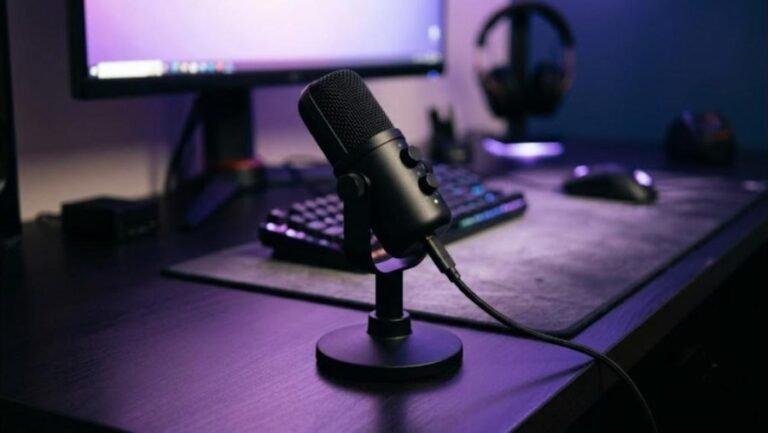
The Wave:3 has a retro, cylindrical look. TechRadar weighed it at 305 g and praised the steel yoke stand. The yoke offers almost 360 degrees of articulation, so you can aim the capsule precisely.
PC Gamer pointed out that a boom-arm adapter is included. That is a smart touch. Most streamers want the mic off the desk, and the adapter saves a separate purchase.
Dial, mute, and indicators
A single multi-function dial sits on the front. You turn it for gain and press for other functions, and a capacitive mute sensor sits on top. PC Gamer liked the tactile control because it works without software.
Having gain in hardware is a big deal. You can lower it when you start laughing or shouting, and you never have to alt-tab to a settings window. That alone separates the Wave:3 from the cheapest USB mics.
Podcastage ran the Wave:3 against several popular USB rivals. The test gives you a direct listen at the voice quality we describe below.
Video: Podcastage tests the Elgato Wave 3 against the Snowball, Yeti, QuadCast, and Seiren X. Opinions in the video belong to the creator, so treat it as another point of view.
Sound Quality
Voice tone and clarity
PC Gamer gave the Wave:3 a 90 out of 100. It cited clean, detailed voice reproduction and a frequency range of 70 Hz to 20 kHz. The cardioid pattern focuses on your voice and rejects much of the room.
TechRadar went further with a full five stars and an Editor’s Choice award. The reviewer called out strong value for content creation. Together, those scores place the mic near the top of its class.
Clipguard and loud moments
Clipguard is the headline feature. It monitors the input and prevents a sudden spike from distorting. For gamers who shout, it is a safety net.
It is not magic. TechRadar noticed slight distortion at loud volume, and PC Gamer advised keeping gain low. Speak across the capsule, not directly into it, to avoid harshness.
Wave Link Software
A mixer built into your PC
Wave Link is free and works as a digital mixer. PC Gamer noted it can handle up to eight channels. You can split game audio, music, chat, and your mic into separate sliders and send different mixes to your stream and your headphones.
That workflow is a major reason streamers pick Elgato. If you already use a Stream Deck or other Elgato gear, the pieces fit together neatly.
The learning curve
The flexibility comes with complexity. PC Gamer flagged a learning curve, and TechRadar called the software finicky. Plan an evening to set up your channels, and save your presets once they work.
You do not have to use it. The mic runs fine as a plain USB input in Windows, macOS, and OBS.
Headphone Monitoring and Latency
The 3.5 mm jack provides zero-latency monitoring, according to TechRadar. You hear your voice instantly in your headphones, which keeps you from shouting or whispering by accident.
If you game with a wireless headset, the jack matters less. A headset such as the Sony INZONE H9 II or Razer BlackShark V3 Pro brings its own mic. A dedicated mic still sounds fuller for streaming, and many creators wear a wired or wireless set only for listening.

Noise Handling and Placement
A cardioid pattern rejects sound from behind, but a sensitive condenser still hears your desk. Use a boom arm and keep gain low. Elgato also sells accessories such as an external pop filter and an extension rod, as its comparison page notes.
Treat the room, not just the mic
Soft surfaces cut echo. A rug, curtains, and a bookshelf make a bigger difference than any mic upgrade. If your keyboard is loud, read our Aula AG75 Pro review and our IQUNIX EV63 review for typing-sound ideas.
Elgato Wave:3 vs Wave:3 MK.2
The MK.2 improves the formula. Elgato says it adds a Wave FX processor developed with LEWITT, on-board DSP, VST inserts, and an Auto Gain Wizard. It also stores settings on the mic itself.
| Spec | Wave:3 | Wave:3 MK.2 |
|---|---|---|
| Capsule | 17 mm | 16 mm |
| Dynamic range | 95 dB | 110 dB |
| Max SPL | 120 dB | 130 dB |
| Clipguard | 1.0 | 2.0 (stacked converters, 32-bit float) |
| Sample rate | 48/96 kHz | 24-bit/48 kHz (tech-spec page) |
| Extras | Wave Link mixer | Wave FX, on-board DSP, VST inserts, Auto Gain Wizard |
If the price gap is small, the MK.2 is the better buy. The extra dynamic range and on-mic processing reduce how much software you need.

This video covers the newer MK.2. It is worth a watch if the MK.2 is the model you will actually buy.
Video: RKiologist reviews the Elgato Wave:3 MK.2. Opinions in the video belong to the creator, so treat it as another point of view.
Real-World Use Cases
Live streaming
Streaming is where the Wave:3 shines. The gain dial lets you adjust between quiet storytelling and loud gameplay. The mute sensor means you can cut the mic in half a second when a cough is coming.
Wave Link then lets you lower game audio while you talk, or send music to your stream without playing it in your headphones. Those controls save you from needing a hardware mixer.
Podcasting and voiceover
One voice and a quiet room is the ideal case. The cardioid pattern focuses on the speaker, and the 24-bit signal gives plenty of room for editing. Add a pop filter, since condenser capsules react strongly to plosives.
For two-person shows, you will need two mics or a shared dynamic mic. A single cardioid condenser forces both guests to crowd together, and that hurts the sound.
Work calls and classes
The Wave:3 is more mic than a typical call needs. It still makes you sound polished, and the headphone jack is useful when you hear a delay on a video platform. If calls are your only use, a cheaper USB mic will do.
Position it about a hand-span or two from your mouth. Closer positions add bass boost and make breaths louder, while a farther distance lets more room echo into the signal.
Who Should Buy the Elgato Wave:3?
| ✅ Good fit | ❌ Look elsewhere |
|---|---|
| Streamers who want hardware gain and mute | Anyone who needs multiple pickup patterns |
| Creators who like a software mixer | Buyers who dislike software setup |
| Podcasters recording one voice | Group podcasts at one table |
| Elgato Stream Deck owners | Buyers on a tight budget |
Price and Value
PC Gamer listed the Wave:3 at $160 at launch. TechRadar later gave $149.99. The MK.2 usually sits in a similar range, but prices move, so check the listing.
Value depends on how you use it. If you only need clear voice for calls, the SoloCast costs far less. If you stream, the dial, Clipguard, and mixer justify the premium.
Elgato Wave:3 vs the Competition
Headset pairing matters too. Our SteelSeries Arctis Nova 5X review and HyperX Cloud III S Wireless review show good listening partners at lower prices.
Against the HyperX SoloCast, the Wave:3 wins on controls and monitoring. Against the Audio-Technica AT2020USB+, it wins on software and style, while the Audio-Technica offers a mix control and a more traditional studio look. We cover that mic in its own review, and our final four-mic comparison pulls the whole group together.
If you want a broadcast dynamic mic instead, XLR models such as the Shure SM7B need an audio interface. They sound great in treated rooms but cost more overall.
Building a Streaming Setup Around the Wave:3
A good mic should sit in a good setup. Start with a comfortable chair such as the Secretlab Titan Evo and a stable desk from our best standing desk for gaming guide. Add a sharp display, and our OLED gaming monitor comparison shows the best choices.
For a mouse, see the Logitech G Pro X Superlight 2. For a handheld option on the road, read our ROG Xbox Ally X review.
Final Verdict
The Elgato Wave:3 is the best-rounded USB mic in this group for streamers. The dial, mute, monitoring, and Wave Link give you real control. It is not perfect, with one pickup pattern and a software learning curve, but it earns its high scores.
Strong voice quality, Clipguard, and a free mixer make it the streamer’s pick. Choose the MK.2 if the price is close, and plan time to learn Wave Link.
Ready to upgrade your voice?
The Wave:3 MK.2 is the model Amazon lists today.
Some links on this page may earn GearZon a small commission at no extra cost to you.
Before You Check Out
Confirm which model the listing shows. Budget for a boom arm if you do not already own one. Keep gain low and test your sound in OBS before going live.
Want the current Elgato mic?
Compare the listing price and bundle options.
Some links on this page may earn GearZon a small commission at no extra cost to you.
Frequently Asked Questions
Is the Elgato Wave:3 good for streaming?
Yes. PC Gamer scored it 90 out of 100 and TechRadar gave it five stars with an Editor’s Choice award. The gain dial, capacitive mute, Clipguard protection, and Wave Link mixer are built for streamers.
Does the Elgato Wave:3 have a headphone jack?
Yes. TechRadar highlights a 3.5 mm headphone jack with zero-latency monitoring, so you hear yourself without delay. That is a clear step up from the HyperX SoloCast.
What is Clipguard on the Elgato Wave:3?
Clipguard is Elgato’s protection against sudden loud peaks. On the Wave:3 it keeps shouts and laughs from clipping. The MK.2 upgrades it to Clipguard 2.0 with stacked converters and a 32-bit float design, according to Elgato.
Is the Elgato Wave:3 cardioid only?
The original Wave:3 uses a cardioid pattern only. Elgato’s comparison page lists the MK.2 as supercardioid, while its tech-spec article lists it as cardioid, so check the current spec sheet before you buy.
What is the difference between the Wave:3 and the Wave:3 MK.2?
Elgato’s comparison page lists a 16 mm capsule, a 110 dB dynamic range, a 130 dB max SPL, Wave FX processing, and on-board DSP for the MK.2. The original has a 17 mm capsule, a 95 dB dynamic range, and a 120 dB max SPL.
Do I need Wave Link software?
No, the mic works without it. Wave Link adds a virtual mixer that can handle up to eight channels, plus level and effect control. PC Gamer noted a learning curve, and TechRadar called it finicky at times.
Will the Wave:3 pick up my keyboard?
Any condenser mic can. The Wave:3 ships with a stand, and Elgato sells accessories such as an extension rod and pop filter. Keep gain low and use a boom arm for the cleanest result.