Corsair Sabre V3 Pro Review: Is the $179.99 PureVector Mouse Worth It?
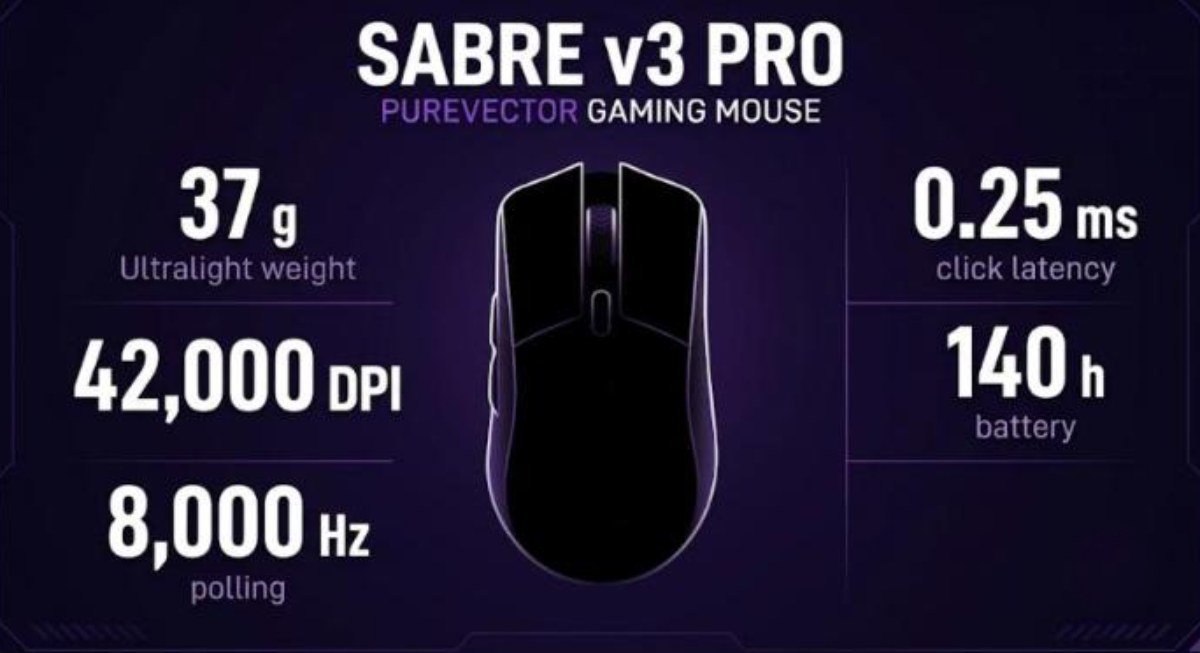
The Corsair Sabre V3 Pro is the second generation of Corsair’s ultralight esports mouse, and it adds something no rival has. Alongside the lower weight and the new sensor, Corsair worked with Aimlabs on PureVector, a calibration that tunes your sensitivity by aiming direction. The plastic Ultralight model weighs 37 g and costs $179.99.
Corsair now sells six versions. Each shell comes in a symmetrical shape and a right-handed Ergo shape, built from plastic, magnesium alloy or carbon fiber. Prices run from $179.99 to $229.99, so the choice of version matters as much as the choice of mouse.
How we built this review. This article combines the official Corsair product page, independent coverage from ProSettings, KitGuru, The AU Review and PC TestBench, and three videos: Corsair’s own launch video made with Aimlabs, a plastic-shell review from Fresh Reviews and an Ergo magnesium review from The Provoked Prawn. Every opinion below is credited to its source.
Corsair Sabre V3 Pro Specs and Quick Verdict
⚙️ Quick Specifications
Full specifications
The table below shows every version Corsair launched on October 20, 2026. The carbon fiber models sell only through Corsair’s own channels and include a carry case.
| Model | Shell | Weight | Price | Battery at 1,000 Hz / 8,000 Hz |
|---|---|---|---|---|
| Ultralight | ABS plastic, symmetrical | 37 g | $179.99 | Up to 140 h / 25 h |
| Ultralight Ergo | Plastic, right-handed | 41 g | $179.99 | Up to 140 h / 25 h |
| MG | Magnesium alloy, symmetrical | 49 g | $199.99 | Up to 200 h / 31 h |
| MG Ergo | Magnesium alloy, right-handed | 55 g | $199.99 | Up to 200 h / 31 h |
| CF | Carbon fiber, symmetrical | 48 g | $229.99 | Up to 200 h / 31 h |
| CF Ergo | Carbon fiber, right-handed | 54 g | $229.99 | Up to 200 h / 31 h |
| Shared spec | Value |
|---|---|
| Sensor | Corsair Marksman X optical, 100 to 42,000 DPI in 1 DPI steps |
| Tracking | 800 IPS, 70G acceleration, 99.7% resolution accuracy |
| Polling rate | 125 Hz up to 8,000 Hz |
| Main switches | Optical, 100 million clicks, 0.25 ms average click latency |
| Controller | Nordic 54-series MCU |
| Dimensions (Ultralight Ergo) | 119 x 64.5 x 41 mm per a retailer listing |
| Cable | 1.8 m braided USB-C cable |
| Warranty | Two years |
The good and the bad
👍 The Good
- ✔ At 37 g, or 41 g for the Ergo, it is among the lightest wireless mice from a major brand.
- ✔ The optical switches are crisp, and ProSettings preferred them to the mechanical switches in the V2 Pro.
- ✔ Setup runs in Corsair Web Hub, so no background app has to stay open.
- ✔ The PureVector profile is saved in the mouse firmware and follows you into any game.
- ✔ Battery life is rated at 140 hours at 1,000 Hz, up from 120 hours on the V2 Pro.
👎 The Bad
- ✘ The $179.99 starting price is steep, and the magnesium and carbon fiber versions cost more.
- ✘ Reviewers saw little or no measurable gain from PureVector, against Corsair’s claim of up to 33% faster aim speed.
- ✘ The main clicks divide opinion, from light and pillowy to heavy and mushy.
- ✘ ProSettings noted side flex in the shell and minor quality control issues.
- ✘ The included charging cable is stiff and tugs on the mouse, according to The Provoked Prawn.
The Sabre V3 Pro is a very light, well-shaped mouse with a capable sensor and crisp optical switches. Buy it for the weight, shape and battery life. Treat PureVector as an optional extra, not as the reason to pay $179.99.
What Changed From the Sabre V2 Pro
The Sabre V3 Pro keeps the V2 Pro’s role as Corsair’s performance flagship. PC TestBench points out that the shape was not redesigned, and The AU Review agrees that the looks are essentially unchanged. The real upgrades sit inside the shell.
| Area | Sabre V2 Pro | Sabre V3 Pro |
|---|---|---|
| Weight | 36 g | 37 g (41 g Ergo) |
| Battery at 1,000 Hz | 120 h | Up to 140 h |
| Main switches | Mechanical | Optical, 0.25 ms latency |
| Aim tuning | None | PureVector, built with Aimlabs |
ProSettings liked the new optical switches more than the old mechanical ones. It also criticized the price increase over the V2 Pro. The AU Review calls the V3 Pro an upgrade in almost every way, and it gave the Ergo model four and a half stars out of five.
Should V2 Pro owners upgrade?
The AU Review suggests that existing V2 Pro owners who like their mouse may find it worth considering. The case rests on the optical switches, the longer battery life and the Ergo shape rather than on PureVector. If your V2 Pro already fits your hand and clicks well, the gain is modest.
What’s in the Box
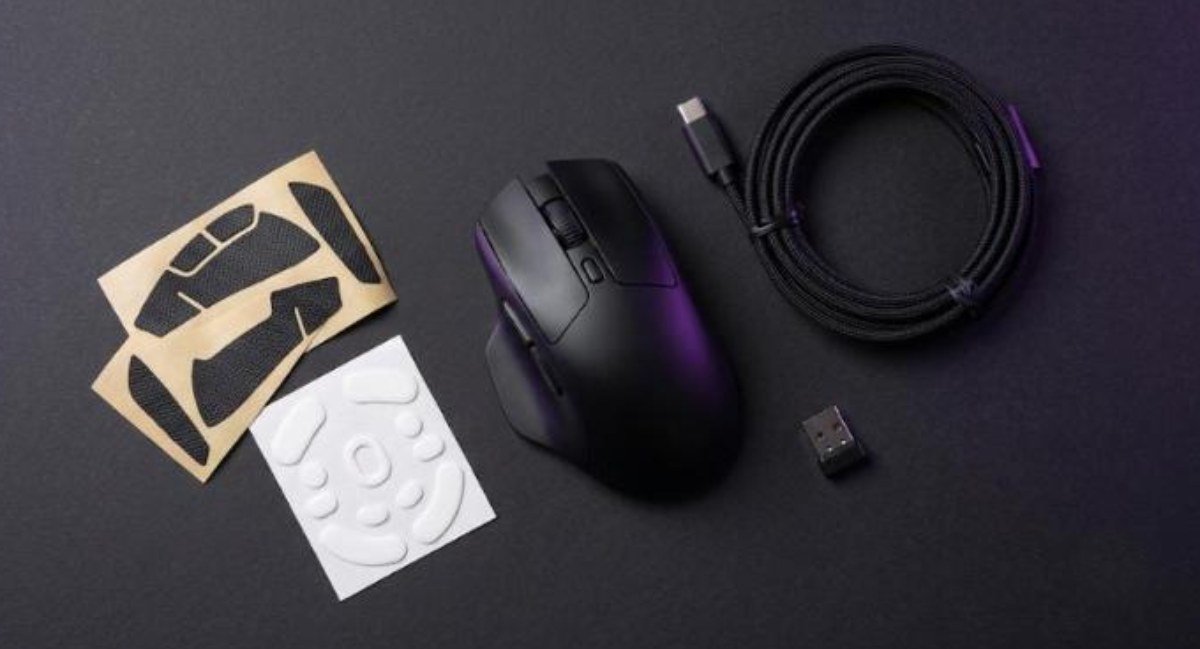
Corsair’s retailer listings and The AU Review agree on the contents. You get the mouse, an 8,000 Hz USB wireless receiver, a USB Type-C to Type-A cable, black and white grip tape, a set of larger mouse skates and a warranty leaflet with a QR code. The carbon fiber models add a carry case.
The Provoked Prawn notes that the receiver has a small clip, so you can attach it to your mouse mat close to the sensor. The same reviewer found the cable stiff for a charging lead. A stiff cable matters mostly when you plug in mid-session, since it drags on the mouse.
Design, Weight and Shape
Weight and the six versions
The plastic Ultralight model is the headline at 37 g, and Fresh Reviews says that weight feels well balanced. The reviewer finds it neither too far forward nor too far back. The Ergo shell adds 4 g, and the magnesium and carbon fiber shells add roughly 11 to 14 g over their plastic equivalents.
The Provoked Prawn reviewed the Ergo magnesium model and puts it at around 57 g, while Corsair lists 55 g. A small gap like that is normal between a quoted spec and a home scale. Fresh Reviews says that if you spend more, he would pick magnesium over carbon fiber.
Shape and grip
The symmetrical shell has a safe, central shape. ProSettings calls it small and recommends it for claw and fingertip grips, and it advises against a palm grip unless your hands are small. Fresh Reviews compares the size and shape to the Hitscan Hyperlite and calls it that mouse’s biggest competitor.
The Ergo shell is the better pick for larger hands. The AU Review credits the raised back and the thumb indent for extra comfort. The Provoked Prawn says the Ergo fits his hand better than the original V2 Pro and gives easy access to the side buttons.
Coating and skates
Fresh Reviews describes a smooth coating that can turn slippery with moisture, and it criticizes the glossy side buttons for picking up sweat. ProSettings makes a similar point about a plasticky finish that feels slick with dry hands. It also notes that the finish copes well with sweat and oil.
The skates match the V2 Pro, according to ProSettings, and sit in the middle for speed. The Provoked Prawn found them decent across surfaces but a little noisier on glass, and The AU Review found them grippy at times. Extra skates ship in the box. Fresh Reviews warns that swapping skates changes your sensitivity, so you should redo PureVector afterward.
Buttons, Scroll Wheel and Build Quality
Main clicks
Opinions on the optical main switches split sharply. Fresh Reviews finds them light and pillowy, and wishes they were firmer. KitGuru, testing the carbon fiber model, found them heavy and mushy with noticeable pre-travel and post-travel. ProSettings found them crisp and better than the V2 Pro’s, with slightly too much pre-travel.
That spread suggests unit variation or a matter of taste. ProSettings even advises you to check each unit. The Provoked Prawn adds a practical note: the clicks are loud enough that his microphone picked them up while recording gameplay.
Side buttons and scroll wheel
Corsair redesigned the side buttons. KitGuru calls them crisp with minimal pre-travel, and Fresh Reviews finds them large and easy to hit. He still notes some pre-travel and a lot of post-travel on the lower button. ProSettings reports side-to-side grinding when you press a side button sideways, which you will not feel in normal use.
The scroll wheel uses an optical encoder. Fresh Reviews likes its clear steps and its response under extra force. ProSettings finds the wheel heavy with the right click tension, and KitGuru calls it too tactile.
Build quality
The Provoked Prawn says the magnesium shell does not flex or bend despite the cutouts. ProSettings felt flex on the sides of the plastic shell, which made it feel spongy, and it heard a rattle that comes from the wheel touching the side button. The back no longer flexes the way the V2 Pro’s did.
KitGuru adds a complaint about naming. The bottom of the carbon fiber model is standard plastic. It also found that the driver turns on a debounce delay called button response optimization by default, which it considers unnecessary with optical switches.
PureVector and Aimlabs: Does It Work?
How PureVector works
PureVector is a Corsair feature developed with Aimlabs. You open the DPI section of Corsair Web Hub, launch Aimlabs and answer questions about your grip and the problems you notice. You then play through five calibration rounds. ProSettings says the task is Spidershot, a standing flicking drill that shows an aim bias graph after each round.
The result is a static sensitivity profile with different values across eight directions. It works like mouse acceleration that does not change over time. The profile saves to the mouse firmware, so Aimlabs does not need to run while you play, and Corsair says no overlay or background app is needed.
Corsair and Aimlabs claim up to 81 ms, or 33%, faster aim speed. The footnote ties that number to Aimlabs beta testing and says individual results may vary.
What reviewers found
The Provoked Prawn was positive. After calibrating he aimed well across several games without knowing which DPI the system chose, and he says it could help anyone who keeps switching sensitivities between games. He adds that you can run more rounds later to refine the profile.
Fresh Reviews gave a balanced view. Across four Apex matches with PureVector on and four with it off, his average damage was about 350 higher with it on. He admits that match variables blur that result. His tracking felt slightly better, but his scores on his preferred mice stayed higher over time, and he calls the claim that it makes you a better player a stretch.
ProSettings noticed no difference after several weeks and says it would not buy the mouse mainly for PureVector. KitGuru saw no meaningful in-game gain either, though it says the calibration helped it adapt to the shape faster. It also found the setup frictionless.
Two of the four sources felt some benefit and two felt none. Nobody reported harm. That makes PureVector a free, optional experiment that costs you a few minutes in Aimlabs.
When to redo the calibration
Fresh Reviews points out that PureVector depends on your gear. If you change skates or switch mouse pads, your overflick and underflick habits change too, so you should repeat the test. ProSettings criticizes the lack of an intensity slider and of any readout of the resulting DPI values after calibration.
Software: Corsair Web Hub
The Sabre V3 Pro uses Corsair Web Hub, a browser-based tool, instead of the iCUE desktop app. ProSettings prefers that approach to a downloadable program, and KitGuru likes that iCUE does not have to run in the background. The AU Review found it intuitive but not especially exciting.
The Provoked Prawn lists what you can change. You can set the polling rate (1,000 Hz by default, up to 8,000 Hz), choose your mouse surface, adjust motion sync, ripple control and sleep time, and reassign buttons to mouse, keyboard, media or macro actions. A DPI button on the underside lets you change DPI by hand without Aimlabs.
Two cautions come from the same video. First, update the firmware on the mouse and on the receiver separately, because they are different updates. Second, close iCUE before you use Web Hub, since the mouse does not work with both at once. Aimlabs also requires an account, and ProSettings dislikes that it is not tied to a Steam login, although a guest login works for PureVector.
Video: The Provoked Prawn reviews the Sabre V3 Pro Ergo magnesium model. Opinions in the video belong to the creator, so treat it as another point of view.
Sensor, Polling Rate and Battery Life
Sensor and latency
The Marksman X sensor tops out at 42,000 DPI with 800 IPS and 70G acceleration. ProSettings says it performed very well with no inconsistencies. The Provoked Prawn found that he could get onto targets easily and that the mouse also works well outside shooters, including in a flight game.
Corsair rates the optical switches at 0.25 ms average click latency. The Nordic 54-series controller allows 8,000 Hz polling over the 2.4 GHz receiver or USB-C. Higher polling shortens battery life sharply, so most players will want 1,000 Hz or 2,000 Hz for daily use.
Battery life by polling rate
| Polling rate | Ultralight models | MG and CF models |
|---|---|---|
| 1,000 Hz | Up to 140 h | Up to 200 h |
| 2,000 Hz | Not specified | 50+ h in KitGuru testing (CF) |
| 8,000 Hz | Up to 25 h | Up to 31 h |
Corsair’s 200-hour figure for the MG and CF models also applies on Bluetooth 6.0. The Provoked Prawn rarely had to charge his Ergo magnesium unit. A small LED in front of the scroll wheel shows when the mouse is charging, so you can see it at a glance.
Price, Alternatives and How It Compares
The plastic models cost $179.99 in the US, the magnesium pair costs $199.99 and the carbon fiber pair costs $229.99. In Australia, The AU Review lists the Ergo at A$289, with the MG at A$319 and the CF at A$359. KitGuru reviewed the carbon fiber model at £210 and suggests that the £159 plastic version is the better buy for most people.
Video: Fresh Reviews tests the plastic Sabre V3 Pro and compares PureVector on and off. Opinions in the video belong to the creator, so treat it as another point of view.
Other ultralight and ergonomic options
If PureVector does not tempt you, other lightweight mice compete on shape and price. Our Logitech G Pro X Superlight 2 review covers the long-time default for esports players. Our Logitech Pro X3 Superstrike review and G Pro X2 Superstrike review cover Logitech’s haptic switch approach, which The Provoked Prawn hopes Corsair will study.
Budget-minded buyers can look at the Pulsar X2F, the ATK U2 V2 Ultimate or the G-Wolves Lyan 29g. For a cheaper wireless pick, see our Attack Shark X3 review. Players who want a bigger ergonomic shape can compare the Lamzu Thorn V2, the Razer Basilisk V4 Pro or the Logitech G502 X Plus.
Not sure which category suits you? Our gaming mouse buying guide explains the five specs that actually matter, and the SteelSeries vs Razer comparison shows how two other brands approach the same problem.
Verdict: Who Should Buy the Sabre V3 Pro?
The Sabre V3 Pro is Corsair’s best mouse so far, according to Fresh Reviews, and the sources broadly agree it is a solid upgrade. ProSettings gave it 4.5 out of 5 with its Innovation Award, The AU Review also gave the Ergo 4.5 out of 5, and KitGuru scored the carbon fiber model 8 out of 10. The common reservations are price and PureVector.
| ✅ Buy it if | ❌ Skip it if |
|---|---|
| You want a 37 g or 41 g wireless mouse from a major brand. | You need Hall effect switches or a firmer click feel. |
| You like a small, safe shape for claw or fingertip grip, or you need the Ergo for larger hands. | You grip with your whole palm and have large hands, unless you choose the Ergo. |
| You want 8,000 Hz polling and a browser-based driver. | You expect PureVector alone to raise your aim scores. |
| You are curious about Aimlabs calibration and do not mind running it again after changes. | You are on a tight budget and a cheaper ultralight mouse would do the job. |
Frequently Asked Questions (FAQ)
How much does the Corsair Sabre V3 Pro weigh?
The plastic Ultralight model weighs 37 g and the Ultralight Ergo weighs 41 g. The magnesium models weigh 49 g and 55 g for the Ergo, and the carbon fiber models weigh 48 g and 54 g for the Ergo.
What is PureVector?
PureVector is a calibration feature that Corsair built with Aimlabs. You complete five rounds in Aimlabs, and the result is a directional sensitivity profile stored in the mouse firmware. Corsair claims up to 33% faster aim speed in its own testing.
Does PureVector really improve aim?
Reviews are mixed. The Provoked Prawn felt a benefit and Fresh Reviews measured a small gain in Apex damage, though other variables may explain it. ProSettings and KitGuru saw no meaningful gain, so treat it as optional.
How long does the battery last?
Corsair rates the Ultralight models at up to 140 hours at 1,000 Hz and 25 hours at 8,000 Hz. The magnesium and carbon fiber models are rated at up to 200 hours at 1,000 Hz or on Bluetooth, and 31 hours at 8,000 Hz.
Does the Sabre V3 Pro need iCUE?
No. You configure it in Corsair Web Hub, which runs in a browser. The Provoked Prawn notes that iCUE must be closed before Web Hub will work with the mouse.
Does it support Bluetooth?
Only the magnesium and carbon fiber versions support Bluetooth 6.0. The plastic Ultralight models use the 2.4 GHz receiver or a USB-C cable.
Which version should I buy?
Most players should start with the plastic Ultralight or Ultralight Ergo at $179.99. Pick the Ergo if you have larger hands, and consider magnesium if you want Bluetooth and the longer battery life.