In-Depth Lofree Hyzen Review: The Perfect Blend of Premium
After a decade of relentlessly testing and reviewing mechanical keyboards, it is incredibly rare to find a product that leaves me completely awestruck. But I am not exaggerating when I say this: the Lofree Hyzen (also known as the Heisenberg) is my all-time favorite keyboard. It masterfully bridges the gap between brute minimalism, a sleek futuristic aesthetic, and top-tier eSports performance, breathing fresh air into an otherwise stagnant keyboard market.
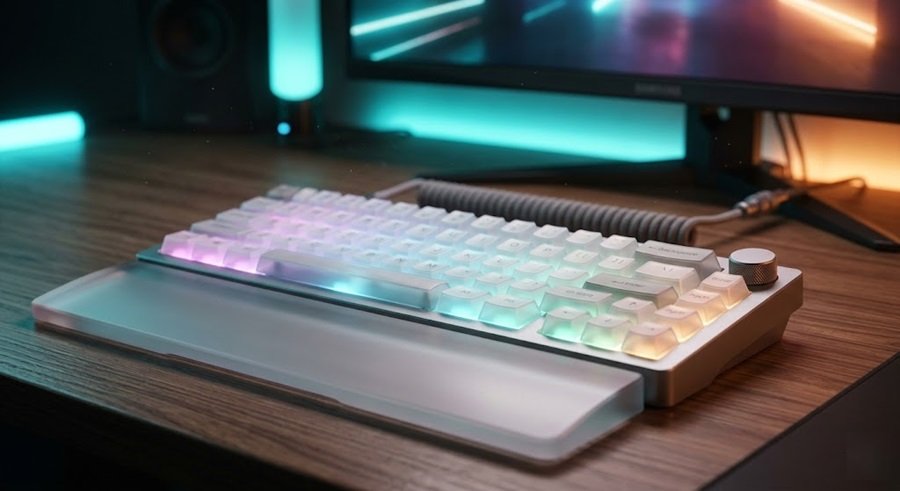
In this comprehensive Gearzon review, we will explore every inch of this 65% masterpiece—from its monolithic aluminum chassis and revolutionary TMR hybrid switches to the minor tweaks we expect before its final production run.
Watch the full hands-on review and sound test of the Lofree Hyzen
Specs at a Glance
The Hyzen came to market through a Kickstarter campaign. According to its Kickstarter page, the campaign ran from April 23 to May 23, 2026. This table pulls the main specs from Notebookcheck, KitGuru and Tom’s Guide.
| Spec | Lofree Hyzen |
|---|---|
| Layout | 65% with dedicated arrow and navigation keys |
| Case | CNC-milled aluminum, gasket mount |
| Switches | Kailh Nexus hybrid mechanical-magnetic, TMR sensing, hot-swappable |
| Polling rate | Up to 8,000Hz in wired and 2.4GHz modes |
| Battery | 10,000mAh (tri-mode version) |
| Connectivity | Wired USB-C, 2.4GHz, Bluetooth |
| Typing angle | Fixed 12 degrees |
| Dimensions | 330.9 x 142.3 x 48.4 mm |
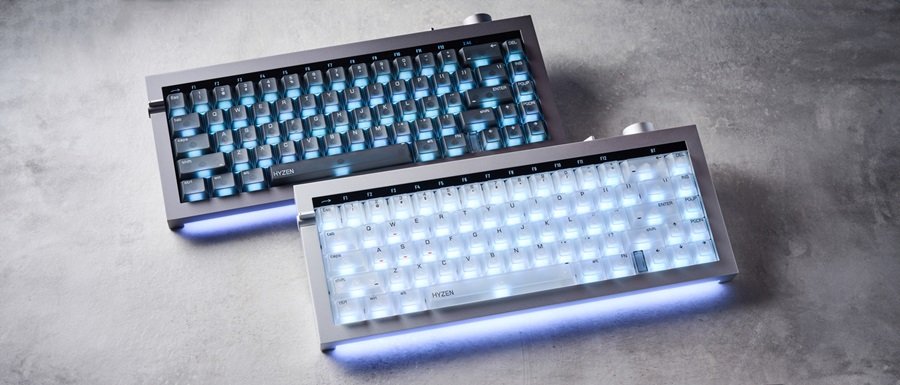
| Colors | Space Gray, Silver |
| Software | Lofree Hub web app, 7 profiles |
| Regular price after Kickstarter | $279 wired, $299 tri-mode (Notebookcheck) |
1. Unboxing Experience and Accessories
Lofree clearly understands that a premium product demands a premium unboxing experience. The presentation of the Hyzen is exceptional right out of the gate.
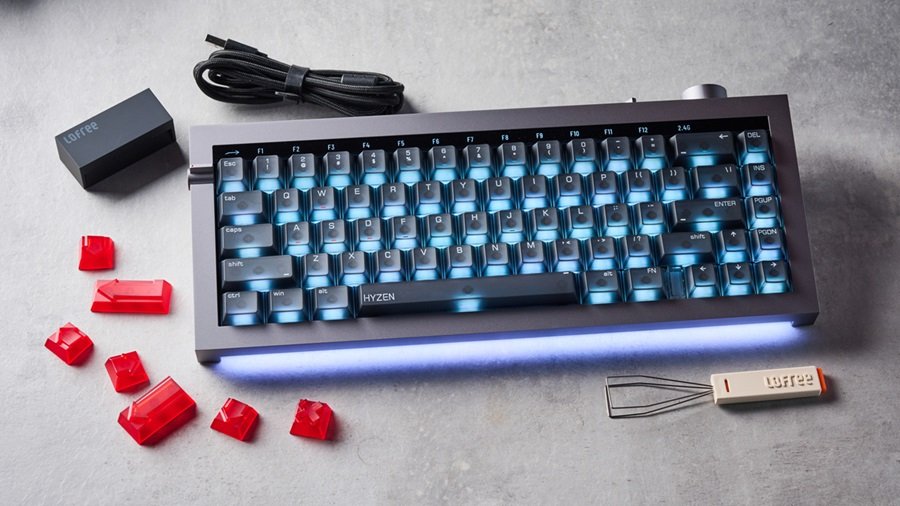
- Carrying Case: The keyboard arrives inside a highly unique, egg-shaped fabric carrying case that feels incredibly durable.
- Protective Gear: Inside, the board is wrapped in a high-quality dust-proof protective sleeve.
- Included Extras: You receive a standard keycap puller, a few transparent red accent keycaps to customize the look, a braided USB-C cable, and a 2.4GHz wireless receiver.
2. Design, Build Quality, and RGB Lighting
At first glance, the Lofree Hyzen strikes the perfect balance between raw, brutalist minimalism and a sleek, sci-fi vibe. It utilizes a compact 65% layout, but it manages to pack in an array of clever physical features.
A Heavyweight CNC Aluminum Tank
The construction is absolutely phenomenal. The chassis is CNC-milled from a single, solid block of aluminum, resulting in a seamless unibody design. This makes the keyboard an absolute tank, tipping the scales at nearly 1,900 grams (over 4 lbs). For a 65% footprint, that weight is mind-blowing and guarantees zero desk slip.
Smart Lighting and Physical Controls
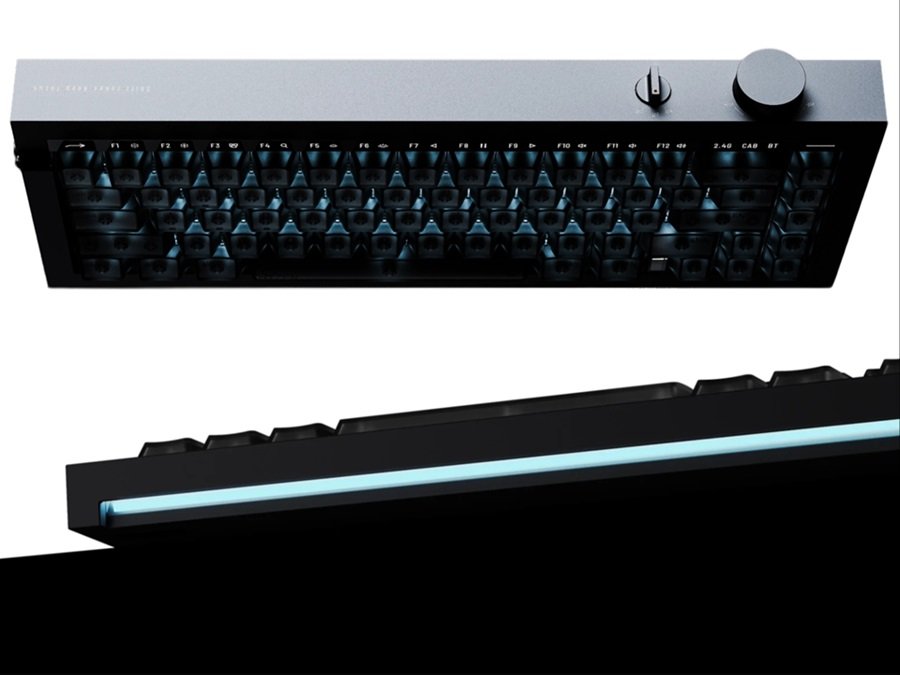
In addition to per-key RGB, the Hyzen features a stunning LED light strip tucked under the front lip. This underglow elegantly fades out across your desk (or into the optional wrist rest). Lofree also integrated several highly functional physical controls:
- F-Row Toggle (Left Side): Flipping this switch illuminates the number row, seamlessly turning them into your F-row modifiers without requiring a larger physical footprint.
- Function Key: Pressing the FN key grants instant access to secondary commands like multimedia controls and brightness adjustments.
- Profile Indicator: An LED blocker sits between the FN key and the arrow cluster. It glows to indicate your active software profile and thankfully turns off afterward to maintain the board’s clean aesthetic.
- Volume Dial (Rear): A large, tactile rotary knob on the back adjusts your PC volume in crisp increments of two. While it feels fantastic, it currently lacks a push-to-mute function.
3. The Magnetic Frosted Wrist Rest (The Perfect Match)
It is important to note that the gorgeous wrist rest is an optional add-on, but it is an absolute must-have if you want the complete aesthetic experience.
- Seamless Transition: The wrist rest features an aggressive, sharp edge that creates a flawless, sweeping transition from your desk up to the keyboard.
- Magnetic Attachment: The back edge is heavily magnetized. Simply slide it near the front lip of the Hyzen, and it snaps perfectly into place.
- Perfect Ergonomics: When attached, it completes a highly comfortable 12-degree typing angle.
- Visual Synergy: The keyboard’s front LED strip shines directly into the frosted finish of the wrist rest, creating a beautifully diffused glowing effect. On the Silver model, the white frosted rest seemingly glows from all four sides.
4. Groundbreaking TMR PCB & Kailh Nexus Switches
Beneath the frosted matte polycarbonate keycaps lies the Hyzen’s true superpower. Lofree and Kailh have teamed up to create the world’s first hybrid mechanical and Hall Effect switch, dubbed the Nexus switch.
- TMR PCB Technology: The keyboard utilizes a Tunneling Magnetoresistance (TMR) PCB. Instead of relying on a magnet inside a traditional Hall Effect switch, the PCB sensors detect changes in the surrounding magnetic field.
- The Best of Both Worlds: This technology allows you to use standard mechanical switches while still reaping all the benefits of magnetic Hall Effect technology, such as Rapid Trigger and adjustable actuation points.
- Ultimate Compatibility: Whether you prefer 3-pin or 5-pin mechanical switches, Hall Effect switches, or the stock hybrid Nexus switches, this board supports them all.
- Nexus Switch Specs: The stock Nexus switches are buttery smooth, operating at a 40g actuation force with an adjustable travel distance ranging from a deep 3.5mm all the way up to a hair-trigger 0.01mm.
5. Typing Experience and Gaming Performance
Sound Profile and Feel
The typing experience on the Lofree Hyzen is exceptional. The sound profile is deep, thocky, and incredibly refined out of the box. There is absolutely zero stem rattle, thanks to incredibly tight factory tolerances. Despite being a gasket-mounted board, the typing feel is quite firm with very little flex—a characteristic that competitive gamers often prefer. Internally, the board boasts five distinct layers of dampening foam, completely eliminating any hollow pinging.
Elite Gaming Features
Do not let the minimalist, sophisticated design fool you; this is an eSports-grade weapon. It includes every feature a hardcore competitive gamer could want:
- 8KHz Polling Rate: Delivering ultra-low latency inputs.
- Rapid Trigger: Fully adjustable actuation down to an insane 0.01mm for instant strafing in tactical shooters like Valorant or CS2.
- Advanced SOCD & Mod Tap: Essential features for fighting games and movement-heavy titles.
6. Connectivity and Massive Battery Life
The Hyzen features seamless Tri-mode connectivity, easily toggled via a robust switch on the back. A small, elegant LED strip clearly indicates whether you are in “cab” (wired) mode, “2.4” (dongle) mode, or Bluetooth.
The most shocking specification here is the battery. Lofree managed to cram a massive 10,000 mAh battery into this 65% chassis. During our testing, the board went over a full month of daily wireless use without needing a single charge. Note: Lofree will offer this board in both a wired-only version and the premium tri-mode wireless variant.
Lofree Hub Software
The Hyzen uses Lofree Hub, a web-based tool. Notebookcheck notes that you need no desktop installation, and the keyboard stores up to seven profiles. Lofree describes Hub as the place to tune actuation, response settings, key mapping and input logic. You can find the setup link on Lofree’s download center.
Hub covers Rapid Trigger, Dynamic Keystrokes (DKS) and SOCD settings, according to Notebookcheck. It does not support QMK or VIA. Notebookcheck also says the battery indicator is only visible inside the web tool.
Tom’s Guide was less happy with the early-access build. Its reviewer found the web app slow to load, and firmware updates needed a separate Windows-only download. Lofree may have fixed these issues by now, so check the download center before you buy.
7. Expected Changes for the Final Production Model
Because we tested an early prototype unit, Lofree has already acknowledged several minor flaws that will be fixed before the final summer release:
- Keycap Font Inconsistencies: The current legends suffer from poor centering and an odd mix of uppercase and lowercase fonts. Lofree has promised 100% corrected legends for the retail version.
- Mac Compatibility: The final version will either feature dual Mac/Windows legends or include swappable Mac-specific keycaps in the box.
- Logo Removals: The intrusive “Hexen” logo on the spacebar, the Lofree logo on the receiver, and the embossed logo on the wrist rest will all be removed for a cleaner look.
- The Copyright Text Issue: Currently, the wrist rest features visible copyright text right on the top surface. We strongly urge Lofree to move this to the bottom, as it clashes with the minimalist vibe.
How It Compares and Who Should Buy It
Hyzen Versus the Wooting 60HE+
The Hyzen sits in the crowded Hall effect and magnetic keyboard market. Its main rival in spirit is the Wooting 60HE+, a well-known competitive 60% board. Here is how the two differ on paper.
| Feature | Lofree Hyzen | Wooting 60HE+ |
|---|---|---|
| Layout | 65% | 60% |
| Case | CNC aluminum | ABS plastic |
| Sensing | TMR with Kailh Nexus hybrid switches | Hall effect, Lekker L60 switches |
| Connectivity | Wired, 2.4GHz and Bluetooth (tri-mode version) | Wired |
| Software | Lofree Hub (web) | Wootility (app or browser) |
| Weight | Heavy; reported figures vary by source | 605 g |
Tom’s Guide also lists cheaper magnetic boards as alternatives, including the Keychron K2 HE at $130 and the Lemokey P2 HE at $169. For more options, read our ATK RS6+ review and our YUNZII RT75 PRO review. Both cover 8K magnetic keyboards worth comparing.
What Other Reviewers Found
Not every early review matched our enthusiasm. Tom’s Guide tested early-access samples and reported noisy stabilizers, a battery that died unexpectedly and defective case zips. It also saw input registration issues in mechanical mode. Its verdict was that it could not recommend the Hyzen in that state.
Notebookcheck’s review was kinder. It praised the build and the hybrid switches. It also listed a fixed typing angle, a subtle tactile bump and no analog input as drawbacks. On battery life, it reports about one week on average and two to three days with the RGB base strip on. That is far below the one-month figure in our review, so treat battery life as use-dependent.
Who Should Buy It
- Competitive players who want 8K polling and Rapid Trigger in a heavy, premium 65% board.
- Typists who like a deep, firm sound and want to try mechanical and magnetic modes on one keyboard.
- Buyers who value industrial design and will use the optional wrist rest.
Who Should Skip It
- Shoppers on a budget, since the regular price sits above the magnetic boards in Tom’s Guide’s comparison list.
- Anyone who wants QMK or VIA support or an adjustable typing angle.
- Typists who prefer soft, flexy gasket boards.
If you do buy, build the rest of the desk around it. Our mechanical keyboard spending guide helps you judge the price. A matching mouse matters too, so see our gaming mouse buying guide, the Logitech G PRO X SUPERLIGHT 2 review and the Pulsar X2F review. For audio, try the Turtle Beach Stealth Pro 2 or the Logitech G PRO X3 LIGHTSPEED. For a screen, our Dell Alienware AW3426DW review and ASUS TUF Gaming VG247Q1A review cover two fast displays. Finally, the Herman Miller x Logitech Embody review covers a chair for long sessions.
8. Early Bird Pricing and Final Verdict
👍 Pros
- Stunning, unibody CNC aluminum design (1,900g).
- World’s first TMR PCB supporting hybrid mechanical/HE switches.
- Incredible gaming specs (8KHz, Rapid Trigger, 0.01mm actuation).
- Massive 10,000mAh battery life.
- Deep, premium acoustic sound profile out of the box.
👎 Cons
- The beautiful wrist rest is an optional, separate purchase.
- Volume dial lacks a push-to-mute function.
- Very firm gasket mount (may not suit fans of flex-heavy typing).
The early bird pricing for the Lofree Hyzen is almost unbelievable:
- Wired Version: $189
- Tri-Mode Wireless Version: $209
For a keyboard constructed from a solid block of aluminum, packed with a 10,000mAh battery, and featuring a revolutionary TMR PCB that blends mechanical feel with Hall Effect gaming performance, this price is an absolute steal.
The keyboard space has felt stale over the last few years, but the Lofree Hyzen proves that genuine innovation is still possible. It doesn’t look like a Wooting, and it isn’t a Razer—it is something entirely unique. If this is a sign of what’s to come from Lofree’s Hexen lineup, the rest of the industry needs to pay very close attention.
Discover More Premium Keyboards
Looking for more deep dives into the best mechanical keyboards and gaming setups? Check out our latest hardware reviews and build guides right here at Gearzon!
Frequently Asked Questions
What makes the Lofree Hyzen’s switches unique?
It’s built around the world’s first TMR (Tunneling Magnetoresistance) PCB paired with Kailh Nexus switches, letting it run standard mechanical switches while still offering Hall Effect features like Rapid Trigger and adjustable actuation from 3.5mm down to 0.01mm.
Does the Lofree Hyzen come with a wrist rest?
No — the magnetic frosted wrist rest that completes the look and adds a 12-degree typing angle is an optional, separate purchase.
How much does the Lofree Hyzen cost?
Early bird pricing is $189 for the wired-only version and $209 for the tri-mode wireless version.
How long does the wireless Lofree Hyzen last on a charge?
It packs a massive 10,000mAh battery that lasted over a full month of daily wireless use in our testing.
Is the reviewed Lofree Hyzen the final retail version?
No, we tested an early prototype. Lofree has confirmed several fixes before the summer release, including corrected keycap legends, Mac compatibility options, and removed logos.


What software does the Lofree Hyzen use?
The Hyzen uses Lofree Hub, a web-based configuration tool listed on Lofree’s download center. It supports up to seven profiles, plus actuation, response and key-mapping settings. Notebookcheck notes that no desktop installation is required, but the keyboard does not support QMK or VIA.
Does the Lofree Hyzen support QMK or VIA?
No. Notebookcheck reports that the Hyzen has no QMK or VIA support. You configure it through Lofree Hub, the manufacturer’s web tool, which handles profiles, actuation, Rapid Trigger, DKS and SOCD settings. If open-source firmware matters to you, look at other magnetic keyboards.
Does the Lofree Hyzen reach 8,000Hz over Bluetooth?
No. Notebookcheck says the Hyzen polls at up to 8,000Hz in wired and 2.4GHz modes. For the highest polling rate, use the USB cable or the 2.4GHz dongle instead of Bluetooth.
What is the regular Lofree Hyzen price after Kickstarter?
Notebookcheck lists the regular price at $279 for the wired model and $299 for the tri-mode wireless model. The Kickstarter campaign ran from April 23 to May 23, 2026, so early-bird tiers have ended. Check Lofree’s store for current availability and pricing.
Does the Lofree Hyzen work with Mac?
Yes. Tom’s Guide lists Windows, macOS, iOS, iPadOS and Android support for the Hyzen. Our review notes that the early prototype lacked Mac legends, and Lofree has said the final version will offer them or include Mac-specific keycaps. Check the retail keycap set before buying.