ASUS TUF Gaming VG247Q1A Review: The Ultimate Budget 165Hz Monitor?
If you are looking for a fast, responsive gaming monitor without spending a fortune, the ASUS TUF Gaming VG247Q1A demands your attention. In 2026, while the premium market is flooded with 4K and OLED displays, a blazing-fast 1080p monitor remains the absolute sweet spot for the vast majority of competitive eSports players.
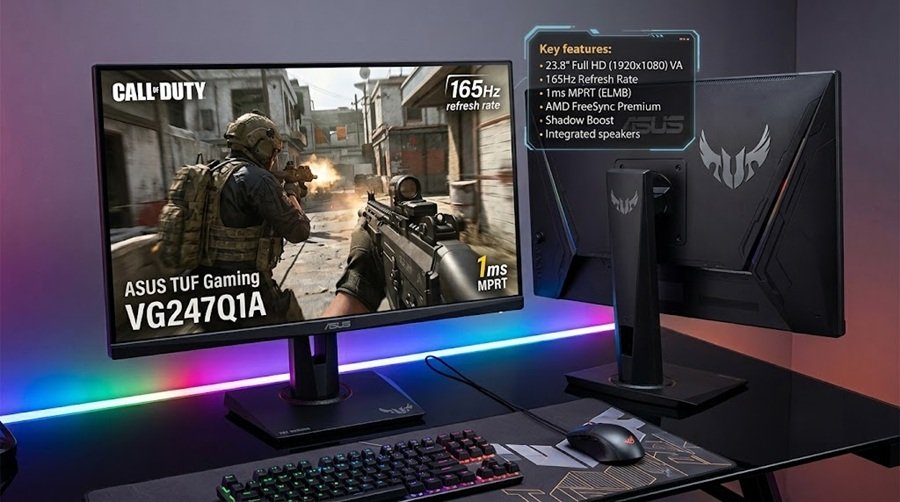
Featuring a 165Hz refresh rate, 1ms MPRT response time, FreeSync Premium, and an array of ASUS-exclusive gaming technologies, this monitor is engineered to give competitive players a smoother, tear-free experience. Welcome to Gearzon’s in-depth review, where we break down why the VG247Q1A stands out as one of the best budget-friendly monitors for FPS games and everyday setups.
Watch the full visual breakdown and gameplay performance of the ASUS TUF VG247Q1A.
⚙️ Quick Specifications
- 🖥️ Screen Size: 23.8-inch Full HD (1920 x 1080)
- ⚡ Refresh Rate: 165Hz
- ⏱️ Response Time: 1ms (MPRT) with ELMB technology
- 🔄 Sync Tech: FreeSync Premium & Nvidia Adaptive-Sync Compatible
- 🔊 Audio: Built-in stereo speakers
- 🛡️ Warranty: 3-Year Manufacturer Warranty
Full Specs Table
The quick list above covers the basics. This table follows the ASUS spec page and adds the panel type, brightness, ports and stand details that shoppers often ask about.
| Spec | ASUS TUF Gaming VG247Q1A |
|---|---|
| Panel | 23.8-inch VA, anti-glare |
| Resolution | 1920 x 1080 (Full HD), 16:9 |
| Refresh rate | 165Hz |
| Response time | 1ms MPRT |
| Adaptive sync | Adaptive-Sync, AMD FreeSync Premium |
| Brightness | 350 cd/m² |
| Contrast ratio | 3000:1 |
| Inputs | 1x DisplayPort 1.2, 2x HDMI 1.4, earphone jack |
| Speakers | 2W x 2 |
| Stand | Tilt only (+23 to -5 degrees), no height adjustment |
| Wall mount | 100 x 100mm VESA, Kensington lock slot |
| Gaming features | ELMB, Shadow Boost, GamePlus |
| Eye care | TUV-certified flicker-free and low blue light |
| Weight | 3.33 kg with stand, 2.81 kg without |
One detail stands out: the panel uses VA technology, not IPS. That choice explains both the strong contrast and the response-time debate below.
1. Display Quality and Gaming Performance
The ASUS TUF VG247Q1A features a 24-inch Full HD (1920×1080) display. While 1080p might seem basic to some, at roughly 24 inches, it provides crisp, sharp visuals with excellent pixel density. More importantly, a 1080p resolution keeps performance demands highly manageable, allowing mid-range and budget gaming PCs to easily push maximum frame rates.
The 165Hz Advantage: The biggest highlight of this monitor is the 165Hz refresh rate. If you are upgrading from a traditional 60Hz display, the jump in visual fluidity is staggering. Whether you are grinding ranked matches in Valorant, Counter-Strike 2, Fortnite, Apex Legends, or Call of Duty, the higher refresh rate drastically improves responsiveness and your ability to track moving targets.
To back up that speed, ASUS includes their Extreme Low Motion Blur (ELMB) technology. This delivers a rapid 1ms MPRT (Moving Picture Response Time) to effectively reduce ghosting and motion blur during fast-paced, erratic gameplay.
Why VA Matters: Contrast and Brightness
VA panels are known for deep blacks, and independent tests confirm it. TFTCentral measured a 4174:1 contrast ratio, well above the rated 3000:1. Monitor Nerds measured 4255:1 at 50% brightness and a peak of 421 cd/m². TFTCentral recorded 329 cd/m² in the default Racing mode.
These figures make dark scenes look richer than they do on a typical IPS monitor. The trade-off is viewing angle and, more importantly, pixel speed.
Response Time Reality Check
The 1ms figure is an MPRT rating, not a gray-to-gray measurement. Real pixel transitions are slower. TFTCentral measured an average of 13.3ms G2G at 165Hz. Black-to-gray transitions reached 67.8ms at maximum overdrive, which produces visible black smearing. That review concludes that the response times are bad even at 165Hz.
Monitor Nerds also noticed black trails in fast scenes, though it measured input lag at 5ms at 165Hz. In short, the monitor feels responsive, but fast motion can smear. Competitive players who care about clarity should weigh this before buying.
ELMB reduces blur but costs brightness. TFTCentral measured about 198 cd/m² in the standard ELMB mode and 152 cd/m² in the turbo mode, and it found that ELMB did not fully hide the slow transitions.
2. Adaptive Sync & Tactical Gaming Features
Screen tearing and micro-stuttering can completely ruin a competitive match. Thankfully, the VG247Q1A supports FreeSync Premium and Adaptive-Sync technology. It is also fully compatible with modern Nvidia GeForce graphics cards, making it a highly flexible option regardless of whether you are Team Red (AMD) or Team Green (Nvidia).
One of the most useful tactical features baked into the monitor’s OSD (On-Screen Display) is Shadow Boost. This technology intelligently brightens dark areas of the screen without washing out or overexposing the brighter sections. In games where spotting an enemy hiding in the shadows is critical, Shadow Boost provides a legitimate competitive advantage.
On-Screen Display and Gaming Tools
The settings live in the on-screen menu, and the tools are practical. ASUS lists GamePlus alongside Shadow Boost and ELMB. According to TFTCentral, GamePlus adds a crosshair, a timer and an FPS counter.
Color settings need a careful touch. TFTCentral reports that the sRGB mode removes most OSD controls and drops contrast to 1982:1. It also measured an average color error (dE) of 5.4 in the native mode, with orange tones the weakest. Monitor Nerds measured a 4.12 average dE and 1.44 after calibration. If you care about accuracy, plan to calibrate.
Gamut coverage is good for the price. TFTCentral measured 95.9% sRGB and 91.1% DCI-P3, while Monitor Nerds reported 98% sRGB and 91% DCI-P3.
3. Ergonomics, Eye Care, and Extras
ASUS has packed a few extra quality-of-life features into the TUF VG247Q1A to round out its value:
- ASUS Eye Care: Features TÜV Rheinland-certified flicker-free technology and a blue light filter, which are absolutely essential for reducing eye strain during marathon gaming sessions.
- Connectivity: Standard but effective, featuring DisplayPort support and HDMI connectivity for multi-device setups (like hooking up a PC and a console simultaneously).
- Built-in Speakers: It includes basic built-in speakers. While they won’t blow you away with cinematic bass, they are incredibly convenient if you don’t want to wear a headset while browsing YouTube or taking a quick break.
⚠️ Gearzon Reality Check: To hit this aggressive budget price point, ASUS had to make a few sacrifices. The monitor stand is quite basic, offering only tilt adjustments (there is no height or swivel adjustment). Additionally, while the color performance is great for gaming, it is not color-accurate enough for professional photo or video creators.
Stand, Mounting and Connections
ASUS lists a tilt range of +23 to -5 degrees and no height or swivel adjustment. TFTCentral calls the stand stiff to operate and says it feels cheap. The fix is easy because the monitor accepts 100 x 100mm VESA arms. A budget monitor arm solves the height problem for many desks.
Connections are basic. ASUS lists one DisplayPort 1.2 input, two HDMI 1.4 inputs and a headphone jack. PC players should use DisplayPort to reach the full 165Hz. Monitor Nerds also notes the minimal connectivity as a downside.
The 2W x 2 speakers fit casual use only. If you plan to game with sound, a headset is better. Our Logitech G PRO X3 LIGHTSPEED review and Turtle Beach Stealth Pro 2 review cover two wireless options.
4. Pros and Cons Summary
✅ What We Love
- Buttery smooth 165Hz refresh rate.
- Fast 1ms response time with ELMB technology.
- FreeSync Premium & Nvidia Adaptive-Sync compatibility.
- Shadow Boost tech actively improves dark-scene visibility.
- Eye Care features for long gaming sessions.
- Strong 3-year manufacturer warranty.
❌ Room for Improvement
- Basic stand with limited ergonomic adjustments.
- Built-in speakers are only average in quality.
- Color gamut is strictly for gaming, not professional creator work.

How the VG247Q1A Compares With Rivals
At this price, three details separate budget monitors: panel type, pixel speed and stand. The table compares the VG247Q1A with a sibling IPS model and a popular 165Hz alternative. All figures come from manufacturer spec pages.
| Monitor | Panel | Refresh / response | Brightness | Contrast | Stand |
|---|---|---|---|---|---|
| ASUS TUF VG247Q1A | 23.8-inch VA | 165Hz / 1ms MPRT | 350 cd/m² | 3000:1 | Tilt only |
| ASUS TUF VG249Q3A | 23.8-inch IPS | 180Hz / 1ms GTG | 250 cd/m² | 1000:1 | Tilt only |
| AOC 24G2SP | 23.8-inch IPS | 165Hz / 1ms MPRT | 300 cd/m² | Not listed (20M:1 dynamic) | Height, tilt, swivel, pivot |
The ASUS TUF Gaming VG249Q3A uses an IPS panel at 180Hz with a gray-to-gray rating. It is dimmer and has far lower contrast, but IPS panels usually handle motion better. The AOC 24G2SP adds a fully adjustable stand and a USB hub, plus a three-year warranty. Both rivals therefore fix the weak spots we found in the ASUS.
If your budget stretches far beyond this class, our Dell Alienware AW3426DW review shows what a 280Hz QD-OLED ultrawide offers. It costs far more, of course.
Who Should Buy the VG247Q1A
- Players upgrading from a 60Hz monitor on a tight budget.
- Fans of dark, high-contrast visuals in slower-paced games.
- Buyers who plan to use a VESA arm and a headset.
Who Should Skip It
- Competitive players who value pixel clarity, since reviewers measured slow black transitions.
- Creators who need accurate color without calibration.
- Anyone who wants a height-adjustable stand out of the box.
Building a Budget Desk Setup
A fast screen works best with a good mouse and keyboard. Our gaming mouse buying guide explains what matters most, and the mechanical keyboard budget guide helps you set a price limit. For a light esports mouse, see the Logitech G PRO X SUPERLIGHT 2 review or our SteelSeries vs Razer comparison.
Console and handheld players can use it too. Our best handheld gaming PCs guide and the ROG Xbox Ally X review cover devices that dock to a monitor like this one.
5. Final Verdict: Who Should Buy This?
The ASUS TUF Gaming VG247Q1A is unapologetically designed for one thing: delivering high-speed, competitive gaming performance on a strict budget. It doesn’t pretend to be a 4K cinema display or a color-grading monitor.
Who is it ideal for? This monitor is perfect for competitive gamers, FPS players, eSports enthusiasts, console gamers, and students building their first real gaming setup. If you are currently playing on a standard 60Hz monitor or a living room TV, upgrading to this 165Hz display will feel like a night-and-day revolution in your gameplay.
Offering an impressive combination of speed, tactical features, and robust warranty coverage, the ASUS TUF Gaming VG247Q1A is absolutely worth considering as one of the top budget gaming monitors on the market today.
Upgrade Your Battle Station with Gearzon
Want to see how this ASUS TUF monitor stacks up against budget 144Hz options from AOC, Gigabyte, or MSI? Check out our ultimate monitor buying guides to find your perfect screen.Explore More Monitors at Gearzon
Frequently Asked Questions
What refresh rate does the ASUS TUF Gaming VG247Q1A support?
It runs at 165Hz with a 1ms MPRT response time thanks to ASUS’s Extreme Low Motion Blur (ELMB) technology, which keeps fast-moving targets sharp in competitive shooters.
Does the VG247Q1A support FreeSync and G-Sync?
Yes. It’s certified for FreeSync Premium and is also compatible with Nvidia’s Adaptive-Sync, so it works with tear-free variable refresh rate on both AMD and Nvidia graphics cards.
Is the ASUS TUF VG247Q1A good for photo or video editing?
Not really. The color gamut is tuned for gaming speed rather than accuracy, so creative professionals doing color-critical photo or video work should look at a dedicated color-accurate monitor instead.
What are the biggest downsides of the ASUS TUF VG247Q1A?
The stand only tilts — there’s no height or swivel adjustment — and the built-in speakers are just average, fine for background audio but not a headset replacement.
Is the ASUS TUF VG247Q1A a VA or IPS panel?
It is a VA panel, according to ASUS. VA panels offer strong contrast, and reviewers measured over 4000:1 in testing. The trade-off is slower pixel transitions in dark scenes than IPS models, so black smearing can appear in fast motion.
How fast is the VG247Q1A in independent tests?
The 1ms rating is MPRT, not gray-to-gray. TFTCentral measured an average of 13.3ms G2G at 165Hz, with some black transitions much slower. Monitor Nerds reported 5ms input lag at 165Hz but noted black trails in fast scenes. It feels responsive, yet it is not the clearest in motion.