YUNZII IF68 Review: Is the $84.99 Screen Keyboard Worth It?
The YUNZII IF68 is a 65% wireless mechanical keyboard with 63 keys, a 200 × 480 pixel TFT screen, a rotary knob and QMK/VIA support. YUNZII sells it for $84.99 on sale, down from a $96.99 list price. It adds a status screen to a hot-swappable, gasket-mounted board with an 8,000 mAh battery.
That is a lot of features for the money, and it comes with an honest catch. The IF68 is new, and independent testing is thin. This review explains what the board offers, what it takes away, and what you should verify before you buy.
How we built this review. GearZon has not tested this keyboard, and we will not pretend otherwise. We combined the official YUNZII product page, launch coverage from KitGuru, the analysis from The Desk Brief, and the official YUNZII showcase video from the YUNZII KEYBOARD channel. That video is a 35-second product clip with a short typing-sound test and no spoken review, so it supplies features and not impressions. We found no hands-on review with measurements, and we say so wherever it matters.
YUNZII IF68 Specs and Quick Verdict
Here is the short version. The IF68 is a compact, customizable board for people who want a screen and open firmware at a modest price. It is not for anyone who needs a function row or navigation keys.

⚙️ Quick Specifications
Full specs table
| Spec | Details | Source |
|---|---|---|
| Model | YUNZII IF68 QMK/VIA Wireless Mechanical Keyboard | YUNZII store |
| Layout | 65%, 63 keys, one knob and one TFT screen | YUNZII store |
| Dimensions | 326.5 × 116.9 × 44.2 mm | YUNZII store |
| Weight | 725.5 ± 5 g | YUNZII store |
| Switches | YUNZII Milk V2 Linear or YUNZII Candy Linear, pre-lubed | YUNZII store and video |
| Actuation force and travel | Not published | YUNZII store |
| Hot-swap | Yes, 3-pin and 5-pin switches | YUNZII store |
| Keycaps | Double-shot PBT, Cherry profile | YUNZII store |
| Mounting | Gasket mount with sound-absorbing foam layers | YUNZII store |
| Screen | 200 × 480 px TFT, preloaded GIFs and images, custom uploads | YUNZII store |
| Software | QMK and VIA on Windows and macOS; screen set up on a website | YUNZII store |
| Connectivity | Bluetooth, 2.4 GHz wireless, USB-C wired | YUNZII store |
| Polling rate | Not published | YUNZII store |
| Battery | 8,000 mAh; up to 30 hours with RGB and screen on, up to 23 days with both off (claims) | KitGuru |
| Lighting | South-facing per-key RGB, 16.8 million colors | YUNZII store |
| Colors | Pink, Beige, Black | YUNZII store |
| Warranty | One year | YUNZII store |
| Price | $84.99 sale, $96.99 list | YUNZII store |
The Good and the Bad
👍 The Good
- ✔ QMK and VIA support gives you deep remapping, macros and layers at a modest price.
- ✔ Tri-mode connectivity covers Bluetooth, 2.4 GHz and a wired USB-C cable.
- ✔ The 8,000 mAh battery is large for a 65% board, at least on paper.
- ✔ Hot-swap sockets accept both 3-pin and 5-pin switches.
- ✔ The TFT screen shows battery, connection and custom GIFs at a glance.
- ✔ Double-shot PBT keycaps in Cherry profile are a good fit for the price.
👎 The Bad
- ✘ There is no function row, and the screen replaces the navigation keys of the AL68.
- ✘ YUNZII publishes no polling rate, so wireless latency is unknown.
- ✘ Actuation force and travel for the stock switches are not published.
- ✘ We found no independent typing, sound or battery tests.
- ✘ Battery figures are manufacturer claims, and the screen will drain the cell faster.
- ✘ Stock may be tight, since one report listed the keyboard as backordered.
A well-equipped 65% with a useful screen, QMK/VIA and a big battery for under $90. Buy it if you want open firmware in a compact size. Skip it if you need navigation keys, or want proof from independent tests first.
Design, Layout and Keycaps
The IF68 measures 326.5 × 116.9 × 44.2 mm and weighs about 725.5 g, according to YUNZII. That is a substantial 65% board, not a featherweight. It should stay put on a desk, but it is not the lightest option for a backpack.

The keycaps are double-shot PBT in Cherry profile. Double-shot caps mold the legend into the plastic, so it cannot wear off like printed legends. PBT quality varies between makers, which a listing cannot tell you, so treat the material as a good sign and not a guarantee.
Colors
You can pick pink, beige or black, each paired with either the Milk V2 or Candy linear switch. All six combinations cost the same $84.99 on YUNZII’s store.

Lighting
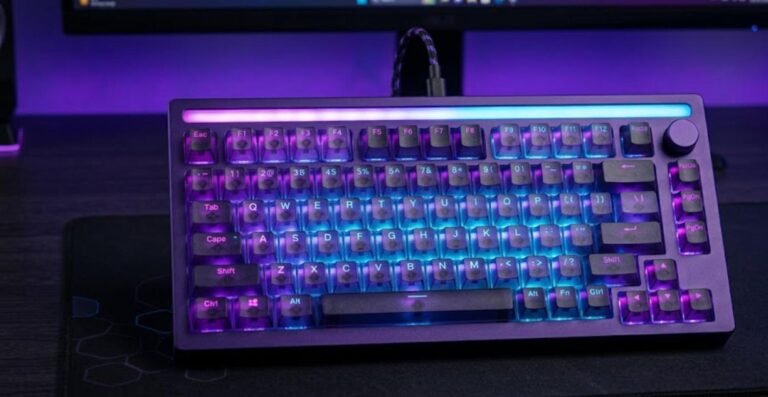
The IF68 uses south-facing per-key RGB with 16.8 million colors. South-facing LEDs sit behind the switch and point toward the typist, which suits keycaps with legends on the side or front. YUNZII’s graphic lists Fn shortcuts for brightness, color, effect and speed.

What you give up: the navigation keys
A 65% layout already drops the function row. The IF68 goes a step further. KitGuru notes that the screen takes the space that dedicated navigation keys occupy on the YUNZII AL68. The Desk Brief reports that Delete, Page Up and Page Down move to a function layer.
That is a real trade-off. If you edit long documents, write code or live in spreadsheets, those keys matter. If you mostly game and browse, you may not miss them. Our guide on how much to spend on a mechanical keyboard can help you decide which layout fits.
TFT Screen and Knob

The 200 × 480 screen
The vertical TFT sits in the top-right corner. It comes preloaded with animated GIFs and images, and YUNZII says you can upload your own through a dedicated website on Windows or macOS. The Desk Brief adds that it can show the time, a battery gauge and connection status.
The Desk Brief also points out that a screen like this is a fingerprint magnet, and that its brightness and legibility have not been measured. We agree that those are fair questions to ask before you buy. A screen is also a battery drain, which matters for the runtime claims below.
The multifunction knob
The rotary knob controls volume and RGB brightness out of the box. The Desk Brief calls it the least controversial part of the design. With QMK and VIA, you may be able to remap more, but check YUNZII’s current firmware notes for what the knob can be set to do.
Switches, Typing Feel and Sound
The IF68 ships with pre-lubed YUNZII Milk V2 or Candy linear switches. YUNZII does not publish their actuation force or travel, so we cannot say how light or heavy they feel. Both are linear, so expect a smooth press without a tactile bump.

The board uses a gasket mount with layers of sound-absorbing foam. YUNZII says this gives a creamy feel and a deep, thocky sound. KitGuru repeats the claim that the damping layers reduce typing noise. Those are goals, not measurements. Only a recording and a hands-on session can show how it sounds.
Hot-swap and modding
The PCB is hot-swappable, so you can try other switches without soldering. It accepts both 3-pin and 5-pin switches, which opens up a wide choice. If you enjoy tinkering, that is one of the board’s strongest selling points. For another budget-friendly board you can mod, see our YUNZII RT75 Pro review.

Watch it in action
YUNZII has posted two short showcase videos. Both are official marketing clips, so treat the sound test as a best-case sample. Each runs well under a minute and includes a brief typing-sound segment.
QMK and VIA Software
Open firmware is the IF68’s biggest practical advantage. YUNZII lists full QMK and VIA support on Windows and macOS. VIA lets you remap keys, build macros and set up layers in a graphical tool, without compiling firmware yourself.

The Desk Brief contrasts this with the Epomaker TH65, which uses a closed companion app. That difference matters if you want your settings to live on the keyboard and not in a vendor program. The screen is configured separately through a website, which YUNZII does not name on its product page. We have not used either tool, so we cannot judge polish or stability.
Battery, Connectivity and Charging

The 8,000 mAh battery is the headline. YUNZII rates it at up to 30 hours with RGB and the screen on, and up to 23 days with both off. The Desk Brief notes that these are manufacturer claims, and that the screen drains the battery heavily. For comparison, it lists the Keychron V1 Max with a 4,000 mAh battery.
Tri-mode connectivity

You can pair over Bluetooth, use the 2.4 GHz receiver, or plug in a USB-C cable. That is the standard setup for a modern wireless board. The missing piece is the polling rate. YUNZII has not published one, so we cannot tell you how the IF68 compares with 1,000 Hz or 8,000 Hz rivals such as the YUNZII RT75 Pro.
Gaming and Everyday Use
A 65% layout is popular with gamers because it frees mouse space and keeps the arrow keys. The IF68 fits that pattern. It also offers a wired mode if you want a stable connection for competitive play.
Linear switches suit fast, repeated presses in shooters. Without a published polling rate or any latency testing, though, we would not call this a competitive-grade keyboard. If raw speed is your priority, look at Hall Effect boards such as the MCHOSE Ace 75 or the Logitech G PRO X TKL Rapid. For a premium 8K magnetic option, see our ATK RS6+ review.
For everyday work, the knob and screen are handy, and QMK/VIA lets you build shortcuts. Just remember the missing navigation keys. A matching mouse completes the setup, and our gaming mouse buying guide covers what to look for. Good light options include the Pulsar X2F the Logitech G PRO X Superlight 2. Ergonomic fans can look at the Lamzu Thorn V2 and the Razer Basilisk V4 Pro.
Price, Alternatives and How It Compares
YUNZII lists the IF68 at $84.99 on sale, against a $96.99 list price. KitGuru and EnosTech both report the $84.99 launch price. The Desk Brief noted one offer as backordered, so confirm stock before you plan around a specific color.
| Keyboard | Price | Layout | Standout feature |
|---|---|---|---|
| YUNZII IF68 | $84.99 sale | 65%, 63 keys | TFT screen, knob, QMK/VIA, 8,000 mAh |
| Keychron V1 Max | About $94 assembled, $74 barebones | 75% | QMK/VIA, 4,000 mAh battery, no screen (per The Desk Brief) |
| Epomaker TH65 | $64.99 | 65% | Knob, closed companion app, no QMK/VIA (per The Desk Brief) |
| MCHOSE Ace 75 | $99 launch price | 75% with knob | Hall Effect switches, up to 8,000 Hz |
YUNZII IF68 vs Keychron V1 Max
The Desk Brief calls the Keychron V1 Max the safer pick for heavy typists. It costs a little more, has a smaller battery, and has no screen, but it has a track record of independent reviews. Choose the IF68 if you want the screen and the larger battery. Choose the Keychron if you want proof first.
YUNZII IF68 vs Epomaker TH65
The Epomaker TH65 costs about $20 less and also has a knob. It uses a closed app and lacks QMK/VIA, according to The Desk Brief. If open firmware matters to you, the IF68 wins on features. If you want the cheapest 65% with a knob, the TH65 is cheaper.
YUNZII IF68 vs a Hall Effect board
The MCHOSE Ace 75 costs about $15 more at launch pricing and adds Hall Effect switches with Rapid Trigger. It suits gamers who care about speed. The IF68 suits people who care about customization and a screen. Our Lofree Hyzen review covers a more minimalist, premium take on a compact board.
Verdict: Who Should Buy the YUNZII IF68?
The YUNZII IF68 packs a screen, a knob, QMK/VIA, tri-mode wireless and a big battery into a 65% board for under $90. That is a strong feature list. The caution is evidence. The Desk Brief rated it 3.5 out of 5 and recommended waiting for measured reviews, and we agree that independent testing would help.
| Buy it if | Skip it if |
|---|---|
| You want QMK/VIA and a status screen in a compact board. | You rely on a function row or dedicated navigation keys. |
| You like to mod and swap switches without soldering. | You want measured battery, latency and sound data first. |
| You want one board for Bluetooth, 2.4 GHz and wired use. | You prefer a lighter keyboard to carry around daily. |
| You are happy with a linear, gasket-style typing feel. | You want a tactile or Hall Effect switch. |
We give it 7.8 out of 10 based on the features and price, with points held back for the thin evidence and the missing navigation keys. We will revisit the score if we get hands-on time or if independent reviews appear.
Frequently Asked Questions (FAQ)
Is the YUNZII IF68 wireless?
Yes. The IF68 is a tri-mode keyboard that connects over Bluetooth, a 2.4 GHz wireless receiver or a wired USB-C cable. YUNZII has not published a polling rate for any of these modes, so we cannot compare its wireless latency with other boards.
Does the YUNZII IF68 support QMK and VIA?
Yes. YUNZII lists full QMK and VIA support on Windows and macOS, which lets you remap keys, build macros, set up layers and adjust RGB. The screen is configured separately through a dedicated website, which YUNZII does not name on its product page.
How long does the YUNZII IF68 battery last?
YUNZII rates the 8,000 mAh battery at up to 30 hours with RGB and the screen on, and up to 23 days with both off. Those are manufacturer claims, and we found no independent battery test. Expect real use to land somewhere between the two figures.
Is the YUNZII IF68 hot-swappable?
Yes. The PCB is hot-swappable and accepts both 3-pin and 5-pin mechanical switches without soldering. The stock switches are YUNZII Milk V2 Linear or Candy Linear, and YUNZII does not publish their actuation force or travel.
How much does the YUNZII IF68 cost?
YUNZII lists the IF68 at $84.99 on sale, down from a $96.99 list price, in pink, beige and black. Launch coverage from KitGuru also gives $84.99. Prices and stock change, so check the current listing.
Does the YUNZII IF68 have a function row and navigation keys?
It has arrow keys but no function row, because it is a 65% board with 63 keys. The screen takes the space that dedicated navigation keys used to occupy on the YUNZII AL68. The Desk Brief reports that Delete, Page Up and Page Down move to a function layer.
Can you upload your own images or GIFs to the IF68 screen?
Yes. The 200 × 480 pixel TFT screen comes with preloaded animations and images, and you can upload your own photos or GIFs through a dedicated website on Windows or macOS.