AULA AG75 Pro Review: Is This 8K Hall Effect 75% Worth $199.90?
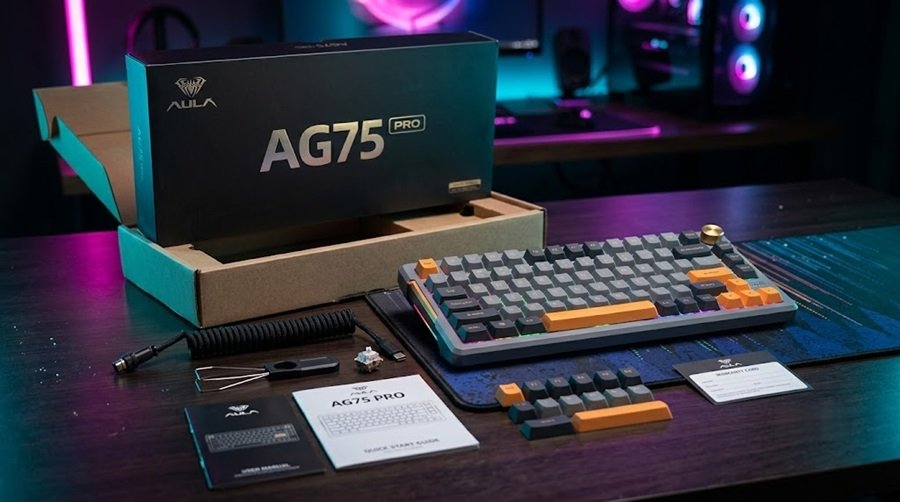
The AULA AG75 Pro is a wired 75% Hall Effect keyboard with a full aluminum case, 8,000 Hz polling and Rapid Trigger that adjusts in 0.001 mm steps. AULA sells it for $199.90 in its US store. That sits between the $169.90 base AG75 and the $229.90 to $249.90 AG75 Ultra.
It is also a slightly confusing product. AULA sells the AG75 as a three-tier family, and retailers publish different scan rates, switch names and warranty terms for the Pro. This review sorts through those numbers so you know what you are actually buying.
How we built this review. GearZon has not tested this keyboard, and we will not pretend otherwise. We combined the specs on AULA’s US store page, AULA’s AG75 announcement, and the listings from Evetech. We then added what the available video coverage shows. We found no independent lab review of the Pro, so most performance figures below are AULA’s own claims. We say so wherever it matters.
AULA AG75 Pro Specs and Quick Verdict
Here is the short version before we dig into the details. The Pro is a heavy, well-damped aluminum board with fast, adjustable switches. Its biggest weakness is how little independent testing exists.

⚙️ Quick Specifications
Full specs table
| Spec | Details |
|---|---|
| Model | AULA AG75 Pro (colors: Rainbow, Shadow, Armor, Cloud Rock White) |
| Layout | 75%, 81 keys with arrow keys and function row |
| Dimensions | 319.8 × 143.8 × 42.1 mm (retailer listing) |
| Weight | About 1,532 g without the cable (retailer listing) |
| Case | Full CNC aluminum, 220-grit sandblasted and anodized |
| Plate | Carbon fiber, with high-precision non-magnetic stabilizers |
| Switch | AULA Ice Heart Silver Hall Effect, clear tactile bump |
| Actuation force | 27 ± 5 gf |
| Total travel | 3.4 ± 0.1 mm |
| Rapid Trigger | 0.001 to 3.4 mm in 0.001 mm steps, true zero dead zone |
| Polling rate | 8,000 Hz (wired) |
| Scan rate and latency | 256K and about 0.1 ms per AULA and most retailers |
| Hot-swap | Listed as yes by Evetech and HACOM |
| Acoustics | Six layers: slow-rebound PO cotton, PET pads, IXPE switch underpads and bottom dampening |
| Typing modes | Physical Soft and Firm switch |
| Assembly | Tool-free ball-catch quick-release top frame |
| Lighting | Dual-light ARGB, 170 LEDs, about 20 effects |
| Connection | Wired USB-C |
| Software | AULA Web HUB 3.0, plus a desktop Control Hub download |
| Warranty | 1 year at one retailer, 2 years at Evetech and HACOM |
| US price | $199.90 (AULA US store) |
The Good and the Bad
👍 The Good
- ✔ Rapid Trigger adjusts from 0.001 mm to 3.4 mm with a true zero dead zone, per AULA.
- ✔ Wired 8,000 Hz polling is part of the whole AG75 family, even the cheaper Base model.
- ✔ A full aluminum case, carbon fiber plate and six dampening layers feel premium on paper.
- ✔ A physical Soft and Firm switch changes the typing feel without any software.
- ✔ The tool-free quick-release top frame makes modding easier.
- ✔ The browser-based Web HUB means there is nothing to install.
👎 The Bad
- ✘ We found no independent lab review, so most numbers are AULA claims.
- ✘ AULA and its retailers disagree on scan rate, latency, switch names and warranty.
- ✘ It is wired only, with no wireless option.
- ✘ At about 1.5 kg it is a desk keyboard, not a travel keyboard.
- ✘ AULA does not publish a clear keycap spec for the Pro.
- ✘ The MCHOSE Ace 75 undercuts it by about $100 at launch pricing.
Which AULA AG75 Is the Pro? Base vs Pro vs Ultra
AULA sells the AG75 in three tiers that share a 75% layout and an aluminum body. The Pro is the middle one. Retailer comparison tables list dual-light RGB with 170 LEDs and a tactile stock switch for the Pro, where the Base uses a simpler lighting setup and a linear switch.
| AG75 Base | AG75 Pro | AG75 Ultra | |
|---|---|---|---|
| US price (AULA) | $169.90 | $199.90 | $229.90 to $249.90 |
| Hall sensor | 3rd generation | 3rd generation | 4th generation |
| Scan rate | 256K | 256K | 2304K |
| Latency (AULA claim) | About 0.1 ms | About 0.1 ms | About 0.08 ms |
| Polling rate | 8,000 Hz wired | 8,000 Hz wired | 8,000 Hz wired |
| Stock switch | Linear (Mixue, 32 gf) | Ice Heart Silver tactile, 27 gf | Eight Treasure (35 gf) or Super God (27 gf) |
| Lighting | South-facing RGB | Dual-light, 170 ARGB LEDs | Dual-light, 170 ARGB LEDs |

How big is the Ultra upgrade?
The Ultra adds a 4th-generation sensor, a 2304K scan rate and a claimed 0.08 ms of latency for $30 to $50 more. The gap between 0.1 ms and 0.08 ms is 0.02 ms. Human reaction times are measured in tens of milliseconds, so that difference is almost certainly invisible in play. Most buyers should save the money and take the Pro, unless they want the Ultra’s switch options.
The Pro colors


Where AULA’s numbers disagree
This is the part most spec sheets hide. When we compared the sources, several Pro details did not line up. We trust AULA’s own pages first and flag the rest.
| Detail | What we found |
|---|---|
| Scan rate | AULA and most retailers list 256K for the Pro. Evetech also quotes 2304K per key, a figure AULA attaches to the Ultra. |
| Latency | AULA lists about 0.1 ms for the Pro. HACOM lists 0.08 ms. |
| Switch name | Ice Heart Silver (AULA), Ice Silver, Bingxin Silver, Ice Core (HACOM) and LEOBOG Frostcore (Evetech). |
| Maximum actuation | AULA says 3.4 mm. HACOM lists 3.3 or 3.4 mm. |
| Warranty | One retailer lists 1 year. Evetech and HACOM list 2 years. |
| Keycaps | Retailers describe metal-themed, heat-sublimation or side-printed PBT caps. AULA does not give one clear answer. |

Hall Effect Switches, Actuation and Rapid Trigger
Under each keycap, a magnet moves past a sensor instead of closing a metal contact. The keyboard therefore knows how far every key has traveled, not just whether it is pressed. That is what makes adjustable actuation and Rapid Trigger possible.
AULA rates the Pro’s Ice Heart Silver switch at 27 ± 5 gf of actuation force and 3.4 ± 0.1 mm of travel. It describes the switch as having a clear tactile bump. That is unusual. Most Hall Effect switches are linear, so a tactile option gives typists something to feel at the actuation point.

Rapid Trigger and zero dead zone
AULA says Rapid Trigger works from 0.001 mm to 3.4 mm in 0.001 mm steps, with a true zero dead zone. With Rapid Trigger, a key releases as soon as you lift by the set distance and presses again as soon as you push back down. That makes counter-strafing in shooters feel crisp.
Be realistic about the 0.001 mm figure. It describes the setting resolution. Sensor noise means you will likely run Rapid Trigger at a much larger distance in practice.
The Web HUB also supports SOCD handling, often called Snap Tap, which resolves conflicting left and right inputs in your favor. Check your league’s rulebook before you use it in competition, because some organizers restrict these features. For a primer on how to think about keyboard budgets, see our guide on how much to spendon a mechanical keyboard.
Design, Build and Acoustics
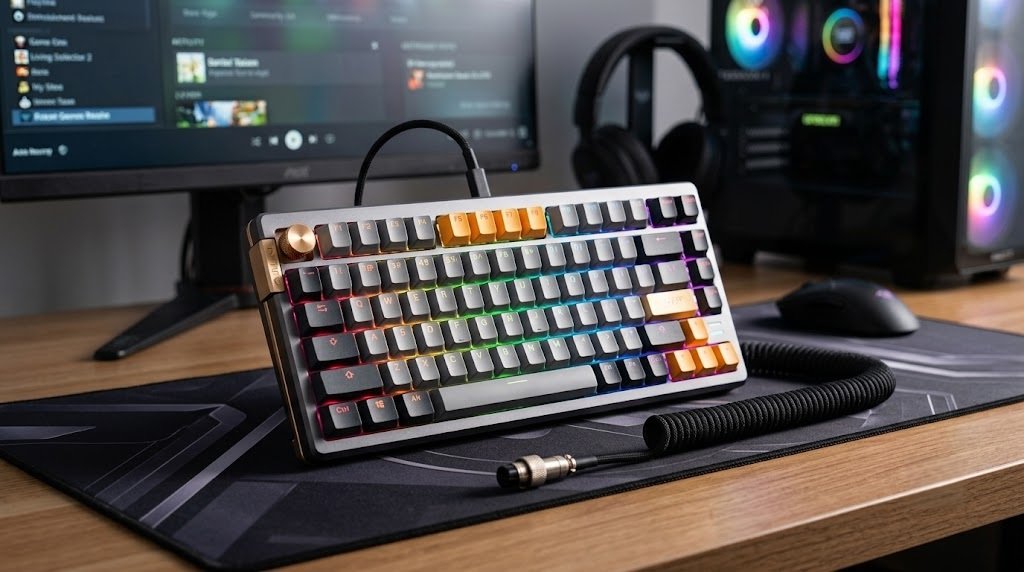
The AG75 Pro uses a CNC-machined aluminum case with a 220-grit sandblasted, anodized finish. Inside sits a carbon fiber plate over six layers of dampening, including slow-rebound PO cotton, PET pads, IXPE switch underpads and bottom foam, according to AULA. AULA also fits high-precision non-magnetic stabilizers, which makes sense on a keyboard full of magnets.
Retailer listings give the size as 319.8 × 143.8 × 42.1 mm and the weight as about 1,532 g without the cable. That is heavy. It will not slide around your desk, but you will not want it in a backpack.

Soft and Firm modes
A physical switch toggles between Soft Mode, which AULA describes as a cushioned feel, and Firm Mode, which gives more direct feedback. You do not need software to change it. We have not felt the difference ourselves, so treat the labels as AULA’s description and not a guarantee.
Layout and quick-release frame
The 75% layout keeps the arrow keys and function row while saving about 25 percent of desk space compared with a full-size board, according to AULA. That leaves room for a big mouse pad. Our guide to choosing a gaming mouse covers the other half of that desk setup.

The ball-catch quick-release lets you lift the top frame without screws or tools. That makes it easier to reach the internals if you like to tinker.
Keycaps and legends
AULA does not publish a consistent keycap spec for the Pro. One retailer lists metal-themed, heat-sublimation caps. Another mentions side-printed PBT. Several say nothing. Confirm the keycap material and legend style on the exact listing before you buy.
Typing Feel and Sound
This is the section where we have to be careful. GearZon has not typed on an AG75 Pro, and we found no independent review with sound tests or measurements. What we can do is explain what the specs suggest and point you to the footage that exists.
Light force and a short 3.4 mm travel should make the board quick and low-fatigue in long sessions. The tactile Ice Heart Silver switch adds a bump that linear Hall Effect boards lack. The carbon fiber plate and six dampening layers point toward a deeper, more controlled sound than a hollow plastic board. Sound is subjective, though, and only a recording can show it.
What owners say
The one public sample we found is thin. A Walmart listing for the Pro Shadow Gray shows a 4.7 out of 5 average from just 19 ratings. That is too few to draw conclusions, so we read it as a mild positive signal and nothing more.
Watch it in action
Three videos are worth a look. The first is AULA’s own 40-second Pro versus Ultra switch comparison, which is marketing. The second is a full AG75 Ultra review from Galaxy Tech Review, which covers the same chassis and software. Its description includes an affiliate link. The third is a roughly 18-minute Vietnamese-language hands-on of the Pro from SH TECH, with about 54,000 views when we checked.
AULA Web HUB Software
AULA configures the AG75 through a browser-based tool called Web HUB, so there is nothing to install. You set per-key actuation, Rapid Trigger distance, dead zones and SOCD there. Retailer listings also mention DKS (dynamic keystrokes), Multi-Point Trigger, Mod-Tap, Toggle, Rapid Switch and macros.
AULA also offers a desktop download called Control Hub for Windows and macOS. One retailer lists version 2.1.4 and says firmware updates need the USB-C cable plugged in. Keep the cable connected until an update finishes. We have not used either tool, so we cannot judge polish or stability. Hall Effect tuning lives and dies by its software, so read recent owner feedback before you buy.
Gaming Performance: 8K Polling and Latency
The headline number is 8,000 Hz polling. At 1,000 Hz the keyboard reports to the PC every 1 ms. At 8,000 Hz that gap shrinks to 0.125 ms. AULA also quotes about 0.1 ms of latency and a 256K scan rate for the Pro.
Treat those figures as best-case claims. The gain from 8K polling over 1,000 Hz is small for most people, and the setting can raise CPU load on older systems. It is a nice margin to have, not a reason to buy on its own. Your actuation point and Rapid Trigger tuning will matter more in a match than the polling rate.
In fast shooters like Valorant and Counter-Strike 2, the mix of light actuation and Rapid Trigger is where the Pro should help most. For a mouse that matches that speed, see our reviews of the Logitech G PRO X Superlight 2 and the Logitech Pro X3 SUPERSTRIKE. Lighter options include the Pulsar X2F and the ATK U2 V2 Ultimate.
Price, Alternatives and How It Compares
AULA’s US store lists the Pro at $199.90 in the Rainbow, Shadow and Armor colors. The base AG75 costs $169.90 and the Ultra costs $229.90 to $249.90. Third-party prices differ. A Walmart listing for the Pro Shadow Gray showed $229 and was out of stock when we checked, and a South African retailer lists it at R 2,399. Buy from a seller with a clear return policy.
| Keyboard | Price | Polling | Best for |
|---|---|---|---|
| AULA AG75 Pro | $199.90 (AULA US) | 8,000 Hz wired | Aluminum build and a tactile Hall Effect switch |
| MCHOSE Ace 75 | $99 launch price | Up to 8,000 Hz | Budget 75% with a knob |
| YUNZII RT75 Pro | See our review | 8,000 Hz wired and 2.4 GHz | Wireless 75% Hall Effect |
| Logitech G PRO X TKL Rapid | $169.99 | 1,000 Hz | Logitech G HUB and a TKL layout |
AULA AG75 Pro vs MCHOSE Ace 75
The MCHOSE Ace 75 costs about half as much at its $99 launch price and also supports up to 8,000 Hz polling. AULA’s case rests on the all-aluminum body, the carbon fiber plate and the Soft and Firm switch. If those do not excite you, the MCHOSE is the better value.
AULA AG75 Pro vs YUNZII RT75 Pro
The YUNZII RT75 Pro adds 2.4 GHz wireless at 8,000 Hz and a rotary knob. If you want to cut the cable, it is the clearer pick. If you only ever use the keyboard on a desk, the AULA’s heavier metal build is the more solid-feeling option on paper.
AULA AG75 Pro vs Logitech G PRO X TKL Rapid
The Logitech G PRO X TKL Rapid costs $169.99, polls at 1,000 Hz and uses a tenkeyless layout. Logitech offers polished G HUB software and a big support network. The AULA gives you 8K polling and a tighter 75% footprint for about $30 more.
If you want another 8K magnetic option, our ATK RS6+ and Ultra review is worth a read. For a premium minimalist alternative, check the Lofree Hyzen review.
Verdict: Who Should Buy the AULA AG75 Pro?
The AULA AG75 Pro looks like a strong value on paper. You get a full aluminum body, 8,000 Hz polling, fine-grained Rapid Trigger and a tactile switch for $199.90. The catch is proof. Without independent testing, you are trusting AULA’s numbers, and its own retailers cannot agree on several of them.
| Buy it if | Skip it if |
|---|---|
| You want a heavy, well-damped aluminum 75% for the desk. | You need a wireless keyboard. |
| You like a tactile bump but want Hall Effect speed. | You want independent test data before you spend $200. |
| You will tune Rapid Trigger and SOCD in a browser tool. | You are on a tight budget and $99 options appeal. |
| You are fine with a wired, 1.5 kg board. | You carry your keyboard between desks. |
We give it 8.0 out of 10 on the strength of its specs and price, with points held back for the thin evidence and the spec confusion. We will revisit the score if we get hands-on time or if solid independent reviews appear.
Pair it with a lightweight wireless mouse for a fast, uncluttered desk. Our Razer Basilisk V4 Pro review suits ergonomic players, and the VXE R1S and Superlight 2 suit claw and fingertip grips.
Frequently Asked Questions (FAQ)
Is the AULA AG75 Pro wireless?
No. The AG75 Pro is a wired keyboard that connects over USB-C, and AULA lists wired 8,000 Hz polling for the whole AG75 family. If you want a cable-free Hall Effect board, look at the YUNZII RT75 Pro, which adds 2.4 GHz wireless.
How much does the AULA AG75 Pro cost?
AULA lists the AG75 Pro at $199.90 in its US store. The base AG75 is $169.90 and the Ultra runs $229.90 to $249.90. Third-party sellers can charge more, so compare return policies as well as prices.
What is the difference between the AG75 Pro and the AG75 Ultra?
Retailer comparison tables list the Pro with a 3rd-generation Hall sensor, a 256K scan rate and about 0.1 ms latency. The Ultra moves to a 4th-generation sensor, a 2304K scan rate and about 0.08 ms latency, for $30 to $50 more. Both support 8,000 Hz wired polling.
Is the AULA AG75 Pro hot-swappable?
Evetech and HACOM both list the Pro as hot-swappable. AULA’s own US store page does not spell it out, so confirm the exact switch socket and compatible switch types with the seller before you plan a switch swap.
Does the AULA AG75 Pro have 8K polling?
Yes. AULA specifies 8,000 Hz polling over the wired connection for the AG75 Base and Pro. You need to enable it in the settings, and you should plug into a USB port that can handle the higher report rate.
Is the AULA AG75 Pro good for typing?
On paper, yes. It has light 27 gf switches with a tactile bump, a carbon fiber plate and six dampening layers, plus a Soft and Firm switch. GearZon has not tested it, though, and we found no independent sound or typing review, so treat that as an informed expectation and not a verdict.
Does the AULA AG75 Pro work on Mac?
AULA’s Web HUB runs in a browser, so it does not need a native app. One retailer also lists a desktop Control Hub for Windows and macOS 12 or later. Check AULA’s download page for the current version before you buy.