SteelSeries QcK vs QcK Prism: Is the RGB Worth the Extra Cost?
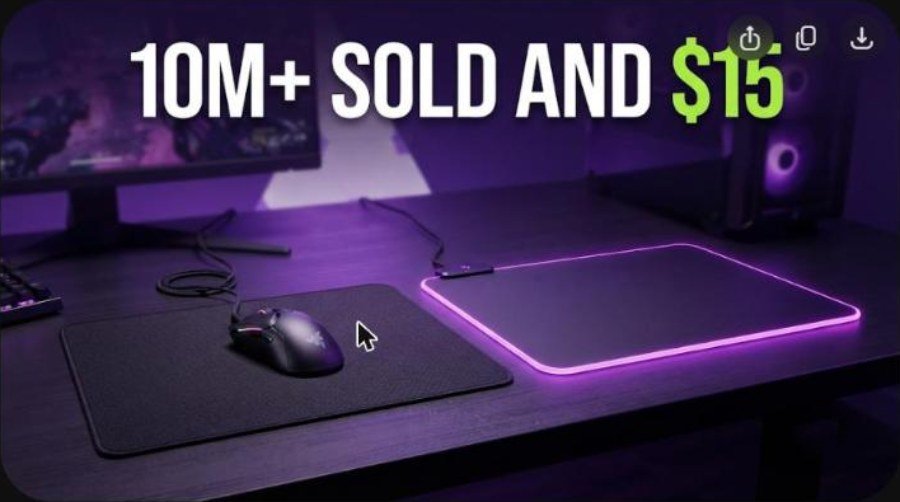
The SteelSeries QcK is probably the most familiar cloth mouse pad on the planet. It costs about $15 in the sizes most people buy, it has barely changed in looks for years, and SteelSeries says the QcK line has sold more than 10 million units. The QcK Prism Cloth keeps the same woven surface but adds a thicker 4 mm body and two-zone RGB lighting, and it starts at a much higher price.
This guide puts the two side by side. It covers the specs, sizes, surface feel, lighting and software, durability, price and which one fits your desk. It also shows where the budget QcK still beats pads that cost three or four times as much, and where the Prism earns its premium.
How we built this review. It combines SteelSeries’ own QcK Prism product page, retailer listings for the standard QcK, the NicheGamer review of the Prism and several YouTube reviews. Every measurement and opinion below is credited to its source.
SteelSeries QcK vs QcK Prism: Specs and Quick Verdict
⚙️ Quick Specifications
SteelSeries QcK vs QcK Prism specifications
| Spec | QcK (cloth) | QcK Prism Cloth |
|---|---|---|
| Surface | Micro-woven cloth | Micro-woven cloth |
| Base | Non-slip rubber | Non-slip rubber |
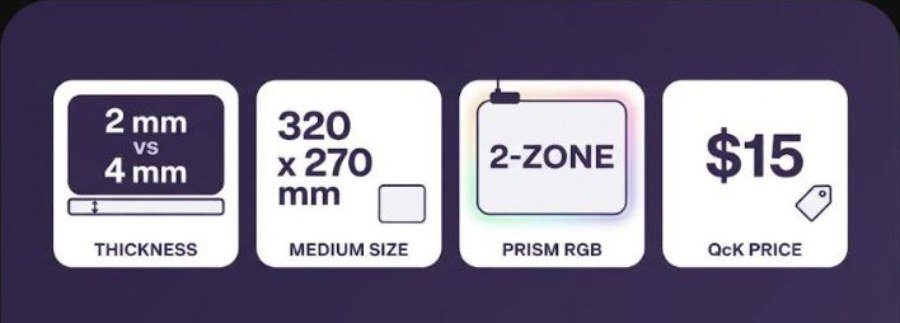
| Thickness | 2 mm (Heavy version: 6 mm) | 4 mm |
| Medium size | 320 x 270 mm | 320 x 270 mm |
| Larger sizes | Large, XL and XXL options | XL 900 x 300, 3XL 1220 x 590, 4XL 1220 x 762, 5XL 1600 x 800 mm |
| Lighting | None | Dynamic 2-zone RGB, 16.8 million colors |
| Software | None needed | SteelSeries Engine, PrismSync, Discord and game alerts |
| Connection | None | Cable to your PC for lighting power and control |
| Typical price | About $15 | $39.99 Medium, $59.99 XL (SteelSeries listing) |
The Good and the Bad
👍 The Good
- ✔ The QcK is cheap, proven and available almost everywhere, in sizes from small to desk-covering.
- ✔ Both pads use a tight micro-woven weave that SteelSeries says was tested with optical and laser sensors.
- ✔ The non-slip rubber base keeps the pad planted during fast flicks.
- ✔ The Prism adds two-zone RGB, game alerts and Discord notifications, and NicheGamer scored it 9 out of 10.
- ✔ The 4 mm Prism body feels more cushioned and looks more premium than the thin standard pad.
👎 The Bad
- ✖ The plain QcK has no wrist cushion, and a 2 mm pad shows desk texture on a rough surface.
- ✖ The Prism costs several times more and needs a USB connection, so it adds one more cable to your setup.
- ✖ NicheGamer notes that dust and marks show easily on the Prism, and very large sizes can be unwieldy.
- ✖ Cloth pads of any brand wear over time, so budget buyers should expect to replace them eventually.
Buy the plain QcK if you want the safest, cheapest pad that works. Buy the Prism only if you want RGB that matches the rest of your desk, because the glide surface is the same family of weave rather than a new technology.
How the SteelSeries QcK Family Is Organized
SteelSeries has several pads that share the QcK name, and the lineup has been renamed more than once. On the official store the older QcK Mini, QcK, QcK+ and QcK Heavy names have become QcK Small, Medium, Large and Heavy sizes. That is why shoppers often see conflicting size names for the same pad.
| Pad | Size and thickness | Notes |
|---|---|---|
| QcK Medium | 320 x 270 x 2 mm | The classic budget cloth pad |
| QcK Edge | M 320 x 270, L 450 x 400, XL 900 x 300 mm, 2 mm | Stitched edge to resist fraying; $11.99 to $23.99 on SteelSeries.com |
| QcK Heavy | Medium, Large and XXL, about 6 mm | Extra thick cloth pad with the same weave |
| QcK Hard | 320 x 270 x 3 mm | Hard polyethylene surface, $29.99 |
| QcK Prism Cloth | M 320 x 270, XL 900 x 300 mm and larger, 4 mm | Two-zone RGB, from $39.99 |
If you shop for a plain QcK, check the exact size before you buy. A Medium pad fits a low-sensitivity wrist swipe, while a Large or XL pad lets you rest a keyboard and a mouse on one surface. The official Prism page lists the Prism in five sizes, from the 320 x 270 mm Medium to the 1600 x 800 mm 5XL.
What You Get in the Package
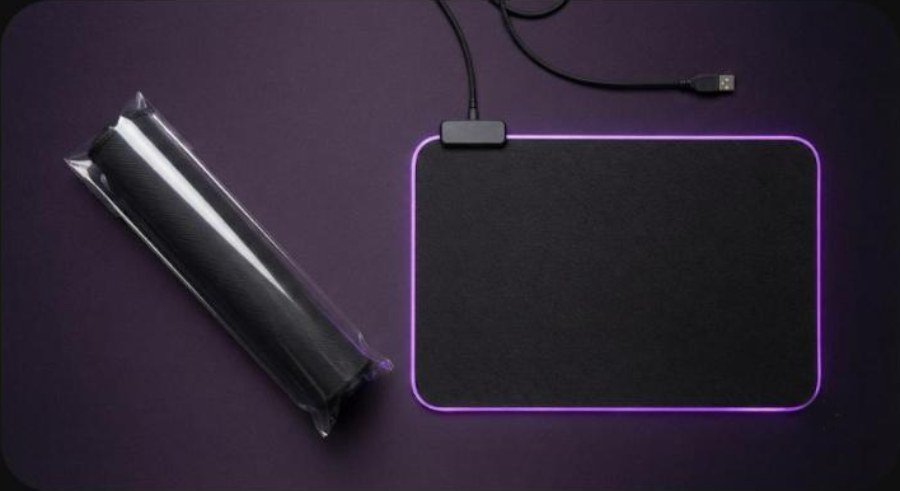
A mouse pad is a simple purchase. The standard QcK arrives as a single cloth pad, usually rolled or flat in light packaging, with no cables or software to install. The Prism is the same idea with extra hardware: the pad has a built-in light ring and a cable that connects to a USB port on your PC.
That cable is routed off the left side of the pad, according to SteelSeries, so it should stay clear of your mouse cable. You then use SteelSeries Engine to pick colors and effects. Nothing else is needed.
Design and Build Quality
Both pads look deliberately plain. The QcK is a flat black cloth rectangle with a small SteelSeries logo, and the Prism keeps that restrained look until you plug it in. That is part of the appeal. The QcK has been a default choice in esports for about 15 years, according to SteelSeries, and it does not need a loud design to stay relevant.
Standard QcK build
The standard QcK is only 2 mm thick, so it sits almost flush with the desk. The rubber base grips well enough that you rarely need to reposition it. If your desk surface is smooth, that thin profile gives a consistent feel from the center to the edges.
QcK Prism build
The Prism is twice as thick at 4 mm, with a light ring built into the pad. NicheGamer describes the cloth as soft, tightly woven and easy to wipe down, and the reviewer even says it might be the highest quality pad they have used. The same review points out that the pad cannot be customized with your own art, which matters if you like printed desk mats.
Video: Serenity 101 reviews the thicker QcK Heavy and calls the line a trusted pick for FPS players and everyday users. Opinions in the video belong to the creator, so treat it as another point of view.
Surface, Glide and Control
The QcK surface is a micro-woven cloth with a high thread count. SteelSeries says the weave was tested with a leading mouse sensor maker for accuracy with both optical and laser sensors. In practice, that means any modern gaming mouse should track on it without surprises.
Cloth pads such as the QcK are usually described as control-oriented. The fabric adds a little static friction, so the mouse stops quickly when you stop moving it. That helps with micro-adjustments in tactical shooters, which is one reason the QcK Heavy has a loyal following. A video from KriZ even asks why CS2 pros still use a pad that costs about $20.
Does the Prism glide differently?
SteelSeries presents the Prism as the same micro-woven cloth family, with lighting and extra thickness added on top. It does not market a different glide. The practical difference is cushioning and looks, not a new surface technology.
If you move to the Prism from a worn pad, you will notice a fresher surface more than any change in design. If you move from a new QcK, expect it to feel familiar.
QcK Prism RGB and Software
The Prism has dynamic two-zone RGB with 16.8 million colors. NicheGamer says the lighting runs around the edges of the pad, and you control it through SteelSeries GG, the renamed Engine software. It can react to in-game events such as health or shield loss and to Discord notifications.
PrismSync and game alerts
SteelSeries lists PrismSync, which syncs lighting across Prism-enabled SteelSeries gear, along with game alerts for events such as a reload, low health or an ultimate ready. There is also an audio visualizer and Discord chat notifications for new messages and mute status.
That is the real reason to buy the Prism. If your keyboard, headset and mouse already run SteelSeries lighting, the pad completes the set. If your desk uses another RGB ecosystem, the Prism is only a pretty pad.
The Prism needs a USB connection and the SteelSeries software to do anything beyond basic lighting, so check that you have a free port before you order.
Thickness, Comfort and Desk Setup
Thickness is the other big difference. A 2 mm pad is easy to live with if you use a low-profile keyboard or a wrist rest. A 4 mm pad is more comfortable under your forearm, but its raised edge can feel different if you rest your wrist on the boundary.
Size matters as much as thickness. A Medium pad suits low-sensitivity play with a lot of wrist motion. An XL pad at 900 x 300 mm gives your keyboard and mouse a shared surface. NicheGamer warns that very large sizes can be unwieldy and may flap off the desk if you do not measure first.
Video: MercuryTV shows the QcK Prism XL in use and covers the RGB lighting. Opinions in the video belong to the creator, so treat it as another point of view.
If you stand at a desk, a large pad can look neat on top of a standing desk. Our FlexiSpot L-shaped standing desk review and best standing desk for gaming guide cover what that setup needs.
Durability, Cleaning and Care
Cloth pads are the easiest style to clean and the easiest to wear out. The weave collects skin oils, dust and crumbs, and a pad that looked fine in month one can feel slower by year two. NicheGamer notes that dust and marks collect easily on the Prism, especially on the biggest sizes, although the marks wipe away.
The standard QcK has a stitched-edge sibling, the QcK Edge, for people who worry about fraying. SteelSeries says the stitched edge resists fraying and peeling. Because the standard QcK is so cheap, many players simply replace it when it looks tired.
A light routine keeps either pad in good shape. Brush off crumbs, wipe it with a slightly damp cloth, and let it dry flat. Avoid folding the Prism, since it has built-in lighting.
Price, Availability and Alternatives
The plain QcK costs about $15 in the common sizes. SteelSeries.com lists the stitched QcK Edge from $11.99 for Medium to $23.99 for XL. The Prism is listed at $39.99 for Medium and $59.99 for XL, and NicheGamer gives a $39.99 to $159.99 range across all sizes.
That makes the Prism roughly four times the price of the QcK for the most popular size. You are paying for the lighting, the extra thickness and the software, not for a better tracking surface.
Better pad, better mouse
A pad only matters if your mouse is worth tracking. If you are upgrading both, start with our gaming mouse buying guide. Light wireless mice such as the Logitech G Pro X Superlight 2, the G Pro X2 Superstrike and the Pro X3 Superstrike suit a fast cloth surface.
Budget buyers can look at the Attack Shark X3, the Pulsar X2F or the G-Wolves Lyan 29g. Players who want a more ergonomic shape can read about the Lamzu Thorn V2 and the Razer Basilisk V4 Pro.
The older Logitech G502 Hero and the Corsair Sabre V3 Pro also work well on cloth. If you already use SteelSeries lighting, our Arctis Nova 5X review and SteelSeries vs Razer comparison show how the brand compares.
Verdict: Who Should Buy Which Pad
| Buy the QcK if | Buy the QcK Prism if |
|---|---|
| You want the cheapest reliable cloth pad. | You want RGB that syncs with your SteelSeries gear. |
| You play competitive shooters and prefer a thin, familiar surface. | You like a thicker, more cushioned pad on the desk. |
| You plan to replace the pad every year or two. | You want game alerts and Discord notifications on the pad itself. |
| You want a stitched-edge or Heavy variant for a small extra cost. | You have a free USB port and do not mind another cable. |
For most buyers the standard QcK is the smart pick. It is cheap, easy to find and tuned for competitive play. The Prism is a good-looking upgrade for people who already want RGB, and NicheGamer’s 9 out of 10 shows it is well liked, but its premium is mostly for lighting.
Frequently Asked Questions (FAQ)
What is the SteelSeries QcK?
It is a micro-woven cloth gaming mouse pad with a non-slip rubber base. The Medium size is 320 x 270 x 2 mm, and SteelSeries says the QcK line has sold more than 10 million units.
How much does the SteelSeries QcK cost?
The common sizes cost about $15. SteelSeries.com lists the stitched QcK Edge at $11.99 for Medium, $14.99 for Large and $23.99 for XL.
What is the difference between the QcK and the QcK Prism?
The Prism uses the same micro-woven cloth idea but is 4 mm thick instead of 2 mm and adds two-zone RGB lighting, SteelSeries Engine software and PrismSync. It also needs a USB connection to your PC.
How much does the QcK Prism cost?
SteelSeries lists the Prism Cloth at $39.99 for the Medium size and $59.99 for the XL size. NicheGamer gives a range of $39.99 to $159.99 across all sizes.
Does the QcK Prism have USB passthrough?
SteelSeries does not list a USB passthrough on the Prism product page. The pad connects to your PC for lighting and control.
Is the QcK Prism worth it over the regular QcK?
It is worth it if you want RGB that syncs with other SteelSeries gear and a thicker pad. If you only care about tracking and price, the regular QcK covers the same basics for a fraction of the cost.
Does the QcK work with optical and laser mice?
Yes. SteelSeries says the micro-woven surface was tested with a leading mouse sensor maker for both optical and laser sensors.