Logitech PRO X2 Rapid Review: Is This $230 Magnetic Keyboard Worth It?
The Logitech PRO X2 Rapid is a wired tenkeyless keyboard with magnetic analog switches, 8,000 Hz polling and a small OLED screen for changing settings without opening any software. Logitech announced it on September 23, 2026 at its G PLAY event and lists it at $229.99 in the US, which makes it the most expensive gaming keyboard the company has made. The question every reviewer asks is the same: does a plastic, cable-only board justify that price?
This is the follow-up to the Logitech G PRO X TKL Rapid, Logitech’s first Hall-effect keyboard. The new model keeps the 0.1 to 4 mm actuation range, adds faster polling, a display and a heavier, better-damped body, and raises the price by $60. The early verdicts are split. Several reviewers love how it types, while others point out that cheaper boards offer more.
How we built this review. This article combines Logitech’s official PRO X2 Rapid page, the Tom’s Guide review, coverage from TechRadar, ProSettings, The Shortcut and Insider Gaming, Logitech Support’s unboxing video, a typing demo from the creator 許柏升 and a hands-on video review by Dazs. Every measurement and opinion below is credited to its source, and where sources disagree we show both numbers.
Logitech PRO X2 Rapid Specs and Quick Verdict
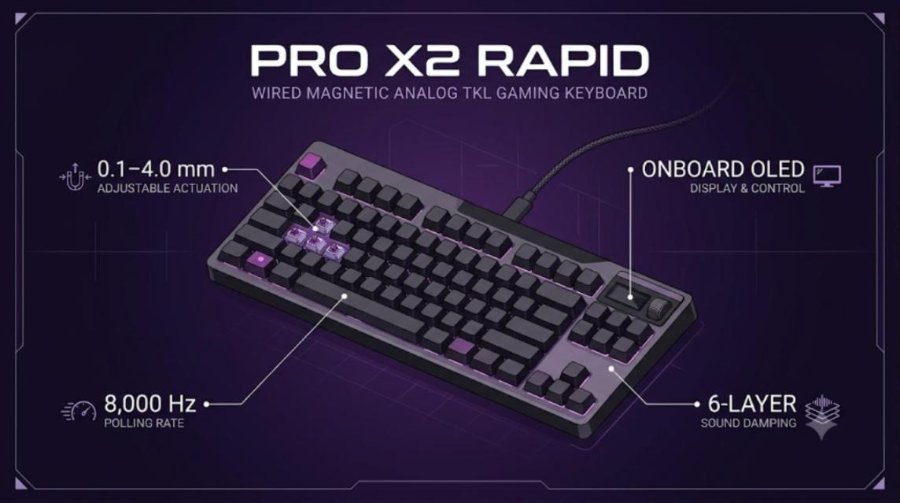
Here is the keyboard at a glance, followed by the full spec sheet and our quick take.
⚙️ Quick Specifications
Full Specifications
| Spec | Details |
|---|---|
| Model | Logitech PRO X2 Rapid (sold as G PRO X2 Rapid in some listings) |
| Type | Wired magnetic analog gaming keyboard |
| Layout | Tenkeyless, 84 keys (Tom’s Guide) |
| Switches | KS-20 POM linear Hall-effect switches co-developed with Gateron, factory-lubed |
| Actuation range | 0.1 to 4 mm, adjustable per key in 0.05 mm steps |
| Actuation force | About 30 g (ProSettings) |
| Rapid Trigger | Yes, adjustable reset distance |
| Key Priority (SOCD) | Yes, for strafing control |
| Polling rate | 8,000 Hz scan and USB polling |
| Display | Onboard OLED with scroll roller and menu button |
| Keycaps | Doubleshot PBT, swappable |
| Stabilizers | Screw-in |
| Case | Plastic case, aluminum key plate, six layers of sound damping |
| Connection | USB-C to USB-A cable, wired only |
| Software | Logitech G HUB, plus onboard settings and memory |
| Dimensions | About 14.3 x 5.6 x 1.5 in (36.3 x 14.2 x 3.8 cm) |
| Weight | About 1.09 kg (2.4 lb); Dazs weighed 1,087 g |
| Colors | Black (Logitech US page); Black, White and Magenta per TechRadar and Tom’s Guide |
| Price | $229.99 US, £209.99 UK, AU$399.95 Australia |
The Good and the Bad
👍 The Good
- ✔ Typing feel and sound are the standout, with soft, thocky sound and smooth linear travel according to several reviewers.
- ✔ Per-key actuation from 0.1 to 4 mm and Rapid Trigger cover everything a competitive shooter needs.
- ✔ 8,000 Hz polling and an onboard OLED let you change key settings without installing software.
- ✔ The heavy body stays put on the desk, and the height-adjustable feet help with angled setups.
- ✔ Screw-in stabilizers, PBT keycaps and an aluminum plate give it a solid, rattle-free build.
👎 The Bad
- ✘ At $229.99 it costs more than rivals that offer wireless or deeper software.
- ✘ It is wired only, with no 2.4 GHz or Bluetooth option.
- ✘ TechRadar found the OLED fiddly and the wrist rest cold and poorly padded.
- ✘ G HUB lacks split Rapid Trigger sensitivity and a continuous-mode toggle, per ProSettings.
- ✘ Key Priority can get you kicked from some servers, including Counter-Strike 2.
The PRO X2 Rapid earns praise for its typing feel, and it has every competitive feature you are likely to use. Its weak spot is value. Buy it if you want a premium, wired esports board with Logitech support. Look elsewhere if you want wireless, a metal case or more tweaking options for less money.
What Changed From the PRO X TKL Rapid
The PRO X2 Rapid keeps the idea of the first model and upgrades almost every other part. The table below compares Logitech’s figures for the new board with the specs we recorded in our PRO X TKL Rapid review.
| Feature | PRO X TKL Rapid | PRO X2 Rapid |
|---|---|---|
| US price | $169.99 | $229.99 |
| Polling rate | 1,000 Hz | 8,000 Hz |
| Actuation range | 0.1 to 4.0 mm | 0.1 to 4 mm in 0.05 mm steps |
| Actuation force | 35 gf | About 30 g (ProSettings) |
| Display | None | Onboard OLED with roller |
| Case | Plastic with aluminum front plate | Plastic with aluminum key plate and six-layer damping |
| Onboard memory | Three profiles | Onboard memory (size not stated) |
| Weight | About 1 kg | About 1.09 kg |
The jump to 8,000 Hz and the OLED are the headline changes. The sound and feel changes may matter more day to day, because reviewers keep returning to them. Insider Gaming called the board its new favorite gaming keyboard. ProSettings described it as a massive improvement over earlier Logitech boards.
What’s in the Box
Logitech Support’s unboxing video lists the full contents. You get the keyboard, a silicone palm rest, a USB-A to USB-C cable, a keycap puller, additional keycaps and user documentation. ProSettings adds that the spare keycaps are replacements for Esc, Pause/Break, Page Up and Page Down. That no spare switches are included, which the reviewer wanted at this price.
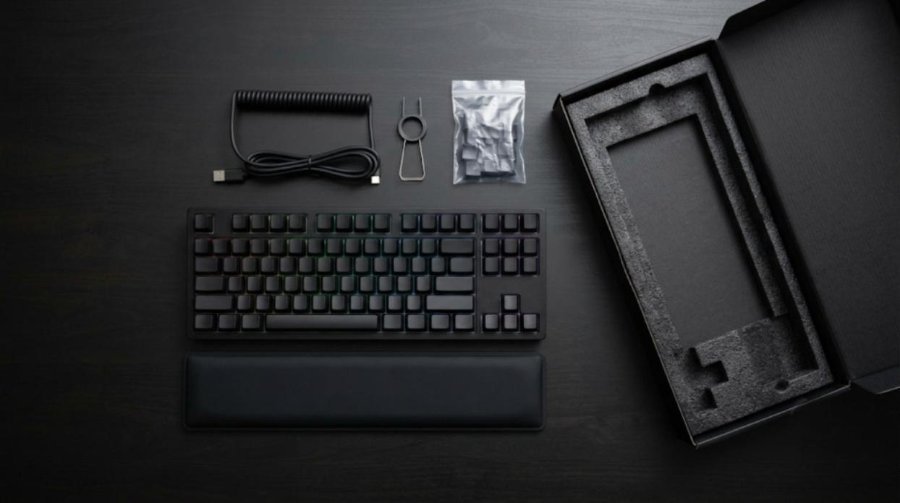

Setup is plug and play. You connect the USB-C end to the keyboard and the USB-A end to your PC, then open G HUB only if you want deeper tuning. The video below walks through the box and the physical controls.
Video: Logitech Support unboxes and sets up the PRO X2 Rapid. Because the channel belongs to the manufacturer, treat it as an official overview.
Design, Build and Layout
Case, Weight and Desk Stability
The case is plastic, but it is a thick, rigid one. Tom’s Guide found no flex. ProSettings reported none in the case or PCB, with a matte finish that resists fingerprints. Inside sit an aluminum key plate, six layers of damping and screw-in stabilizers. TechRadar still criticized the plastic exterior at this price. ProSettings called the angular shape bulky with sharp edges that bite without the wrist rest.
The weight helps. Dazs put the PRO X2 Rapid on a scale and measured 1,087 g, compared with 856 g for the Logitech G512 X. That heft keeps the board from creeping, which matters if you hammer keys during a round. The same reviewer plays with the keyboard rotated at an angle. He said the fold-out rear feet kept it stable in that position. Tom’s Guide lists the weight at 2.4 lb, so the numbers agree.
Amazon’s listing graphic labels the damping stack from top to bottom: aluminum switch plate, Poron foam, IXPE, PET, PCB, Poron foam, IXPE, silicone dampener and bottom case. Logitech says the layers remove echo and reverb.

OLED Display, Roller and Game Mode
The top-right corner holds a small OLED, a scroll roller that doubles as a button and a menu or back button. Logitech Support says you can change Rapid Trigger, actuation point, Key Priority, report rate, lighting, volume and game mode from there. A game mode toggle sits on the right side, and by default it disables the two Windows keys.
Opinions on the screen differ. Insider Gaming called it nice but limited. TechRadar found the menu fiddly and said G HUB is the better tool. Dazs liked that the screen shows which setting you are in and that it matches the rest of the board. Our read is that the OLED is most useful at a LAN event, where you cannot install software and need a quick profile check.
Keycaps, Lighting and Wrist Rest
The keycaps are swappable Doubleshot PBT with a heavy matte texture that hides oils, according to ProSettings. That reviewer disliked the legend font, and noted that some keys light unevenly and that the black plate limits the glow. The silicone wrist rest is divisive. ProSettings called it one of the better free rests, but TechRadar called it cold, rubbery and poorly padded. The Shortcut said it can stick to clammy palms and lift off.
Cable and Connectivity
The keyboard is wired only. TechRadar said the rubbery USB-C cable feels cheap at this price and wanted a braided option. The lack of wireless is the most common complaint in the reviews. Tom’s Guide said the wired-only design is a bitter pill at $229.99. For a tournament board that is less of a problem, because most esports events require a cable anyway.
Switches, Actuation and Rapid Trigger
KS-20 Magnetic Switches
The PRO X2 Rapid uses Logitech’s KS-20 switches, a factory-lubed POM linear design made with Gateron. They are magnetic Hall-effect switches, so a sensor reads the stem position instead of a metal contact closing. That is what allows the 0.1 to 4 mm adjustable actuation. ProSettings measured about 30 g of actuation force and described travel as smooth with a pleasing rebound, plus a little stem wobble. Tom’s Guide described a damped spring weight and a stable feel.
Tuning Actuation and Rapid Trigger
Actuation sets how far you press before a key registers. Rapid Trigger sets how far you release before it resets, so it can fire again without returning to the top. Tom’s Guide found 0.1 mm too sensitive. That reviewer used about 0.75 mm for fast shooters, 1.75 mm for slower games and 2.6 mm for typing. TechRadar said Rapid Trigger improved strafing precision after an adjustment period.
Our advice matches the Dandy Gadget guide: change only a few keys at a time and keep your bindings the same while you compare. Start with the movement keys and leave the rest of the board deeper so you do not hit keys by accident.
8,000 Hz Polling: Real or Marketing?
Logitech lists 8 kHz scanning and USB polling, which is a 0.125 ms reporting interval. Tom’s Guide called the 8K figure essentially snake oil for keyboards, since 1,000 Hz is already fast enough. Dandy Gadget makes a similar point: reporting rate is only one part of the delay between your finger and the screen. Dazs, who used the board for 8K polling, liked the feature and said he does not see a newer keyboard offering more. None of the reviews we read published independent latency tests for this model.
Key Priority and the Counter-Strike 2 Warning
Key Priority is Logitech’s name for SOCD handling. It decides which key wins when you press left and right at once. TechRadar warned that the feature is banned in some competitive games, including Counter-Strike 2, where it can trigger an automatic server kick. Valve’s August 2024 notice told players to turn off input-automation features such as Snap Tap. Check the rules for each game and tournament, and turn Key Priority off for matchmaking if you are unsure.
Save two profiles in G HUB or on the keyboard: one with Key Priority on for single-player and casual games, and one with it off for games that police it. The onboard memory lets you switch with the OLED.
Typing Feel and Sound
This is where the PRO X2 Rapid earns its praise. Tom’s Guide called the typing feel surprisingly nice for a gaming board, thanks to Poron and IXPE foam that cut pings and rattles and leave a light thock. At 2.6 mm actuation that reviewer scored 100 WPM at 89% accuracy. For context, the same table lists 105 WPM at 96% for the Corsair Vanguard Pro 96, 106 WPM at 94% for the Keychron K2 HE and 95 WPM at 87% for the Wooting 80HE.
ProSettings went further. It said the board sounds and types among the best of any mass-produced keyboard the reviewer had tried. Insider Gaming said it sounds absolutely delicious. Dazs said the switches are sharp and get close to a custom keyboard feel. The Shortcut was more measured: it is satisfying and not harsh, but not the quietest board. Taken together, the sound is a clear strength and the main reason to pay the premium.
The creator 許柏升 shows a typing demo of a self-purchased unit that is worth a listen if you want to hear the board before buying. Keep in mind that microphones, desk surfaces and keycap choices all change how a keyboard sounds on video. A mouse-heavy shooter setup can also feel different from a typing-heavy one, so compare the sound at your own preferred actuation point.
Software: G HUB and Onboard Controls
Logitech G HUB handles key remapping, macros, actuation, Rapid Trigger, pro presets and lighting. Settings save to the keyboard, so the board keeps them away from your PC. Opinions on the software split sharply. Tom’s Guide called G HUB polished and reliable but less feature-rich than Wootility or the Keychron and NuPhy web apps. ProSettings found it confusing and said it sometimes switches profiles on its own. The Shortcut said you do not need G HUB at all, because the onboard OLED covers actuation, Rapid Trigger, polling rate, Key Priority and lighting.
The limits are real if you like fine tuning. ProSettings noted that G HUB has no split sensitivity for Rapid Trigger and no toggle for continuous Rapid Trigger. That there is no web driver. Logitech Support also lists multi-action point and key control among the available features. The result is a capable setup for most players, but one that trails the deepest analog boards.
Price, Alternatives and How It Compares
At $229.99 the PRO X2 Rapid is expensive. TechRadar calls it Logitech’s most costly gaming keyboard, priced above the Razer Huntsman V3 HE and the Corsair K70 Max. Tom’s Guide said its price relative to its feature set is why it misses a higher score. Watch the Dazs review below for a hands-on look that compares the board with the Logitech G512 X and with a custom build.
Video: Dazs reviews the PRO X3 Superstrike mouse and the PRO X2 Rapid keyboard. The keyboard section starts after the mouse discussion, and the opinions belong to the creator.
| Keyboard | Price | How it compares |
|---|---|---|
| Logitech PRO X2 Rapid | $229.99 | Wired TKL, 8K polling, OLED, heavy and well damped |
| Wooting 80HE | $199 (Tom’s Guide) | Better performance and customization per ProSettings, but the Logitech sounds better |
| NuPhy Field75 HE | $179 (Tom’s Guide) | Smaller 75% layout at a lower price |
| Keychron K2 HE | $130 (Tom’s Guide) | Much cheaper and 106 WPM at 94% in Tom’s Guide typing test |
| Razer Huntsman V3 HE | More than $100 less (TechRadar, Insider Gaming) | Hall-effect switches, OLED and a metal faceplate |
| SteelSeries Apex Pro TKL | About $250 (Insider Gaming) | Hall-effect switches, OLED and protection mode |
If you want the same competitive features for less, the answer is almost always a cheaper Hall-effect board. On our site, the Attack Shark X68 HE and the MelGeek MADE68 Pro show how much magnetic performance a small budget can buy. The IQUNIX EV63 vs Wooting 60HE+ comparison covers the compact end of the market. If you would rather skip magnetic switches and get a wireless board, the AULA F75 Pro costs about a third of the price.
The older PRO X TKL Rapid is also still a sensible choice if you do not need 8K polling. It is $60 cheaper at list price. If you are building a full Logitech setup, our PRO X3 Superstrike review and PRO X Superlight 2 review cover the matching mice. The mechanical keyboard budget guide helps you decide how much to spend. Our keycap materials guide explains why PBT beats ABS for durability.
Shoppers who prefer a smaller or cheaper board can also read our reviews of the AULA F99, AULA AG75 Pro, MCHOSE ACE 75, IQUNIX EC75, IQUNIX EV63, Wobkey Rainy 75 Pro and Yunzii RT75 Pro. Each one trades some of the Logitech’s polish for a lower price.
Verdict: Who Should Buy the PRO X2 Rapid?
The review scores so far are consistently positive but never glowing. TechRadar gave it 4/5, ProSettings gave it 4/5 and The Shortcut gave it 4.5/5, while Tom’s Guide recommended it only with reservations and Insider Gaming called it a new favorite. The pattern is clear: people who handle the keyboard love how it types. People who compare its price sheet find it wanting.
| Buy it if | Skip it if |
|---|---|
| You play competitive shooters and want per-key actuation with Rapid Trigger. | You want wireless, because there is no 2.4 GHz or Bluetooth mode. |
| You care about typing sound and feel as much as raw speed. | You want a metal case or the deepest software tuning. |
| You like changing settings on the keyboard without software. | You already own a recent Hall-effect board, since The Shortcut found little new. |
| You want a heavy, stable board with PBT keycaps and screw-in stabilizers. | Your budget is under $200, where the Wooting 80HE and cheaper boards compete. |
Frequently Asked Questions (FAQ)
How much does the Logitech PRO X2 Rapid cost?
Logitech lists the PRO X2 Rapid at $229.99 in the US, £209.99 in the UK and AU$399.95 in Australia. TechRadar calls it the most expensive gaming keyboard Logitech has made.
Is the Logitech PRO X2 Rapid wireless?
No. It is a wired keyboard that connects with a USB-C to USB-A cable. Reviewers including Tom’s Guide and TechRadar criticized the lack of wireless at this price.
What switches does the PRO X2 Rapid use?
It uses KS-20 POM linear magnetic Hall-effect switches that Logitech developed with Gateron. They are factory-lubed and allow actuation from 0.1 to 4 mm in 0.05 mm steps on every key.
Does the PRO X2 Rapid support 8K polling?
Yes. Logitech lists 8,000 Hz scanning and USB polling. Tom’s Guide called the benefit small for keyboards, and Dandy Gadget advises tuning actuation and Rapid Trigger before chasing 8K.
Can I use Key Priority in Counter-Strike 2?
TechRadar warns that Key Priority is banned in some games, including Counter-Strike 2, and can trigger automatic server kicks. Turn it off for competitive matches unless the game and event rules allow it.
What comes in the box with the PRO X2 Rapid?
Logitech Support lists the keyboard, a silicone palm rest, a USB-A to USB-C cable, a keycap puller, additional keycaps and user documentation. ProSettings notes there are no spare switches.
Is the PRO X2 Rapid worth it over cheaper Hall-effect keyboards?
It depends on what you value. Reviewers praise its typing feel, build and OLED. But Tom’s Guide and TechRadar say cheaper boards such as the Razer Huntsman V3 HE and Wooting 80HE offer more for less. It makes the most sense for players who want Logitech’s sound, support and onboard controls.