
Lenovo Legion 5a Black Friday Deal: RTX 5060 OLED Gaming Laptop for $1,249
The Lenovo Legion 5a with an RTX 5060 and a 165Hz OLED screen is one of the best gaming laptop deals of Black Friday 2026. B&H Photo has the 83Q70068US model at $1,249.99, down from $1,799.99. That is $550 off, or about 30%.
PC Gamer called it the best gaming laptop deal it had seen in months. Notebookcheck rates the Legion 5a among the best affordable gaming laptops of 2026. Below, we break down the exact configuration, how it performs, what to watch out for, and whether you should grab it before Black Friday on November 27.
How we built this guide: the price and configuration were checked on the B&H listing on November 26, 2026. Performance and display figures come from LaptopMedia’s and Gamer Matters’ reviews of the Legion 5a Gen 11, plus deal coverage from PC Gamer and Notebookcheck. Every figure is credited to its source.

⚙️ Quick Specifications
👍 The Good
- ✔ Full 115W RTX 5060, where many rivals cap at 85W
- ✔ Gorgeous OLED with 100% DCI-P3 and true blacks
- ✔ $550 off makes it far better value than at list price
- ✔ Two M.2 slots and upgradable RAM
- ✔ Slim, well-built chassis
👎 The Bad
- ✖ 512GB SSD fills up fast with modern games
- ✖ Glossy OLED reflects light and uses PWM dimming
- ✖ Runs warm under heavy load
- ✖ Battery life is short for gaming laptops of this size
At $1,249.99, the Legion 5a is a strong buy for 1080p to 1440p gaming on a gorgeous OLED screen. Plan to add a second SSD, and skip it if you need long battery life.
Check the Legion 5a deal at B&H
Lenovo Legion 5a Deal: Exact Configuration
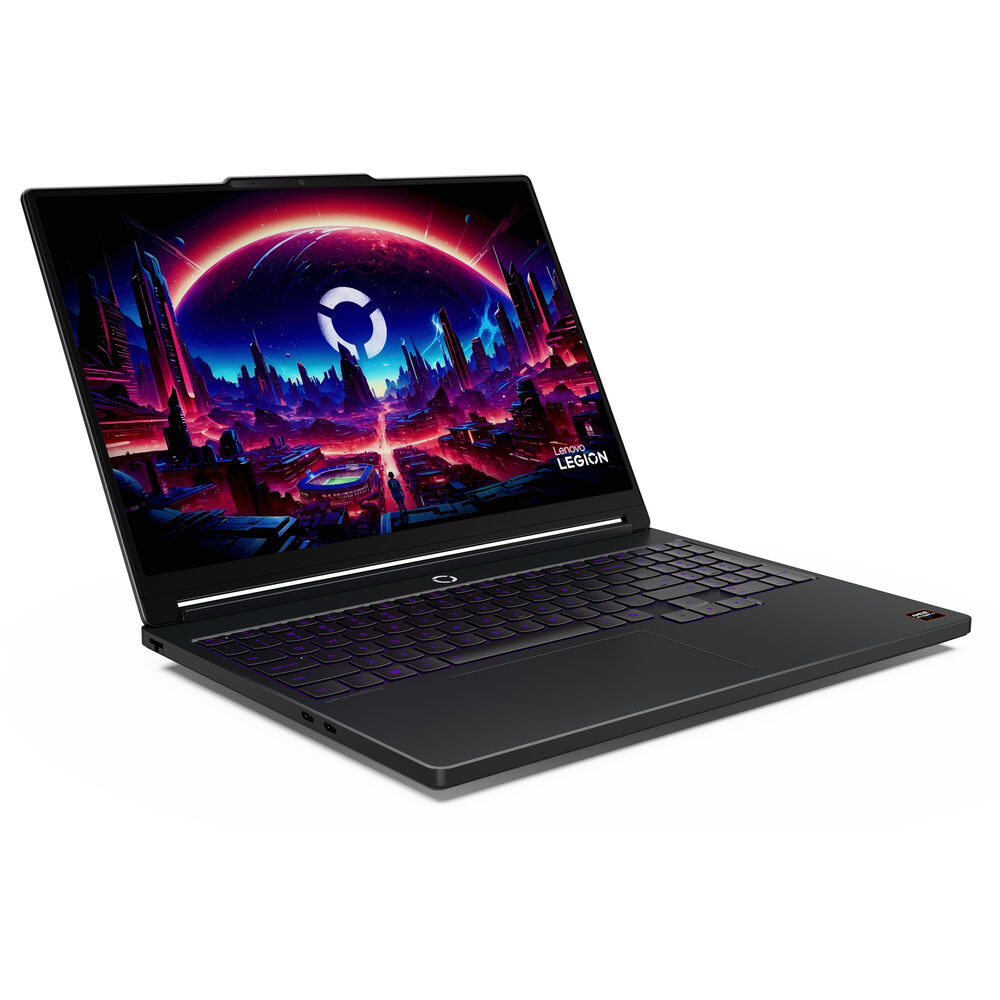
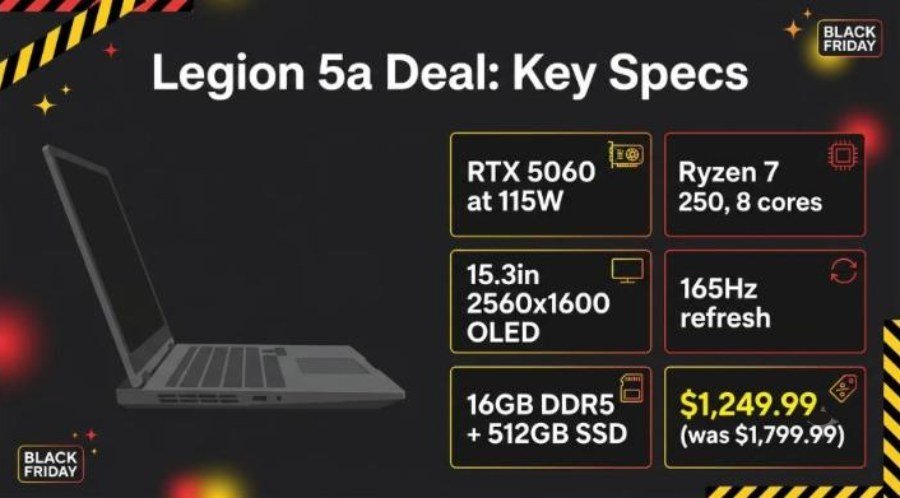
Make sure you buy the right model. The B&H deal is for model 83Q70068US. It pairs an AMD Ryzen 7 250 with an RTX 5060 running at 115W, 16GB of DDR5 memory and a 512GB SSD.
Some reviews you will find online tested pricier versions with a Ryzen AI 9 465 or Ryzen AI 7 450. Those chips are faster in CPU-heavy tasks. For gaming, though, the RTX 5060 does most of the work, so the cheaper Ryzen 7 250 version makes the most sense at this price.
Why the 115W RTX 5060 matters
PC Gamer points out that many RTX 5060 laptops near this price run the GPU at about 85W. The Legion 5a lets it run at 115W. In LaptopMedia’s one-hour gaming test, the GPU averaged 113W at about 2,773MHz while staying at 74°C. More power means higher, steadier frame rates.
Video: SuperSaf looks at the design, screen and performance of the Legion 5a Gen 11. Opinions in the video belong to the creator, so treat it as another point of view.
Who this laptop is for
The Legion 5a fits students, commuters and anyone who wants one machine for gaming and everyday work. It is light enough to carry to class or the office, yet it has the GPU power for evenings of gaming. Creators also benefit, since the OLED panel covers the full DCI-P3 color space and comes well calibrated out of the box. If you mainly game at a desk and never move the laptop, a cheaper IPS model plus an external monitor could also work.
Gaming Performance
LaptopMedia tested the Legion 5a Gen 11 at its native 2560×1600 resolution. Its unit used a Ryzen AI 9 465, so the deal model may be slightly slower in CPU-bound games. These results still show what the RTX 5060 can do.
| Game (2560×1600) | Settings | Average FPS |
|---|---|---|
| Counter-Strike 2 | Very High | 167 |
| Shadow of the Tomb Raider | High | 111 |
| Shadow of the Tomb Raider | Highest | 99 |
| Black Myth: Wukong | Low | 165 |
| Black Myth: Wukong | High | 77 |
| Metro Exodus Enhanced (1200p) | High | 87 |
Gamer Matters ran its tests at 1920×1200. It reported Cyberpunk 2077 with Ray Tracing Ultra at around 40 FPS, and its unit held performance through 3 to 4 hour sessions without throttling.
1080p or 1440p?
For the newest, heaviest games, plan on using DLSS and possibly frame generation at full resolution. PC Gamer makes the same point. Esports games and older titles run very well at native resolution, so this laptop suits players who mix competitive and story games.
The OLED Display
The screen is the headline feature. It is a 15.3-inch 2560×1600 OLED panel at 165Hz with G-SYNC. B&H lists DisplayHDR True Black 1000 and Dolby Vision support.
| Measurement (LaptopMedia) | Result |
|---|---|
| SDR brightness | About 502 nits |
| HDR peak (8% window) | About 1,100 nits |
| Color gamut | 100% sRGB, 100% DCI-P3 |
| Factory color accuracy | Almost perfect |
| Reflections | High (glossy panel) |
| PWM flicker | Present, low amplitude |
The trade-offs are typical for OLED laptops. The glossy panel reflects lamps and windows, and the screen uses PWM dimming. LaptopMedia found the flicker fairly comfortable, but sensitive users should keep it in mind. For more on OLED pros and cons, read our OLED gaming monitor comparison.
Design, Ports and Upgrades
LaptopMedia measured the Legion 5a at 1.87kg and about 19 to 20mm thick, which is slim for a laptop with a 115W GPU. Gamer Matters praised the build quality and finish.
| Feature | Details |
|---|---|
| Weight | About 1.87kg (LaptopMedia) |
| USB-C | 2x USB4, DisplayPort 1.4, 65W to 100W charging |
| Other ports | HDMI 2.1, Ethernet, 3x USB-A |
| Webcam | 5MP with IR and privacy shutter |
| Storage slots | Two M.2 2280 slots, PCIe 4.0 |
| Battery | 80Wh |
Plan for a second SSD
The 512GB SSD is the biggest weakness of this configuration, and both PC Gamer and Gamer Matters flag it. A few modern games can fill it on their own. The good news is the second M.2 slot, so adding a 1TB or 2TB drive is easy. Note that Gamer Matters found the rear ports unlabeled, which can be awkward when plugging in cables.
Video: Crimson Tech reviews the Legion 5a Gen 11 and covers its strengths and flaws. Opinions in the video belong to the creator, so treat it as another point of view.
Thermals, Noise and Battery Life
Under a 30-minute CPU stress test, LaptopMedia saw the processor average 92°C with a 97°C peak. Gamer Matters said the laptop runs warm, with surfaces around 50°C, though the palm rests and WASD area stayed comfortable.
Battery life is modest. LaptopMedia measured about 3 hours of video playback from the 80Wh battery in its power-saving test. Treat this as a laptop you use plugged in most of the time.
What to Do First After Buying
A few quick steps help you get the most out of the Legion 5a from day one. None of them take long, and they make a real difference to speed and comfort.
| Step | What to do | Why |
|---|---|---|
| 1 | Update Windows, NVIDIA drivers and Lenovo Vantage | Fixes bugs and adds game optimizations |
| 2 | Choose the right power mode in Vantage | Performance mode unlocks full GPU power when plugged in |
| 3 | Set the display to 165Hz | Windows can default to a lower refresh rate |
| 4 | Enable DLSS in demanding games | Keeps frame rates high at 2560×1600 |
| 5 | Add a second SSD | Gives you room for a large game library |
Protect the OLED panel
OLED screens can show burn-in after long periods of static content. Hide the taskbar, use a dark theme with a moving wallpaper, and let the laptop run its panel care features. These small habits help keep the screen looking new for years.
Ryzen 7 250 or Ryzen AI versions?
Lenovo also sells the Legion 5a with Ryzen AI 7 450 and Ryzen AI 9 465 processors. LaptopMedia notes that the Ryzen AI 9 465 is faster than you need for gaming alone. Those versions make more sense if you also edit video, compile code or run local AI tools. For gaming, the $1,249.99 Ryzen 7 250 model gives you the same RTX 5060 for much less money.
How it compares at this price
At around $1,250, most gaming laptops with an RTX 5060 use IPS screens and lower GPU power limits. The Legion 5a stands out with both an OLED panel and a 115W GPU. If you want more GPU performance, you would need to step up to an RTX 5070 laptop, which usually costs noticeably more even during Black Friday sales.
Is the Legion 5a Black Friday Deal Worth It?
Notebookcheck notes that the Legion 5a is not a good deal at full retail, and that RTX 5060 laptops were cheaper last year. At $1,249.99, though, it calls the offer a better value than many rivals. PC Gamer is more enthusiastic and calls it a bit of a bargain.
| ✅ Buy it if | ❌ Skip it if |
|---|---|
| You want an OLED gaming laptop under $1,300 | You need long battery life |
| You play at 1080p to 1440p with DLSS | You want maxed-out 1600p in new AAA games |
| You are happy to add a second SSD | You hate glossy screens |
| You want a slim laptop with a full-power GPU | You are sensitive to PWM flicker |
B&H labels the deal as limited supply at this price. If it sells out, watch for similar Legion 5a configurations from Lenovo directly or other retailers over Black Friday and Cyber Monday on November 30.
Get the Legion 5a for $1,249.99 at B&H
Complete Your Gaming Setup
Pair the Legion 5a with a lighter mouse from our Black Friday gaming mouse deals, such as the one in our Razer Viper V4 Pro review or the Corsair Sabre V3 Pro review. If you want a bigger screen at your desk, our Black Friday OLED monitor deals include 240Hz OLEDs from $269.
For audio, see the Sony INZONE H9 II review, the HyperX Cloud III S Wireless review and the SteelSeries Arctis Nova 5X review. A good mousepad helps too, so check our SteelSeries QcK vs QcK Prism comparison.
Prefer a handheld? Our best handheld gaming PCs guide and the ROG Xbox Ally X review cover portable options. For comfort during long sessions, read our best budget gaming chair guide and the best standing desk for gaming roundup.
Frequently Asked Questions (FAQ)
How much is the Lenovo Legion 5a on Black Friday?
B&H Photo lists the Legion 5a 83Q70068US with an RTX 5060 at $1,249.99, down from $1,799.99, a saving of $550.
What are the Legion 5a deal specs?
It has an AMD Ryzen 7 250, a 115W RTX 5060 with 8GB GDDR7, 16GB DDR5, a 512GB SSD and a 15.3-inch 2560×1600 165Hz OLED display.
Is the RTX 5060 in the Legion 5a full power?
Yes. It runs at 115W, and LaptopMedia measured an average of about 113W while gaming. Many rival RTX 5060 laptops run closer to 85W.
Can I upgrade the Legion 5a storage?
Yes. The Legion 5a has two M.2 2280 SSD slots, so you can add a second drive. The RAM is also upgradable.
How long does the Legion 5a battery last?
LaptopMedia measured about 3 hours of video playback from the 80Wh battery, so it works best plugged in.
Is the Legion 5a good for 1440p gaming?
Yes for esports and older games. For the newest AAA games at 2560×1600, expect to use DLSS and frame generation.