
ASUS ROG Strix SCAR 16 RTX 5090 Review: Desktop Power in a 16-Inch Laptop
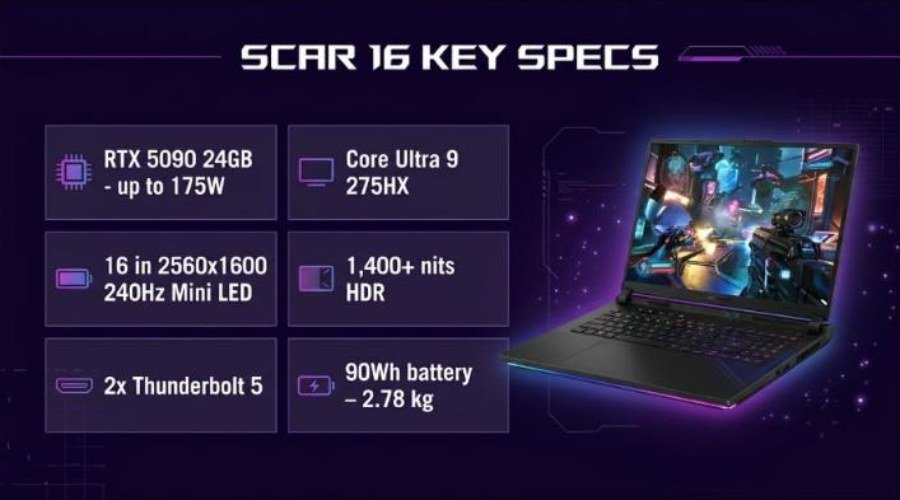
The ASUS ROG Strix SCAR 16 with an RTX 5090 is one of the most powerful 16-inch gaming laptops you can buy. In short, it combines NVIDIA’s flagship laptop GPU running at up to 175W with Intel’s Core Ultra 9 275HX, a bright 240Hz Mini LED screen, and a tool-free bottom panel for easy upgrades.
It also costs a lot. PCWorld lists the RTX 5090 version at $4,299.99, about $1,000 more than the RTX 5080 model. So this review looks at whether that extra money buys you enough performance, and what the trade-offs are in noise, battery life and weight.
How we built this review: it combines ASUS specifications with lab results from Notebookcheck, which tested the RTX 5090 SCAR 16, plus reviews from PCWorld, MobileSyrup and Tom’s Guide, and video reviews from Hardware Canucks and Hubwood. Also, every figure is credited to its source.

⚙️ Quick Specifications
👍 The Good
- ✔ Top-tier performance with a full 175W RTX 5090
- ✔ Bright, colorful 240Hz Mini LED display
- ✔ Tool-free bottom panel for RAM and SSD upgrades
- ✔ Two Thunderbolt 5 ports and HDMI 2.1
- ✔ Striking lighting and a comfortable keyboard
👎 The Bad
- ✖ Very expensive, about $1,000 more than the RTX 5080 model
- ✖ Loud fans in Turbo mode
- ✖ Short battery life when gaming
- ✖ Heavy, with a large power brick
- ✖ No rear ports
The ROG Strix SCAR 16 with RTX 5090 is a desktop-class gaming laptop in a 16-inch body. Buy it if you want the best and will use the 24GB of VRAM. Most gamers will get better value from the RTX 5080 version.
Check the SCAR 16 RTX 5090 on Amazon
ASUS ROG Strix SCAR 16 RTX 5090 Specs

Notebookcheck tested a fully loaded unit with the Core Ultra 9 275HX, RTX 5090 Laptop GPU with 24GB of VRAM, 64GB of DDR5-5600 memory and a 2TB SSD. In addition, the GPU runs at 175W, including 25W of Dynamic Boost. Some retail versions ship with 32GB of RAM, so check the listing.
| Component | ROG Strix SCAR 16 (RTX 5090) |
|---|---|
| CPU | Core Ultra 9 275HX, 24 cores, 165W PL2 / 145W PL1 (Notebookcheck) |
| GPU | RTX 5090 Laptop, 24GB GDDR7, 175W |
| RAM | 32GB or 64GB DDR5-5600, two slots |
| Storage | 2TB PCIe 4.0 SSD in tested units, second M.2 slot |
| Display | 16in Mini LED, 2560×1600, 240Hz |
| Wireless | Wi-Fi 7 (soldered) |
What’s in the Box
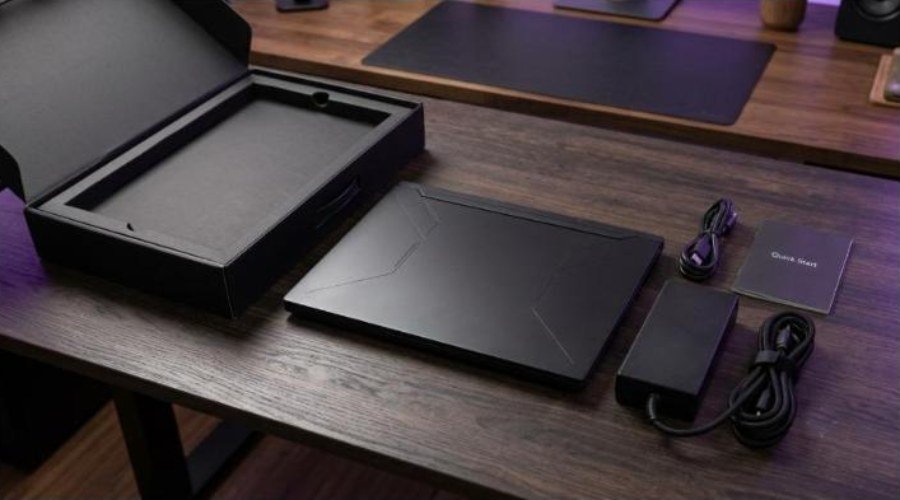
The SCAR 16 ships with the laptop, a large power adapter and its cable, and the usual quick start and warranty papers. Notebookcheck weighed the charger at about 1kg, so your travel bag gets heavy fast.
| Item | Notes |
|---|---|
| ROG Strix SCAR 16 | Configuration depends on model code |
| Power adapter and cable | About 1kg (Notebookcheck) |
| Quick start guide and warranty | Standard paperwork |
Gaming Performance
This is where the SCAR 16 shines, because its GPU gets the full 175W. First, Notebookcheck measured Cyberpunk 2077 at QHD Ultra settings across ASUS’s power profiles.
| Profile (Notebookcheck) | GPU power | Cyberpunk 2077 QHD Ultra |
|---|---|---|
| Turbo | 175W | 107.7 FPS |
| Performance | 160W | 99.9 FPS |
| Quiet | 55W | 46.2 FPS |
| Battery | 55W | 46.5 FPS |
Tom’s Guide also tested the larger SCAR 18 with the same RTX 5090. For example, at 1440p without DLSS, it reported 41 FPS in Cyberpunk 2077 with ray tracing on Ultra, and 44 FPS in Black Myth: Wukong and Assassin’s Creed Shadows. Meanwhile, with path tracing and DLSS 4 frame generation, Cyberpunk climbed to about 232 FPS. Also, Notebookcheck found no performance loss in the 16-inch model compared with the 18-inch version.
RTX 5090 or RTX 5080?
Notebookcheck recommends the RTX 5080 model unless you need the extra VRAM, since the RTX 5090’s lead at QHD is not huge. In practice, the 24GB of memory matters most for 4K output to an external monitor, heavy texture mods and creative work such as 3D rendering and local AI. PCWorld’s RTX 5080 unit, for comparison, hit 189 FPS in Shadow of the Tomb Raider at 1080p highest.
Video: Hardware Canucks reviews both SCAR models and their RTX 5000 performance. Opinions in the video belong to the creator, so treat it as another point of view.
Who the SCAR 16 RTX 5090 is for
Overall, this laptop makes the most sense for three kinds of buyers. The first is the gamer who wants the highest frame rates possible in a 16-inch body and plans to keep the machine for several years. The second is the player who connects a 4K monitor at home, where the 24GB of VRAM gives more headroom for high-resolution textures. Finally, the third is the creator who edits video, renders 3D scenes or runs local AI models, all of which benefit from the extra GPU memory.
If you mostly play esports titles or QHD games on the built-in screen, the RTX 5080 model or a cheaper RTX 5070 Ti laptop will feel almost as fast in practice. Spend the savings on a better monitor, headset or chair instead.
Mini LED Display
The 16-inch Mini LED panel is also one of the best screens in any gaming laptop. Notebookcheck measured the following.
| Measurement (Notebookcheck) | Result |
|---|---|
| Resolution and refresh | 2560×1600, 240Hz, 16:10 |
| SDR brightness | About 773 nits average (818 max) |
| HDR brightness | Over 1,400 nits |
| sRGB | 100% |
| Display P3 | 99.9% |
| SDR contrast | 10,771:1 |
| PWM | 20,555Hz (high frequency) |
Also, local dimming can be turned off when you do not want it, according to Notebookcheck. Also, the high PWM frequency means flicker is unlikely to bother most users. For a matching desktop screen, see our OLED gaming monitor comparison and OLED monitor deals.
Design, Lighting and Keyboard
The SCAR 16 weighs 2.78kg and measures 30.8mm thick, per Notebookcheck. PCWorld called it a bit thick and heavy, while MobileSyrup praised the build quality but found the SCAR 16 and 18 too big for its taste.
Lighting is also a big part of the design. PCWorld also highlighted the AniMe Matrix display on the lid, and Notebookcheck noted the extensive lighting. The keyboard has per-key RGB and no number pad, though a virtual numpad can appear on the touchpad. Notebookcheck rated the keyboard comfortable, while MobileSyrup called it mushy.
Tool-free upgrades
Better still, a slider unlocks the bottom panel without tools, Notebookcheck reports. Then, inside, you get two RAM slots, two M.2 2280 SSD slots, the battery and fans. Wi-Fi is soldered. Plus, this easy access is rare in high-end gaming laptops and makes future upgrades simple.
Ports and Connectivity
| Side | Ports (Notebookcheck) |
|---|---|
| Left | Power, 2.5GbE, HDMI 2.1, USB-A 3.2 Gen 2, 2x Thunderbolt 5 (USB4), 3.5mm audio |
| Right | 2x USB-A 3.2 Gen 2 |
| Rear | None |
First, two Thunderbolt 5 ports are a highlight. However, the lack of rear ports means cables crowd the sides, which both Notebookcheck and PCWorld flagged.
Cooling, Noise and Thermals

ASUS also uses an end-to-end vapor chamber and three fans. Overall, MobileSyrup found the cooling effective with no throttling. However, Tom’s Guide measured a maximum of 118°F on the SCAR 18 under gaming load, well below the 131°F of the previous model.
| Profile | Max fan noise (Notebookcheck) |
|---|---|
| Turbo | 53.6 dB(A) |
| Performance | 48.8 dB(A) |
| Quiet | 35.3 dB(A) |
Still, expect loud fans in Turbo mode, a con listed by both Notebookcheck and MobileSyrup. That said, Performance mode gives up only a few frames for a noticeably quieter experience. A good headset helps, so check our Sony INZONE H9 II review or Audeze Maxwell 2 review.
Video: Hubwood reviews the 2025 SCAR 16 and tests it in games. Opinions in the video belong to the creator, so treat it as another point of view.
Battery Life
The SCAR 16 has a 90Wh battery, but this is not a laptop for long unplugged sessions. PCWorld reported 2 to 4 hours of typical use on its RTX 5080 unit, and MobileSyrup found the SCAR 16 had the weakest battery life of the models it tested. Meanwhile, Tom’s Guide got just over 90 minutes of gaming on battery with the SCAR 18.
Best Settings to Start With
| Setting | What to do | Why |
|---|---|---|
| Profile | Use Performance for most games | Near-Turbo FPS with less noise |
| Turbo | Save for the most demanding games | Full 175W GPU power |
| GPU mode | Use dGPU-only mode when plugged in | Lower latency and higher FPS |
| Refresh rate | Confirm 240Hz in Windows | Full smoothness |
| Local dimming | Enable for HDR, disable for office work | Best contrast or most even backlight |
Keep the laptop on a hard surface so the bottom intakes can breathe. Also, update Armoury Crate, NVIDIA drivers and BIOS before gaming to get the latest fixes.
Price, Alternatives and How It Compares
PCWorld lists the RTX 5090 SCAR 16 at $4,299.99 and the RTX 5080 version at $3,299.99. Prices vary by retailer and configuration, and some Amazon listings are upgraded by third-party sellers, so compare RAM and storage before you buy.
| Laptop | GPU | Screen | Best for |
|---|---|---|---|
| ASUS ROG Strix SCAR 16 (RTX 5090) | RTX 5090, 175W | 16in 240Hz Mini LED | Maximum performance and VRAM |
| ASUS ROG Strix SCAR 16 (RTX 5080) | RTX 5080, 175W | 16in 240Hz Mini LED | High-end value |
| MSI Vector 16 HX AI | RTX 5070 Ti, 140W | 16in 240Hz IPS | Performance per dollar |
| Lenovo Legion 5a | RTX 5060, 115W | 15.3in 165Hz OLED | Budget OLED gaming |
For less money, read our MSI Vector 16 HX AI review and the Lenovo Legion 5a deal. If you want portable gaming, see our best handheld gaming PCs guide and the ROG Xbox Ally X review.
Verdict: Who Should Buy the ROG Strix SCAR 16 RTX 5090
| ✅ Buy it if | ❌ Skip it if |
|---|---|
| You want the fastest 16-inch gaming laptop | You are on a budget |
| You need 24GB of VRAM for 4K or creative work | You game mainly at QHD, where the RTX 5080 is close |
| You value a bright Mini LED screen | You need long battery life |
| You like easy, tool-free upgrades | You want a quiet or light laptop |
ASUS ROG Strix SCAR 16 RTX 5090
Complete your setup with a fast mouse from our Razer Viper V4 Pro review or gaming mouse deals, plus a comfortable seat from our best budget gaming chair guide.
Frequently Asked Questions (FAQ)
How much does the ROG Strix SCAR 16 with RTX 5090 cost?
PCWorld lists the RTX 5090 version at $4,299.99, about $1,000 more than the RTX 5080 model. Prices vary by retailer and configuration.
What is the RTX 5090 power limit in the SCAR 16?
The RTX 5090 Laptop GPU runs at up to 175W, including 25W of Dynamic Boost, according to Notebookcheck.
Is the RTX 5090 SCAR 16 worth it over the RTX 5080?
Only if you need the 24GB of VRAM or the absolute top performance. Overall, Notebookcheck says the RTX 5090 lead at QHD is not huge and recommends the RTX 5080 model for most buyers.
How bright is the SCAR 16 display?
Notebookcheck measured about 773 nits in SDR and over 1,400 nits in HDR on the 240Hz Mini LED panel, with 99.9% Display P3 coverage.
Can you upgrade the SCAR 16?
Yes. A tool-free slider opens the bottom panel, giving access to two RAM slots and two M.2 SSD slots. Wi-Fi is soldered.
How long does the SCAR 16 battery last?
It has a 90Wh battery. PCWorld reported 2 to 4 hours of typical use, and gaming on battery lasts much less.