For years, PC gamers have dreamed of the perfect fusion: the massive game library and versatility of Windows combined with the seamless, optimized, and unified console experience of an Xbox. With the release of the ROG Xbox Ally X—a unique collaboration between ASUS and Microsoft—that dream is closer to reality than ever.
Booting directly into a brand-new “Xbox full-screen experience” layered over Windows 11, this device promises to redefine handheld gaming. But with a staggering $999 USD price tag for the flagship X model, and a heavily downgraded $600 non-X version, does it actually deliver? In this Gearzon review, we dive into the software, hardware teardown, and real-world gaming benchmarks to find out.
Watch the full breakdown, teardown, and performance benchmarks of the ROG Xbox Ally X.
⚙️ Quick Specifications (Ally X Model)
- 🧠 Processor: AMD Ryzen Z1 Extreme (8-Core, 16-Thread)
- 🎮 Graphics: 16 Cores RDNA 3.5 Graphics
- 💾 Memory & Storage: 24GB LPDDR5 RAM | 1TB Full-length M.2 2280 NVMe SSD
- 📺 Display: 1080p 120Hz IPS-type Screen (Angled Design)
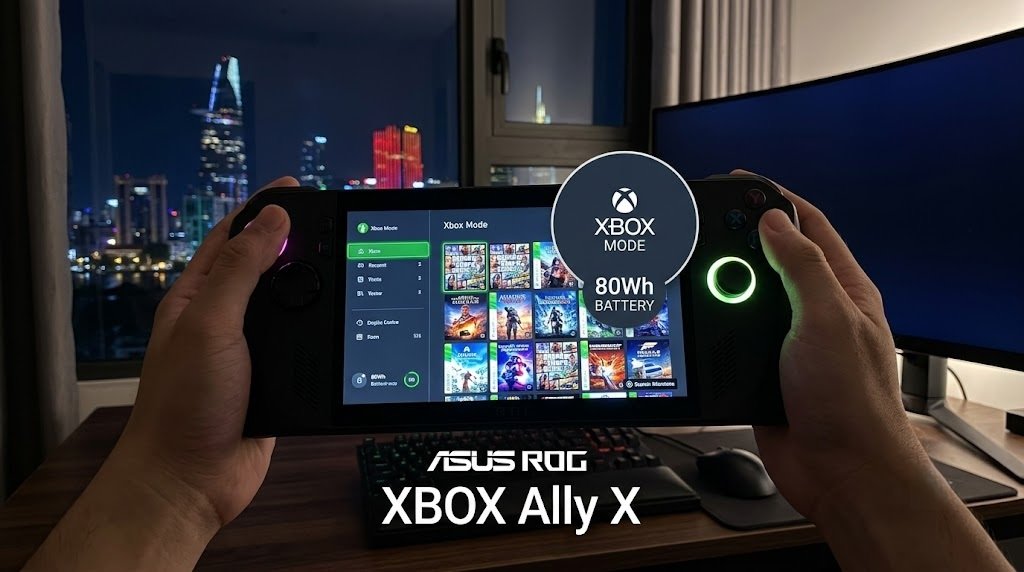
- 🔋 Battery: 80Wh (0 to full in ~90 minutes)
- 🔌 Ports: 2x USB-C (Including 1x Thunderbolt 4 for eGPU support)
- 💰 Price: $999 USD (X Model) / $600 USD (Non-X Model)
1. The Software: Windows 11 “Xbox Full-Screen Experience”
The most defining feature of this device is its operating system. Instead of dumping you onto a traditional Windows desktop, the ROG Xbox Ally X boots directly into a polished Xbox full-screen interface. This optimization is massive—it actually claws back roughly 2GB of system memory by streamlining background processes, which is crucial since your system RAM also acts as your GPU’s VRAM.

It successfully acts as a unified hub for your entire library (Xbox Game Pass, Steam, Epic, GOG). However, the “Windows Jank” hasn’t been completely eliminated. You still have to deal with third-party launcher pop-ups (like Steam updating in the background), occasional UI freezing, and the classic Windows sleep bug where the device might randomly wake up in your bag. Furthermore, despite the “Xbox” branding, you cannot play legacy Xbox games natively—this is strictly a PC gaming machine.
2. Hardware & Ergonomics: The Angled Screen Debate
ASUS has completely overhauled the ergonomics. The most controversial change is the angled screen. If you play while commuting or holding the device upright in front of you, the angle is incredibly comfortable and reduces neck strain. However, if you are a “couch sloucher” or play lying flat on your back, the angle fights against your natural line of sight.
Other physical updates include:
- Ergo Grips: Exceptionally comfortable hand grips that make this heavy device feel balanced.
- Improved Thumbsticks: Dramatically smoother and more precise than the previous generation. The X model features impulse triggers, while the non-X features Hall-effect triggers.
- Button Placement: The menu buttons have been swapped. The new placement puts the Armory Crate button uncomfortably close to the right thumbstick, which takes some getting used to.
3. Teardown & Upgradability
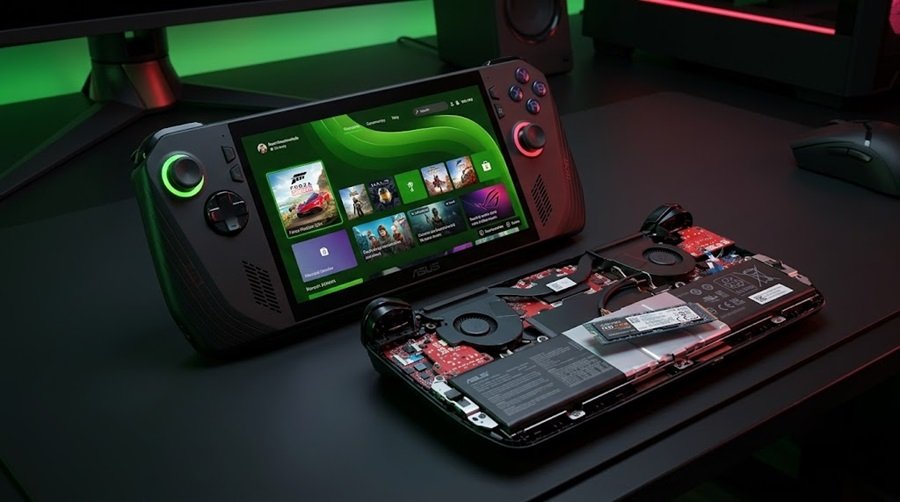
Opening the device is incredibly easy, requiring just a few standard screws. Inside, both the X and non-X models feature a full-length 80mm M.2 2280 NVMe slot. The X model is particularly impressive, offering ample clearance on the underside to support massive double-sided SSDs (like 4TB or 8TB drives) in the future.
4. Performance Benchmarks: The X vs. The Non-X
There is a night-and-day difference between the two models in terms of raw horsepower.
The $999 ROG Xbox Ally X
Armed with the monstrous Ryzen Z1 Extreme and 24GB of RAM, this device is a powerhouse. It crushes heavy AAA titles, maintaining a consistent console-like 30+ FPS in Cyberpunk 2077 at 1080p. Interestingly, thanks to better optimization and more RAM, running the new Ally X at a lower 17W power profile yields the same frame rates as the older ROG Ally X running at full power. This translates to massive real-world battery savings.
The $600 Non-X Model (A Massive Disappointment)
Do not let the naming scheme fool you. The non-X model uses a severely downgraded Zen 2 / RDNA 2 chip (essentially a slightly overclocked version of the 3.5-year-old Steam Deck processor). While it manages a slight 10% to 22% FPS uplift over the Steam Deck at 720p due to faster memory and a 15W TDP, it struggles at 1080p. For $600, a Steam Deck OLED is a far superior value.
5. Battery Life & Thermals
Battery life is where the ROG Xbox Ally X truly shines. Thanks to its massive 80Wh battery, it can easily push past 5 hours of light gaming. Even under heavy load, the efficiency of the new APU allows you to game untethered far longer than a Steam Deck or the original Ally.
Thermals are also exceptionally well-managed. The X model averages around 69°C under heavy load (peaking briefly at 90°C), while the lower-powered non-X stays incredibly cool at an average of just 54°C. Plus, the X model charges from 0 to full in just 90 minutes via its Thunderbolt 4 port.
6. Pros and Cons Summary
👍 Pros
- New Xbox UI saves 2GB of RAM and organizes all launchers beautifully.
- Massive performance gains and 24GB RAM handle 1080p gaming effortlessly.
- Incredible battery life (80Wh) and fast 90-minute charging.
- Full-sized M.2 2280 SSD slot with room for double-sided drives.
- Thunderbolt 4 port allows for eGPU and premium dock expansion.
👎 Cons
- The X model is very expensive at $999 USD.
- The $600 non-X model uses outdated Zen 2 architecture and is not worth buying.
- Angled screen design is polarizing depending on your sitting posture.
- Windows sleep bugs and launcher pop-ups still occasionally interrupt the console illusion.
7. Final Verdict: Should You Buy It?
If you are looking at the $600 non-X model, save your money and buy a Steam Deck OLED instead. However, the $999 ROG Xbox Ally X is a completely different beast.
It successfully blends the raw power and versatility of a high-end PC with the closest thing we’ve ever had to a unified Windows console interface. The ability to run heavy games at 1080p while actually surviving away from a wall charger for hours makes this a true generational leap. It earns a highly recommended rating from the Gearzon review team for hardcore portable gamers.
Ready to Experience the Ultimate Handheld?
Check current pricing, stock availability, and shipping deals for the ROG Xbox Ally X on Amazon.
Explore More Handheld Reviews on Gearzon
Looking for in-depth comparisons between the Steam Deck OLED, MSI Claw, and other portable PCs? Visit Gearzon for expert gaming hardware reviews!