Best SSD for PS5 in 2026: Black Friday Picks for GTA 6 Storage
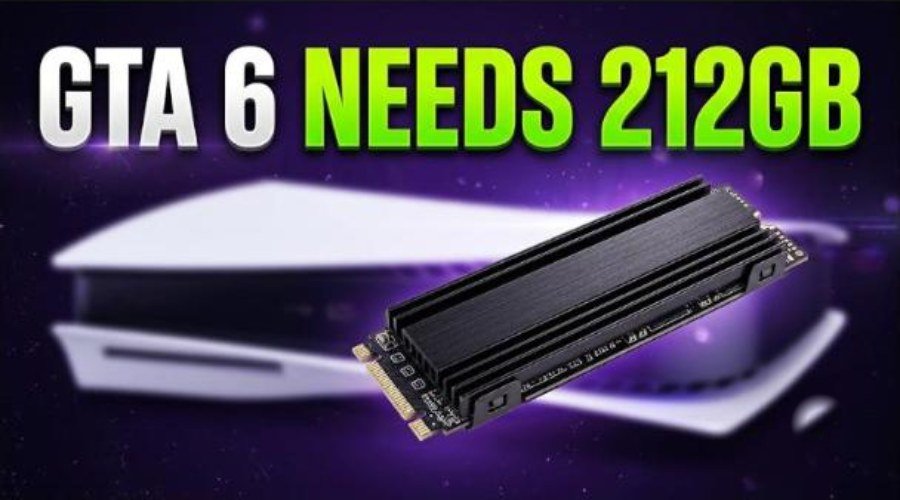
GTA 6 landed on PS5 on November 19, 2026, and it needs 212GB of free space. A launch PS5 has about 670GB of usable storage after formatting, so one game can eat a third of it. That is why the best SSD for PS5 is suddenly the most useful upgrade you can buy this Black Friday.
This guide picks the drives that are worth your money right now. It covers the official PS5 requirements, the best fast and budget M.2 SSDs, how much capacity you need for GTA 6 and the rest of your library, whether you need a heatsink, and how to install a drive yourself.
How we built this guide. Our picks follow the Tom’s Hardware best PS5 SSDs list, last updated on November 11, 2026, and the official PlayStation M.2 SSD requirements. The GTA 6 install size comes from Push Square and Forbes. Prices change daily, so treat every figure as a snapshot.
Best SSD for PS5: Quick Picks
| Pick | Best for | Rated read / write | Capacities | Price seen |
|---|---|---|---|---|
| WD Black SN850X | Best overall (Tom’s top pick) | 7,300 / 6,600 MB/s | 1TB to 8TB, heatsink option | 4TB $249, 8TB $549 (Tom’s) |
| Samsung 990 Pro | Fastest alternative | 7,450 / 6,900 MB/s | 1TB to 4TB, heatsink option | 2TB on sale near $390 |
| Crucial P310 | Best cheap pick | 7,100 / 6,000 MB/s | 500GB to 4TB | 2TB about $145 |
| TeamGroup MP44Q | Cheapest 2TB | 7,000 / 5,900 MB/s | 1TB to 4TB | 2TB about $98 on sale |
Buy the WD Black SN850X with a heatsink if you want the safest, fastest choice. If you only need room for GTA 6 and a few more games, a 2TB Crucial P310 or TeamGroup MP44Q gives you the most space for the money.
WD Black SN850X 2TB (heatsink)Samsung 990 Pro 2TB (heatsink)Crucial P310 2TB (heatsink)TeamGroup MP44Q 2TB
Pros and cons of a PS5 SSD upgrade
👍 The Good
- ✔ A 2TB drive adds room for roughly nine GTA 6-sized installs.
- ✔ Drives at or above Sony’s recommended 5,500 MB/s can run PS5 games straight from the M.2 slot.
- ✔ Installation needs only a #1 Phillips screwdriver, according to PlayStation Support.
- ✔ Black Friday is a good time to buy, since large drives often get the deepest cuts.
👎 The Bad
- ✖ SSD prices have been trending upward for months, according to Tom’s Hardware.
- ✖ You need a heatsink or heat transfer sheet if the drive does not include one.
- ✖ Budget QLC drives slow down during long sustained writes.
- ✖ Formatting the new drive erases everything on it.
Why GTA 6 Makes a PS5 SSD Upgrade Urgent
Push Square reports that GTA 6 needs 212GB of space to download and install on PS5. Forbes lists the same figure for the preload. Two small pre-launch updates followed, and more patches are likely as Rockstar updates the game.
Tom’s Hardware notes that the original PS5 ships with 825GB of storage, or 1TB on the PS5 Slim, and only about 670GB is free after the system takes its share on the launch model. Add a couple of other big games such as Call of Duty and you run out of space quickly.
How much space does GTA 6 leave you?
| Console storage | Free after GTA 6 (approx.) |
|---|---|
| Launch PS5, about 670GB usable | About 458GB |
| PS5 + 1TB SSD | About 1.4TB in total |
| PS5 + 2TB SSD | About 2.4TB in total |
| PS5 + 4TB SSD | About 4.4TB in total |
In short, the math is simple. A 2TB SSD more than triples your free space, and that is the sweet spot for most players this year.
PS5 SSD Requirements (Official)
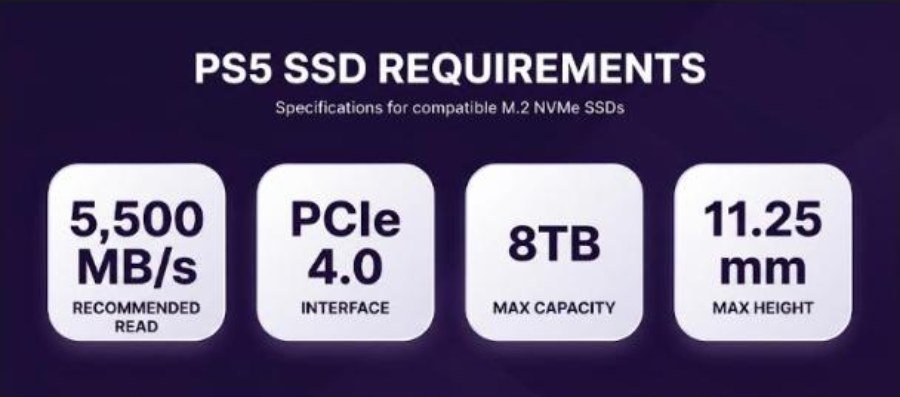
Sony publishes a short list of rules for the expansion slot. Any drive that meets them should work, although Sony says it cannot guarantee every third-party drive.
| Requirement | Sony spec |
|---|---|
| Interface | PCIe Gen4 x4 M.2 NVMe SSD (M key) |
| Capacity | 250GB to 8TB |
| Form factor | 2230, 2242, 2260, 2280 or 22110 |
| Size with heatsink | Up to 25 mm wide and 11.25 mm thick (8.0 mm above the board, 2.45 mm below) |
| Sequential read | 5,500 MB/s or faster recommended |
| Cooling | A heatsink or heat transfer sheet is required |
| Not supported | M.2 SATA drives and PCIe 3.0 drives |
Also, single-sided and double-sided drives are both allowed. Sony also says not to add a second heatsink to a drive that already has one built in. Update your PS5 system software before you install the drive.
The Best PS5 SSDs Right Now
1. WD Black SN850X: best SSD for PS5 overall
Tom’s Hardware names the WD Black SN850X its best pick. It is a PCIe 4.0 x4 drive rated at up to 7,300 MB/s reads and 6,600 MB/s writes, and it comes in 1TB, 2TB, 4TB and 8TB. A heatsink version is available at every capacity, which makes it a true plug-and-play PS5 upgrade.
Tom’s praises its large, consistent SLC cache and five-year warranty, with up to 2,400 TBW. The catch is price. Tom’s warns that SN850X prices keep moving, and it listed the 4TB model at $249 and the 8TB at $549 in its latest update.
2. Samsung 990 Pro: the fastest alternative
The Samsung 990 Pro is Tom’s alternate pick and the fastest drive on its list on paper, rated at 7,450 MB/s reads and 6,900 MB/s writes. It is always single-sided, offers a PS5-compliant heatsink version and comes with a five-year warranty.
However, it tops out at 4TB, and Tom’s flags it as pricier than the WD. The 2TB model was listed with a sale price around $390 at the time of the update, which is steep next to the budget drives below.
3. Crucial P310: best cheap SSD for PS5
The Crucial P310 is Tom’s best cheap pick. It is rated at 7,100 MB/s reads and 6,000 MB/s writes, comes in 500GB to 4TB, and the 2TB model sat at about $145 at the time of the update. Tom’s also notes that it is power-efficient and offers good value per terabyte.
However, it uses QLC flash, which is slower during long writes, and its endurance is rated at up to 800 TBW. For a games library that mostly reads data, that is rarely a problem. You will need to add a heatsink or heat transfer sheet.
4. TeamGroup MP44Q: cheapest 2TB pick
TeamGroup’s MP44Q is Tom’s alternative cheap pick. The 2TB model dropped to about $98 on sale, and it is rated at 7,000 MB/s reads and 5,900 MB/s writes. It is also single-sided and has a five-year warranty with up to 2,000 TBW.
Tom’s notes poor sustained write performance, which is typical for QLC drives. Large installs and file transfers can slow down once its cache fills, but game loading depends mostly on read speed.
Other drives worth a look
Tom’s also lists the Biwin Black Opal NV7400 and WD Black SN7100 as compromise picks, and the 8TB SN850X and Addlink A93 as high-capacity options. Those are also worth checking if your preferred drive is out of stock during Black Friday.
Which Capacity Should You Buy?
| Capacity | Who it suits |
|---|---|
| 1TB | Light players who keep GTA 6 and two or three other big games |
| 2TB | Most players; the best balance of price and space this Black Friday |
| 4TB | Large libraries and anyone who hates deleting games |
| 8TB | Collectors; only the SN850X 8TB and a few others offer it |
Also remember that the PS5 formats the whole drive, so usable space is a little lower than the label. If 2TB and 4TB prices are close during a sale, the bigger drive is usually the better long-term buy.
Do You Need a Heatsink?
Yes, some form of cooling is required. PlayStation Support says the drive needs effective heat dissipation, such as a heatsink or a heat transfer sheet. The whole assembly must stay within 11.25 mm in thickness.
For that reason, the easiest route is to buy a heatsink version, such as the SN850X or 990 Pro with heatsink. If you choose a bare budget drive like the P310 or MP44Q, add a slim PS5-compatible heatsink. Tom’s Hardware tested drives without heatsinks using a Sabrent heatsink.
Do not stack a second heatsink on a drive that already has one. Sony specifically warns against it.
How to Install an M.2 SSD in a PS5
The process is the same idea on every model. For the Slim and Pro (CFI-2000 and CFI-7000), PlayStation Support lists these steps:
| Step | What to do |
|---|---|
| 1 | Update the PS5 system software, then power off and unplug the console |
| 2 | Remove the triangle cover, then the expansion slot cover screw and cover |
| 3 | Remove the screw and spacer, and move the spacer to match your drive length |
| 4 | Insert the SSD at an angle into the slot, press it down and fasten the screw |
| 5 | Refit the slot cover and the triangle cover |
| 6 | Power on and format the drive when prompted |
On the launch PS5 (CFI-1000), however, you remove the base and side cover first. You only need a #1 Phillips screwdriver. Because formatting erases the whole drive, back up anything on it before you start.
Video: PlayStation Support shows the official install steps for the PS5 Slim and PS5 Pro. Opinions in the video belong to the creator, so treat it as another point of view.
Black Friday SSD Buying Tips
SSD pricing is unusually unstable right now. Tom’s Hardware says prices on all SSDs have been trending upward for months, so a Black Friday deal may still be higher than last year’s low. So use these rules to avoid overpaying.
| Do this | Skip this |
|---|---|
| Compare price per terabyte, not just the sticker price | PCIe 3.0 drives, which the PS5 does not support |
| Check that the drive is rated near 5,500 MB/s or faster | M.2 SATA drives, which will not work |
| Buy a heatsink version or add a slim one | Thick heatsinks taller than 11.25 mm in total |
| Look at 2TB and 4TB first for GTA 6 and future games | Tiny 500GB drives that fill up after two big installs |
Video: Gadget Ten compares PS5 SSD options at different budgets. Opinions in the video belong to the creator, so treat it as another point of view.
Build the rest of your setup
Next, pair the faster storage with good audio. Our Sony INZONE H9 II review, SteelSeries Arctis Nova 5X review and Turtle Beach Stealth Pro 2 review cover headsets that work with PS5. Budget buyers can start with the Corsair HS35 v3 or the HyperX Cloud III S Wireless.
For a bigger screen or speakers, read our OLED gaming monitor comparison, ASUS TUF VG247Q1A review and Creative Pebble Pro vs Stage Pro guide. PC and handheld players can also check our ROG Xbox Ally X review and best handheld gaming PCs, and our Audeze Maxwell 2 review covers a premium headset.
WD Black SN850X 2TB (heatsink)Samsung 990 Pro 2TB (heatsink)Crucial P310 2TB (heatsink)TeamGroup MP44Q 2TB
Verdict: The Best SSD for PS5 to Buy This Black Friday
If you want one drive and never think about it again, buy the WD Black SN850X with a heatsink in 2TB or 4TB. It is Tom’s Hardware’s top pick, it is fast, and it is easy to install. The Samsung 990 Pro is the right choice if you find it at a good price.
On a tight budget, however, the Crucial P310 and TeamGroup MP44Q give you 2TB for around $100 to $145 at the time of writing. That is plenty for GTA 6 and several more big games. Just add a slim heatsink, and buy soon, since prices are moving quickly.
Frequently Asked Questions (FAQ)
What is the best SSD for PS5?
Tom’s Hardware names the WD Black SN850X its best PS5 SSD, with the Samsung 990 Pro as the alternate pick. Both are fast PCIe 4.0 drives with heatsink versions.
How much space does GTA 6 need on PS5?
Push Square reports that GTA 6 needs 212GB of space to download and install on PS5. Future patches may add more.
What speed SSD does the PS5 need?
Sony recommends a PCIe Gen4 x4 M.2 NVMe SSD with a sequential read speed of 5,500 MB/s or faster.
Does a PS5 SSD need a heatsink?
Yes. Sony requires effective heat dissipation, such as a heatsink or heat transfer sheet, and the total thickness must stay within 11.25 mm.
What is the cheapest good SSD for PS5?
Tom’s Hardware picks the Crucial P310 and TeamGroup MP44Q as its best cheap PS5 SSDs. The 2TB MP44Q was on sale for about $98 at the time of its update.
What is the largest SSD the PS5 supports?
The PS5 supports M.2 SSDs from 250GB up to 8TB, according to PlayStation Support.
Can I use a PCIe 3.0 or SATA SSD in the PS5?
No. The PS5 needs a PCIe Gen4 M.2 NVMe drive. M.2 SATA drives are not supported, and Tom’s Hardware notes that PCIe 3.0 drives are not allowed.