Creative Pebble Pro vs Stage Pro: Best Budget PC Speakers or Soundbar?
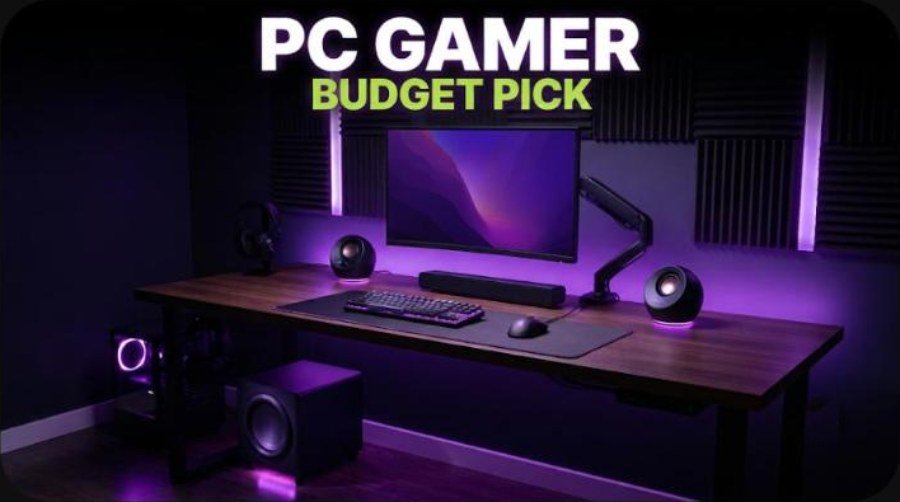
Creative owns the budget end of PC audio right now. In the PC Gamer guide to the best PC speakers, the Creative Pebble Pro is the best budget pick at $69.99, and the Creative Stage Pro is the best gaming soundbar at about $170. Both sit on a desk, both connect over USB-C and Bluetooth, and both cost less than many gaming headsets.
They solve different problems, though. The Pebble Pro is a pair of tiny round speakers for a small desk. The Stage Pro is a 2.1 soundbar with a separate subwoofer that can also run a TV. This guide compares the specs, design, sound, connectivity and price, and helps you pick the right one for your setup.
How we built this review. It combines Creative’s published specifications, the PC Gamer review of the Pebble Pro, PC Gamer’s Stage Pro review, Tom’s Hardware, Tom’s Guide and the What Hi-Fi review of the Stage Pro, plus two YouTube reviews. Every measurement and opinion below is credited to its source.
Creative Pebble Pro vs Stage Pro: Specs and Quick Verdict
⚙️ Quick Specifications
Creative Pebble Pro vs Stage Pro specifications
| Spec | Pebble Pro | Stage Pro |
|---|---|---|
| Type | 2.0 desktop speakers | 2.1 soundbar and subwoofer |
| Drivers | 2 x 2.25-inch full range plus passive radiators | 2 x 8.5 x 5.5 cm racetrack drivers, 5.25-inch subwoofer driver |
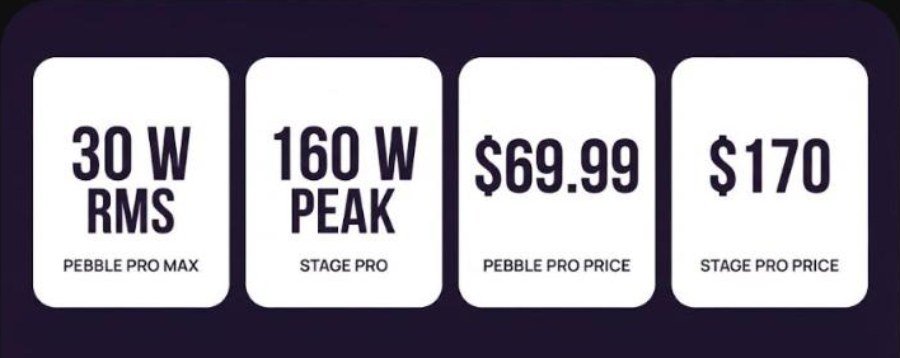
| Power | 10 W RMS (20 W peak) on USB; 30 W RMS (60 W peak) with 30 W USB PD adapter | 20 W RMS bar plus 60 W RMS sub; 160 W peak |
| Frequency response | 80 Hz to 20 kHz | 30 Hz to 20 kHz |
| Connections | USB-C, Bluetooth 5.3, 3.5 mm aux, 3.5 mm headset and mic | HDMI ARC, optical, USB-C, 3.5 mm aux, Bluetooth 5.3 |
| Size | 123 x 123 x 118 mm per speaker | Bar 550 x 112.1 x 80.7 mm; sub 115 x 265 x 420 mm |
| Weight | About 803 g for the pair | Bar 1.33 kg; sub 3.4 kg |
| Lighting | RGB ring, one zone | None |
| Software | Creative App | Remote control with EQ modes |
| Price | $69.99 list, often about $60 | About $170 list, often $130 to $140 |
The Good and the Bad
👍 The Good
- ✔ The Pebble Pro is cheap, tiny and has angled drivers that aim sound at your ears.
- ✔ PC Gamer and Tom’s Hardware both praise clear voices on the Pebble Pro, even at low volume.
- ✔ The Stage Pro adds a real subwoofer and room-filling sound, and PC Gamer scored it 87 out of 100.
- ✔ The Stage Pro has HDMI ARC, optical, USB-C, aux and Bluetooth, so it can serve a PC and a TV.
- ✔ Both connect over USB-C, so you can skip a separate sound card or DAC.
👎 The Bad
- ✖ The Pebble Pro needs a separate 30 W USB PD adapter to unlock full power, and bass stays limited.
- ✖ Bluetooth on the Pebble Pro is basic and supports only SBC, according to PC Gamer.
- ✖ The Stage Pro takes a lot of desk or floor space and brings several cables.
- ✖ Tom’s Guide found Stage Pro dialogue muffled in busy movie scenes and noted no eARC.
- ✖ The Pebble Pro RGB ring is controlled only from the volume knob, so it is easy to ignore.
Buy the Pebble Pro if you want the cheapest real upgrade over monitor speakers on a small desk. Buy the Stage Pro if you have room for a subwoofer and want bass, volume and TV inputs that the Pebble Pro cannot deliver.
Check Pebble Pro priceCheck Stage Pro price
What Is in the Box
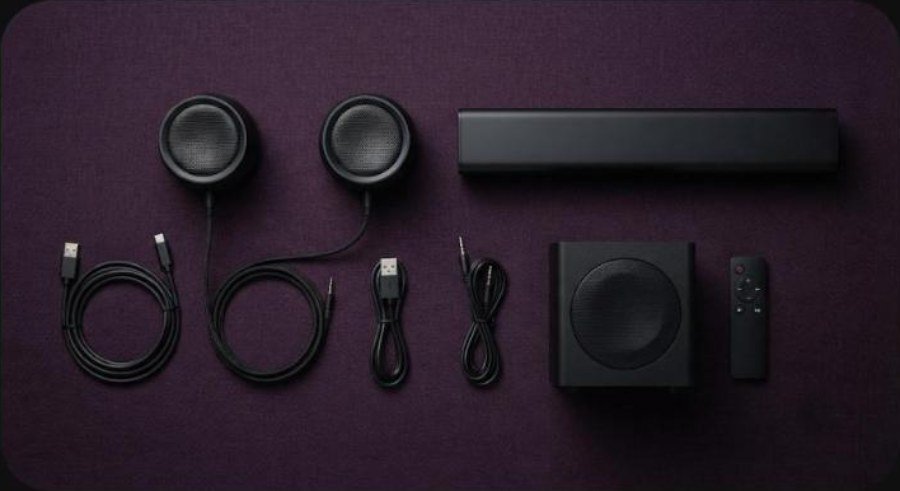
Tom’s Hardware lists a generous cable set with the Pebble Pro: a 1.8 m speaker-to-speaker cable, a USB-C to USB-C cable, a USB-C to USB-A cable and a 3.5 mm aux cable. The 30 W USB PD power adapter that unlocks full output is sold separately, although Tom’s Hardware says Creative bundled it free with direct orders at the time of its review.
The Stage Pro box holds the soundbar, the separate wired subwoofer and a remote. Reviewers at PC Gamer and Tom’s Guide both used the remote to change EQ modes and set bass and treble separately. Plan for a power socket near the subwoofer, because the system runs from AC power rather than USB.
Design and Build Quality
Pebble Pro: small, round and angled
The Pebble Pro keeps the famous Pebble shape. Each speaker is about 123 x 123 x 118 mm, and the pair weighs about 803 g, per Tom’s Hardware. The drivers point upward at an angle, which suits a desk where you sit close to the speakers. An RGB ring glows around the base, and the right speaker carries the volume knob plus headset and mic jacks.
PC Gamer noticed some casing vibration at high volume. It also questioned the point of the RGB, since you change the color with the volume knob rather than an app.
Stage Pro: compact bar, big subwoofer
The Stage Pro bar is 550 mm wide, 112.1 mm deep and only 80.7 mm tall, so it fits under most monitors. The subwoofer is the bulky part at 115 x 265 x 420 mm and 3.4 kg. PC Gamer calls the footprint bulky and mentions a lot of cables. Tom’s Guide thought the design looks a little cheap, while What Hi-Fi rated its build 4 out of 5.
Sound Quality: Pebble Pro
The Pebble Pro is tuned for voices. PC Gamer says mids and treble are stronger than bass, and that speech sounds particularly good. Tom’s Hardware agrees that vocals stay clear, crisp and full even at low volume.
Bass is the limit. PC Gamer found that gunfire and engines have some body, but the low end stays thin and music lacks detail. Tom’s Hardware heard solid movement for a small room but compressed bass when tracks got busy. It measured about 88.2 dBA at full volume, with distortion becoming noticeable around 78% volume.
On a plain USB port the Pebble Pro runs at 10 W RMS. Add a 30 W USB PD adapter and it switches to 30 W RMS, which matters most if you sit farther from the desk or play loud games.
Video: KLGadgetTV reviews the Pebble Pro and its RGB lighting on a desk setup. Opinions in the video belong to the creator, so treat it as another point of view.
Sound Quality: Stage Pro
The Stage Pro is in another league for scale. PC Gamer describes immersive, room-filling sound that keeps its detail at high volume. The reviewer played DOOM: The Dark Ages and Hi-Fi Rush and often wanted more volume than was comfortable at a desk, which shows how much headroom the system has.
Near and Far modes
Creative gives the Stage Pro Near and Far SuperWide profiles. PC Gamer preferred Near at desk distance and found Far more immersive but overpowering up close. You can also cycle movie, music, voice and gaming EQ presets with the MODE button.
Where the reviews disagree
Dialogue is the split. What Hi-Fi praises clear, detailed dialogue and well-integrated bass, but says the sound stays close to the bar. Tom’s Guide found dialogue often muffled in busy action scenes and noticed short audio skips on some UHD Blu-ray content. Tom’s Guide also felt the EQ modes sound similar, so manual bass and treble control matters more.
Video: Headphones Pro Review reviews the Stage Pro soundbar and subwoofer. Opinions in the video belong to the creator, so treat it as another point of view.
Connectivity, Software and Setup
The Pebble Pro is a USB-C speaker first. One cable to your PC carries both power and audio. Bluetooth 5.3 handles a phone or tablet, and a 3.5 mm aux input covers a console controller or an old laptop. The front-facing 3.5 mm headset and mic jacks let you switch to a headset without reaching behind the PC.
PC Gamer warns that Bluetooth is basic and supports only the SBC codec, so a wired connection sounds better. Tom’s Hardware lists support in the Creative App for extra settings.
Stage Pro connections
The Stage Pro has more inputs than most soundbars at its price. You get HDMI ARC for a TV, optical, USB-C audio for a PC, 3.5 mm aux and Bluetooth 5.3. PC Gamer measured Bluetooth range at about 10 meters. That mix lets one system serve a gaming PC on a desk and a TV on a stand.
There is no Wi-Fi streaming and no Dolby Atmos. What Hi-Fi lists Dolby Digital and Dolby Digital Plus. Tom’s Guide notes there is no eARC, so you cannot control your TV with the soundbar remote.
Which One Fits Your Gaming Setup?
| Setup | Better pick | Why |
|---|---|---|
| Small desk or dorm room | Pebble Pro | Tiny footprint and one USB-C cable |
| Ultrawide monitor desk | Stage Pro | The 550 mm bar fits under the screen and the sub sits on the floor |
| PC plus TV in one room | Stage Pro | HDMI ARC and optical inputs |
| Laptop on the go | Pebble Pro | USB power and a light 803 g pair |
| Shared walls or late-night play | Pebble Pro | PC Gamer warns the Stage Pro can get very loud |
If you mostly play with a headset, either speaker makes a good second option for videos and music. Our SteelSeries Arctis Nova 5X review, HyperX Cloud III S Wireless review and Corsair HS35 v3 review cover budget headsets. For a premium jump, read our Sony INZONE H9 II, Razer BlackShark V3 Pro and Audeze Maxwell 2 reviews, or the three-way headset comparison.
Price, Availability and Alternatives
PC Gamer lists the Pebble Pro at $69.99, and PC Gamer has seen it on sale for $59.99. Tom’s Hardware quoted a $59.99 MSRP at launch. The Stage Pro lists at about $170, and PC Gamer and Tom’s Guide both spotted deals around $130 to $140.
That makes the Stage Pro about two to three times the price of the Pebble Pro. The extra money buys a subwoofer, HDMI ARC and far more volume. If you only need clearer game audio and voice chat at a desk, the Pebble Pro is the better value.
Other Creative options
PC Gamer suggests the Pebble Plus if you want a small subwoofer with Pebble-style speakers. Its best PC speakers list also names the Sound Blaster GS3 as the best budget soundbar, which sits below the Stage Pro.
Streamers who add speakers may also want a better microphone. See our Elgato Wave:3 and HyperX SoloCast reviews, or the Logitech G Pro X3 Lightspeed if you prefer a headset mic. A clean desk helps too, so check our SteelSeries QcK vs QcK Prism comparison, best standing desk for gaming guide and OLED gaming monitor comparison.
Verdict: Which Creative Speaker Should You Buy?
| Buy the Pebble Pro if | Buy the Stage Pro if |
|---|---|
| You want the cheapest real upgrade over monitor or laptop speakers. | You want deep bass and room-filling sound for games and movies. |
| Your desk is small or you move between rooms. | You have floor space for a 3.4 kg subwoofer. |
| You care about clear voices more than bass. | You want HDMI ARC to share the system with a TV. |
| You want front headset and mic jacks. | You do not have thin walls or sleeping roommates. |
Both are strong value picks. The Pebble Pro is the smart buy for a compact desk, and it earns its spot as PC Gamer’s best budget speaker. The Stage Pro scored higher with PC Gamer because it sounds far bigger, but it needs more room and money.
Frequently Asked Questions (FAQ)
Is the Creative Pebble Pro good for gaming?
Yes, for a desk setup. PC Gamer named it the best budget PC speaker and praised its clear dialogue, but bass is limited and it will not fill a large room.
How much power does the Creative Pebble Pro have?
It runs at 10 W RMS with 20 W peak on a standard USB connection. With a 30 W USB PD adapter it switches to 30 W RMS with 60 W peak, according to Tom’s Hardware.
Does the Pebble Pro come with the 30 W power adapter?
The adapter is sold separately. Tom’s Hardware says Creative bundled it free with direct purchases at the time of its review.
What inputs does the Creative Stage Pro have?
It has HDMI ARC, optical, USB-C audio, a 3.5 mm aux input and Bluetooth 5.3, so it works with a PC, a TV and a phone.
Does the Creative Stage Pro support Dolby Atmos?
No. What Hi-Fi lists Dolby Digital and Dolby Digital Plus, and Tom’s Guide notes that the Far mode only simulates a wider sound.
How much does the Creative Stage Pro cost?
It lists at about $170, and PC Gamer and Tom’s Guide have seen deals around $130 to $140.
Should I buy the Pebble Pro or the Stage Pro?
Pick the Pebble Pro for a small desk and clear voices on a budget. Pick the Stage Pro if you have room for the subwoofer and want strong bass, high volume and TV inputs.