Corsair HS35 v3 Review: Wired ($49.99) vs Wireless ($79.99)
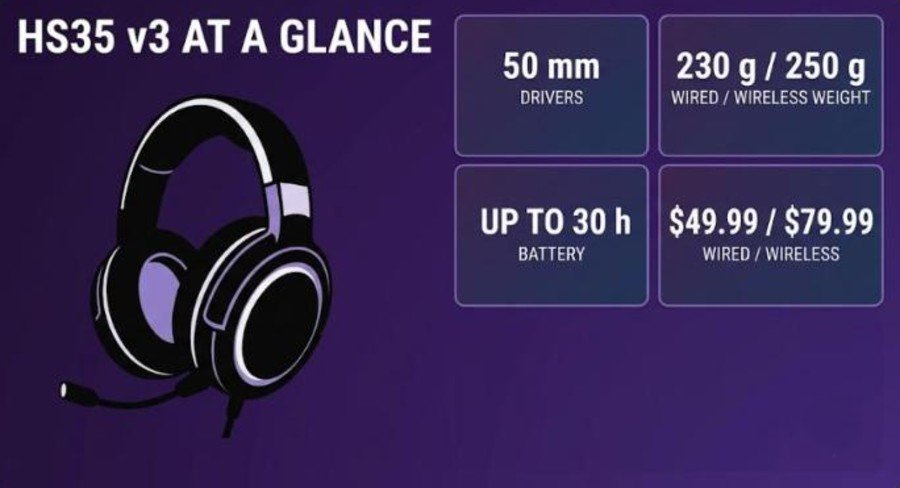
The Corsair HS35 v3 is the third generation of Corsair’s entry-level headset line, and it arrives in two flavors: a $49.99 wired model with a 3.5 mm plug and a $79.99 wireless model with a 2.4 GHz dongle, Bluetooth and a wired mode. Both use 50 mm neodymium drivers, a detachable omnidirectional mic and a new floating headband, and both weigh well under 260 g. Corsair announced the pair at Computex 2026, and the pitch is simple: keep what matters, drop the RGB and the software, and hold the price down.
This review covers both versions side by side, so you can see what the extra $30 for wireless actually buys. We look at weight and comfort, the controls, connectivity, sound, the microphone, battery life, and where the headset falls short against rivals like the HyperX Cloud III S Wireless and the SteelSeries Arctis Nova 5X.
How we built this review
This article combines Corsair’s official specifications, independent coverage from TechRadar, Wccftech, The Shortcut and Tom’s Hardware, and two YouTube reviews: one of the wireless model by iamfallfromgrace, who says Corsair supplied the headset ahead of launch, and one of the wired model by LeoCastsPH. Every measurement and opinion below is credited to its source.
Corsair HS35 v3 Specs and Quick Verdict
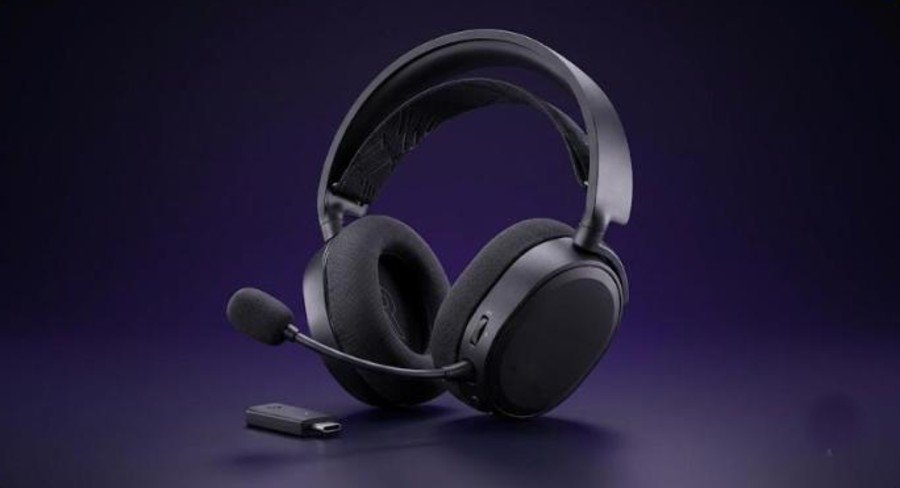
⚙️ Quick Specifications
Full specifications
| Spec | HS35 v3 (wired) | HS35 v3 Wireless |
|---|---|---|
| Price | $49.99 | $79.99 |
| Drivers | Custom 50 mm neodymium | Custom 50 mm neodymium |
| Frequency response | 20 Hz to 20 kHz | 20 Hz to 20 kHz |
| Impedance | 32 ohms at 1 kHz | 32 ohms at 1 kHz |
| Sensitivity | 113 dB (±3 dB) | 117 dB (±3 dB) |
| Weight | 230 g | 250 g |
| Dimensions | 83 x 184 x 201.9 mm | 83 x 184 x 201.9 mm |
| Connection | 3.5 mm wired | 2.4 GHz dongle, Bluetooth 5.2, USB wired |
| Wireless range | Not applicable | Up to 20 m (60 ft) line of sight on 2.4 GHz |
| Battery | Not applicable | Up to 30 h (2.4 GHz) / 32 h (Bluetooth) at 50% volume |
| Microphone | Detachable omnidirectional, 100 Hz to 10 kHz, -42 dB (±2 dB) | Detachable omnidirectional, 100 Hz to 10 kHz, -42 dB (±2 dB) |
| Companion software | None | None (Dolby Access app for Atmos on PC) |
| Warranty | 2 years | 2 years |
The Good and the Bad
👍 The Good
- ✔ The floating headband and light frame make this one of the most comfortable headsets at the price, according to several reviewers.
- ✔ The tri-mode wireless model covers PC, PlayStation, Switch and phones with one headset.
- ✔ The detachable mic is clear enough for Discord and calls, and TechRadar rated it very good.
- ✔ Battery life of about 30 hours matched the Corsair claim in TechRadar testing.
- ✔ The wired model costs $49.99 and plugs into almost anything with a 3.5 mm jack.
👎 The Bad
- ✘ There is no companion software and no EQ, so the tuning is fixed.
- ✘ The wireless model cannot hold Bluetooth and 2.4 GHz connections at once.
- ✘ Wireless is not compatible with Xbox, according to The Shortcut.
- ✘ The build is mostly plastic with no premium materials or noise cancelling.
- ✘ There is no game and chat balance control.
The HS35 v3 Wireless is a light, comfortable, easy-to-live-with headset that sounds good for $79.99, and the $49.99 wired version keeps the same core design. If you want EQ, software or a premium build, look higher up the range.
HS35 v3 vs HS35 v3 Wireless: What the Extra $30 Buys
Corsair built the two models on the same shell, so the choice comes down to how you connect. The wired HS35 v3 plugs into a 3.5 mm jack, so it works with a PC, a Mac, a PC handheld, a PlayStation, a Switch, a Switch 2 and an Xbox, as LeoCastsPH points out in the wired review. It has no battery to charge and no dongle to lose. The reviewer calls a cable the most reliable way to use a headset.
The wireless model adds a 2.4 GHz dongle, Bluetooth and a wired mode, plus a battery rated for up to 30 hours. In exchange it gains 20 g, goes up to $79.99, and drops Xbox support, according to The Shortcut.
| HS35 v3 (wired) | HS35 v3 Wireless | |
|---|---|---|
| Best for | Desk setups, Xbox, handhelds with a headphone jack | Gaming plus phone, travel and the gym |
| Weight | 230 g | 250 g |
| Charging needed | No | Yes, about 3 hours for a full charge (TechRadar) |
| Xbox | Yes | No (The Shortcut) |
| Dolby Atmos on PC | Not listed by Corsair | Yes, via the Dolby Access app and the dongle |
| Price | $49.99 | $79.99 |
What Is in the Box
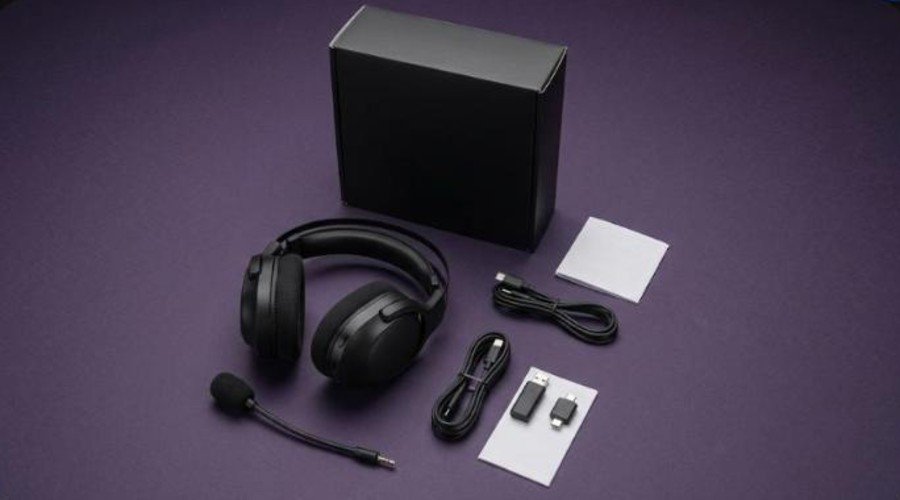
The wireless model ships with the headset and its detachable boom mic, a compact USB-C 2.4 GHz transmitter that Wccftech notes fits into a larger USB-A adapter, a USB cable for wired use and charging, and a user manual. Amazon lists the transmitter and the manual in its box contents. The wired HS35 v3 skips the dongle and the battery, because it connects with a 3.5 mm cable.
Design, Weight and Comfort
Floating headband and light frame
Weight is the first thing you notice. Corsair lists the wired model at 230 g and the wireless model at 250 g. The reviewer in the wireless video calls the headset insanely light and says the floating headband makes it feel like there is almost nothing on the head. The headband is an elastic strap connected to both sides, so the frame rests above the skull instead of pressing on it, as Tom’s Hardware explains.
Clamping force is moderate. The wireless video reviewer has a fairly large head and did not find it too tight, and glasses did not cause pain points either. TechRadar went further after six weeks on PC and PlayStation, calling it one of the most comfortable headsets the reviewer has used. The Shortcut adds that the swivel earcups stay comfortable when worn around the neck.
Ear pads and adjustment
The ear pads are oval and about 2 cm deep, according to the wireless video. They come off easily, but the reviewer says they are fiddly to put back on. Corsair and Amazon describe soft fabric, while Tom’s Hardware lists memory foam under breathable mesh, so expect a fabric surface rather than leatherette. Wccftech found the earcups roomy and breathable enough to limit heat in long sessions. Each side of the headband has three notches of adjustment, and the headband itself is removable.
Build quality
Do not expect premium materials. Wccftech describes a mostly plastic build with yellow accents on the earcup hinges and no RGB. The wireless video reviewer says it feels durable and bendy and would likely survive drops, which suits younger gamers. The trade-off is that the fabric pads only give natural isolation: the headset is not noise cancelling, and you still hear the outside world.
Controls and Connectivity
On-ear controls
The back of the left earcup holds a volume wheel that also presses in to mute the mic, with an audio cue for muted and unmuted. TechRadar describes the control as a toggle that moves volume two steps at a time and criticises the lack of a separate mic mute button, so reviewers describe the control slightly differently. The multifunction button turns the headset on and off with a long press, pauses media with a tap and swaps modes with a double tap. The Shortcut found the power button a little finicky.
A small LED shows the mode: green for the 2.4 GHz USB connection and blue for Bluetooth. While charging it glows red and turns white when full. There is no game and chat balance dial, which The Shortcut lists as a drawback.
2.4 GHz, Bluetooth and wired
Corsair rates the 2.4 GHz connection at up to 20 m (60 ft) with a clear line of sight. The dongle works with USB-C and USB-A ports. The headset pairs with PC, PlayStation, Switch, Mac and phones. On PlayStation or Switch you can also use Bluetooth, the included cable, or the dongle. Plug the cable into any device and the headset switches to wired mode automatically, even if it is paired elsewhere.
Bluetooth and 2.4 GHz cannot run at the same time. You cannot listen to a phone call over Bluetooth while your game plays through the dongle. Both the wireless video reviewer and Wccftech flag this, and The Shortcut calls switching between them a little clunky.
Video: iamfallfromgrace walks through the design, controls, battery and microphone of the HS35 v3 Wireless. Opinions in the video belong to the creator, so treat it as another point of view.
Sound Quality and Microphone
Gaming and music
Corsair tunes the 50 mm neodymium drivers for gaming. Wccftech describes slightly forward mids, defined highs without harshness and controlled bass, which suits competitive play, and says the soundstage is functional rather than wide. TechRadar could pick out enemy footsteps in The Outlast Trials. The Shortcut was more enthusiastic, saying the balanced tuning has enough low-end weight, the treble is not harsh and the soundstage is wide for a closed-back headset. It also praised single-player games, multiplayer and music.
Volume is not a problem. The wireless video reviewer found 50% already loud and never got near 100%. Music lacks the depth of pricier headsets, according to Wccftech, which treats that as a deliberate trade-off. The sound is fixed because there is no EQ, although The Shortcut says the default tuning works well.
Dolby Atmos on PC
PC players can switch on Dolby Atmos spatial audio, but only on the wireless model with the USB dongle, and it needs the Dolby Access app. Wccftech says Atmos improves spatial awareness without changing the headset’s character. The wireless video reviewer used Bluetooth most of the time, so Atmos mattered less to them.
Microphone
The detachable omnidirectional boom mic is rated 100 Hz to 10 kHz with -42 dB sensitivity. Reviewers mostly like it. TechRadar says it performed very well on Google Meet and Discord without a pop filter, picking up quiet speech while rejecting keyboard noise and chewing. LeoCastsPH says it comes from the same family as Corsair’s pricier headset mics. The Shortcut found the voice full without a metallic edge, though it heard a slight buzz. Wccftech is cooler, finding it intelligible but slightly compressed and not meant for streaming. If you need broadcast quality, a standalone mic such as the HyperX SoloCast or the Audio-Technica AT2020USB+ is a better idea.
Battery Life and Charging
Corsair rates the wireless model at up to 30 hours over 2.4 GHz at 50% volume and up to 32 hours over Bluetooth. TechRadar measured about 30 hours of use and roughly three hours for a full charge, and the supplied cable is long enough to keep playing while it charges. Wccftech also found the claim close to reality at about 50% volume, and noted Bluetooth stretches the battery slightly. The Shortcut adds that the battery is replaceable if it degrades.
There is no quick-charge figure from Corsair. TechRadar contrasts this with the Razer BlackShark V3, which its reviewer says gives about two hours from a 15-minute charge, so plan to charge it overnight rather than rely on a quick top-up. The wired HS35 v3 has no battery at all.
Software and Customization
There is no companion app for EQ or profiles, and reviewers agree on it. TechRadar lists it as a con, while noting it keeps setup simple. The only software step is the Dolby Access app for Atmos on PC. The wireless video reviewer says the removable headband hints that Corsair may offer customization later, and hopes for more band and earcup options. Until then, what you get is what you hear. If you want tuning and a mixer, models like the Arctis Nova 5X offer them at a higher price.
Video: LeoCastsPH reviews the wired HS35 v3 and compares it with the wireless version. Opinions in the video belong to the creator, so treat it as another point of view.
Price, Alternatives and How the HS35 v3 Compares
At $79.99, the wireless HS35 v3 sits against the Turtle Beach Stealth 500 ($79.99, 40-hour battery, software and spatial audio) and the JBL Quantum 360X Wireless ($64.95, 22-hour battery), both named in TechRadar’s review. Amazon showed the wireless model at $59.99 on a 25% discount when we checked, so the gap narrows when it goes on sale. Prices change, so check before you buy.
Step up and you get more features. The HyperX Cloud III S Wireless and the Arctis Nova 5X vs Cloud III S comparison show what a bit more money buys. At the premium end, our reviews of the Razer BlackShark V3 Pro, the Sony INZONE H9 II and the Audeze Maxwell 2 cost several times as much, and our three-way comparison explains where the money goes. Corsair itself positions the HS35 line below its Virtuoso and HS80 headsets, as Wccftech notes.
Gamers on a handheld will like the light weight. If you play on a ROG Xbox Ally X or another device from our handheld buying guide, the wired model is the simplest match, and Bluetooth covers handhelds without a headphone jack. A headset also pairs well with the rest of a setup, from a gaming monitor to a budget gaming chair and a standing desk. If you already own a Corsair mouse such as the Sabre V3 Pro, the HS35 v3 is an inexpensive way to match the brand.
Verdict: Who Should Buy the Corsair HS35 v3?
Reviewers land in a similar place. Wccftech gave the wireless model 8/10, calling it comfortable, practical and versatile but not premium. The Shortcut scored it 4.5/5 and an Editor’s Choice, while TechRadar called it a surprisingly good headset for its price. Our read matches: the strengths are comfort, weight, a decent mic and long battery life, and the weaknesses are the fixed tuning, the single-connection limit and the plastic build.
| Buy it if | Skip it if |
|---|---|
| You want a light headset you can wear for hours. | You want EQ, a mixer or companion software. |
| You split time between a PC, a console and a phone (wireless). | You play on Xbox and want wireless. |
| You want a clear detachable mic for calls and Discord. | You need a mic for streaming or recording. |
| You want the cheapest route in at $49.99 (wired). | You want noise cancelling or a premium build. |
Frequently Asked Questions (FAQ)
What is the difference between the Corsair HS35 v3 and the HS35 v3 Wireless?
The wired HS35 v3 costs $49.99, weighs 230 g and connects with a 3.5 mm cable. The HS35 v3 Wireless costs $79.99, weighs 250 g and adds a 2.4 GHz dongle, Bluetooth and a battery rated for up to 30 hours. Both share 50 mm drivers and a detachable mic.
How much does the Corsair HS35 v3 cost?
Corsair lists the wired model at $49.99 and the wireless model at $79.99. Amazon has shown the wireless model discounted to $59.99, but retail prices change.
How long does the HS35 v3 Wireless battery last?
Corsair rates it at up to 30 hours on 2.4 GHz and up to 32 hours on Bluetooth at 50% volume. TechRadar measured about 30 hours and roughly three hours to fully charge.
Does the Corsair HS35 v3 work with Xbox?
The wired HS35 v3 works with devices that have a 3.5 mm jack, including Xbox. The Shortcut says the wireless model is not compatible with Xbox.
Can you use Bluetooth and 2.4 GHz at the same time?
No. The wireless model uses one connection at a time, so you double tap the multifunction button to switch between modes.
Does the HS35 v3 have software or an equalizer?
No. There is no companion app or EQ. PC users can set up Dolby Atmos through the Dolby Access app when the wireless model is connected with its USB dongle.
Is the HS35 v3 microphone detachable?
Yes. Both versions use a detachable omnidirectional boom mic with on-ear mute and volume controls.