Attack Shark X68 HE Review: Is the Budget Hall Effect Keyboard Worth It?
The Attack Shark X68 HE is one of the cheapest Hall effect keyboards on Amazon. It packs 8000 Hz polling, a 0.01 mm Rapid Trigger step and adjustable actuation into a 65% board. Street prices usually sit between $40 and $65. That price is why so many gamers ask whether this Attack Shark X68 HE review ends in a yes or a no.
The answer splits reviewers. Hipyo Tech tells viewers not to buy it. Youtuber Wyatt likes it and plans to keep it on his desk. This guide weighs both views against the official specs and the Amazon listing. If you are still setting a budget, our guide on how much to spend on a mechanical keyboard is a good first stop.
How we built this review

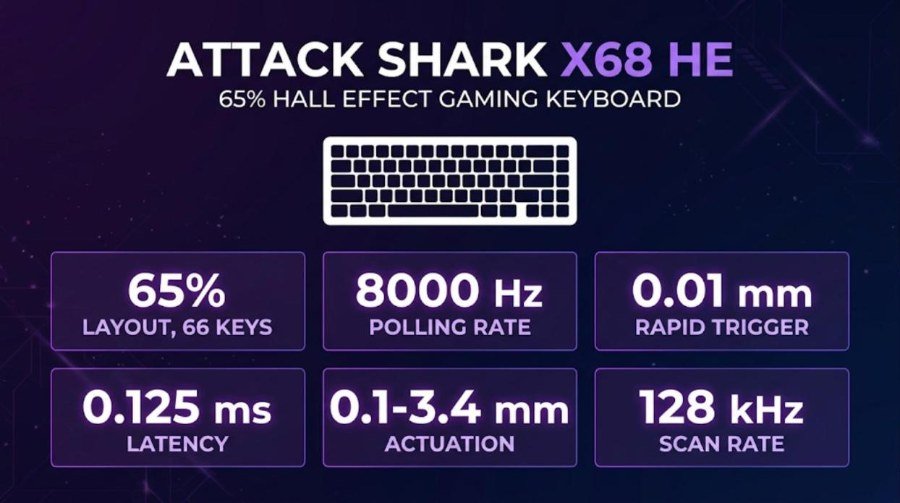
⚙️ Quick Specifications
👍 The Good
- 8000 Hz polling and 0.125 ms latency at a $40-$65 price
- Actuation from 0.1 to 3.4 mm with a 0.01 mm Rapid Trigger step
- 65% layout keeps the arrow keys
- Web driver needs no download
- Coiled cable, strap and RGB included in the Amazon bundle
👎 The Bad
- Hipyo Tech found the sound and feel poor, with pingy springs and chatter
- Plastic case and a basic tray mount, with no tilt feet
- Web software is clunky for frequent tweaking
- Amazon feedback on reliability is mixed
- Case design draws Wooting clone criticism
Want the cheapest Hall effect entry?
Check the current Attack Shark X68 HE price and color options on Amazon.
Some links on this page may earn GearZon a small commission at no extra cost to you.
Attack Shark X68 HE Specs and Quick Verdict
The X68 HE is a budget Hall effect board built around speed. Attack Shark lists an 8000 Hz wired polling rate, 0.125 ms latency and a 128 kHz scan rate. Rapid Trigger works in 0.01 mm steps. Actuation is adjustable from 0.1 to 3.4 mm.
Some stores call it a 60% keyboard. Amazon even adds TKL to the title. The board has 66 keys and a full arrow cluster, so the official 65% label is the right one. Both Hipyo Tech and Youtuber Wyatt also describe a 65% layout.
| Spec | Detail | Source |
|---|---|---|
| Layout | 65%, 66 keys with arrow keys | Official page, Amazon |
| Switch type | Magnetic Hall effect, linear | Official page |
| Actuation range | 0.1-3.4 mm, adjustable | Official page, Amazon |
| Rapid Trigger | 0.01 mm accuracy, adjustable to 3.4 mm | Official page |
| Operating force | 40 gf, 100 million clicks | Amazon switch graphic |
| Polling rate | 8000 Hz wired | Official page |
| Latency and scan rate | 0.125 ms, 128 kHz scan rate | Official page |
| Keycaps | PBT, OEM profile | Official page |
| Stabilizers | Demagnetized steel wire | Official page |
| Lighting | 16M south-facing RGB, 20+ effects | Official page |
| Connection | Wired USB-C | Amazon |
| Size | 14 x 5 x 1.93 in | Amazon |
| Weight | 500 g | MediaMarkt listing |
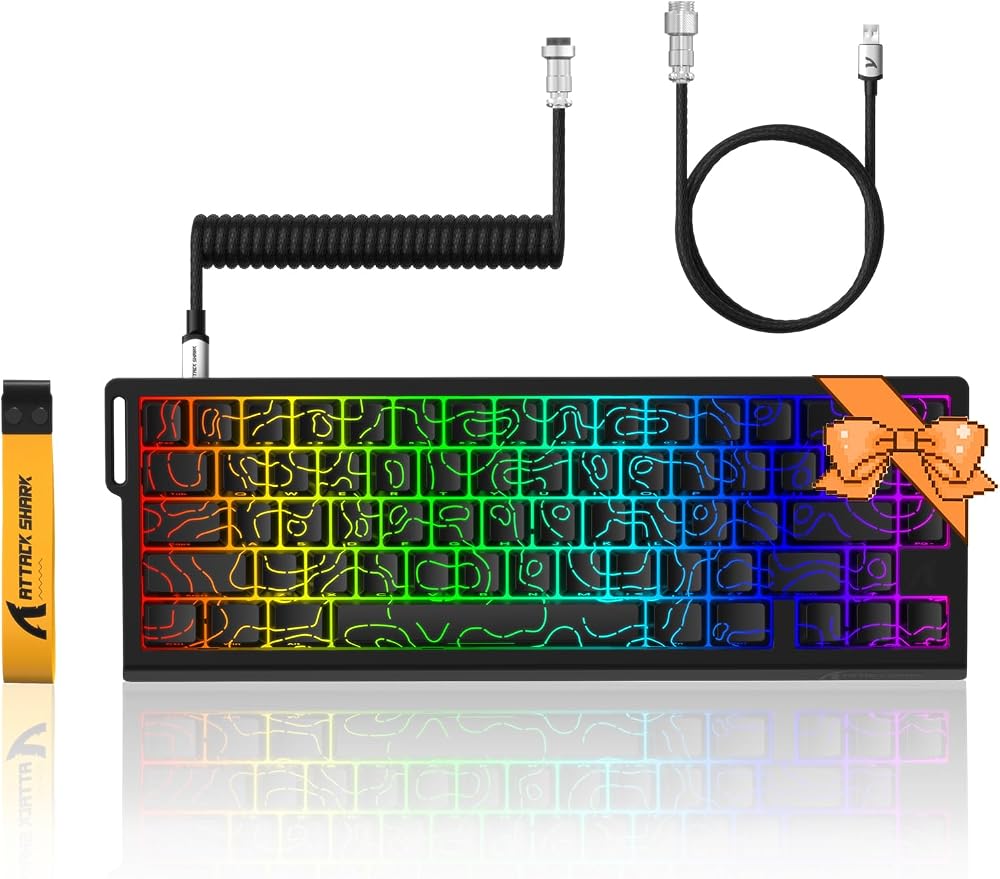
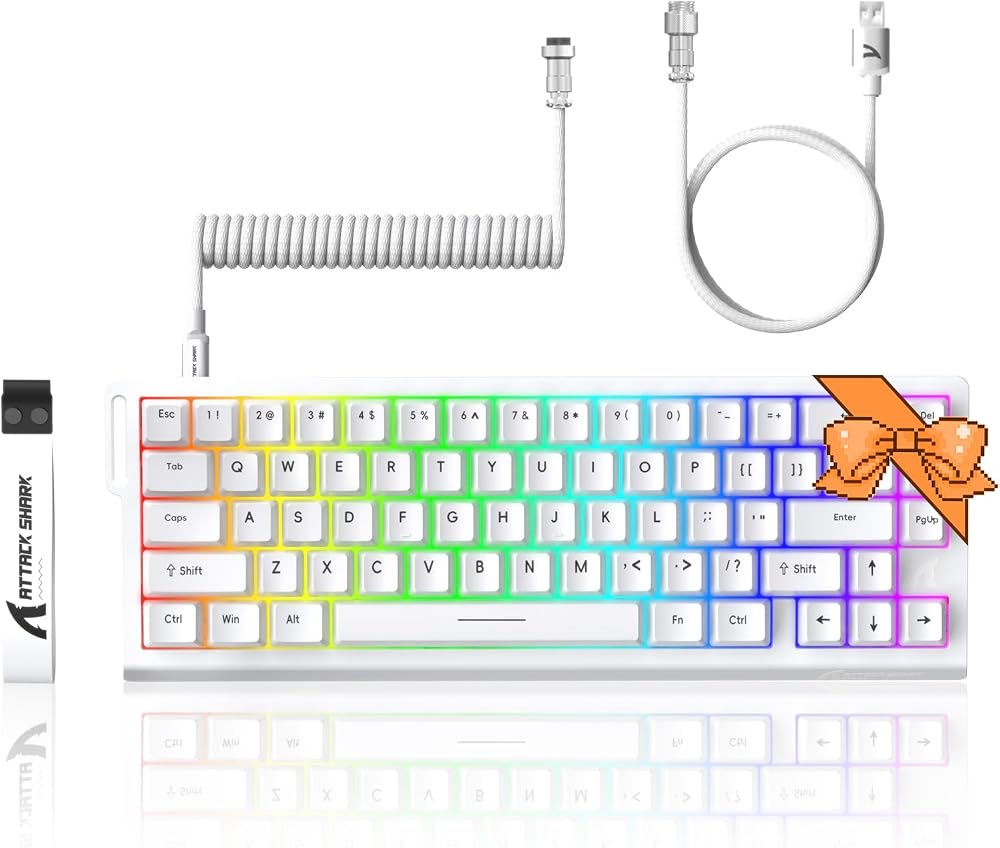
| Colors | Black, White, Crystal White, Black Gradient, Black Contours, White Contours, Pink Contours | Official page |
| Price | $59.99 (Black, White) or $69.99 (other colors) on the official page | Official page |
Our quick verdict is simple. The X68 HE gives you the headline gaming features for the price of a mid-range mouse. It does not give you a pleasant sound, a solid-feeling case or polished software. That trade-off decides whether it fits you.
Where the sources disagree
The official page mentions a top CNC case and an aluminum alloy positioning plate. Hipyo Tech calls the case unapologetically plastic and the mount a basic tray design. The Amazon exploded diagram shows an aluminum alloy plate inside a two-part case. We read that as a plastic or composite shell around a metal plate.
Weight is another gap. A MediaMarkt listing gives 500 g. One Indian retailer lists 41 g, which is clearly a typo for a full 65% board.
What’s in the Box
The contents depend on the bundle you buy. The Amazon listing for the black coiled-cable bundle names five items. Youtuber Wyatt’s retail unboxing adds a few extras.

| Item | Amazon bundle | Wyatt unboxing |
|---|---|---|
| Keyboard | Yes | Yes |
| Cable | Detachable coiled cable | Cord that ships with the keyboard |
| Keycap and switch puller | 2-in-1 puller | Switch puller |
| Strap | Detachable strap | Ribbon for the keyboard |
| Manual | Yes | Yes |
| Stickers | Not listed | Attack Shark logo stickers |
Wyatt also bought a separate 1.5 m coiled cable to match his white board. Hipyo Tech described his unboxing as lackluster. He received a keyboard, a puller and a basic cable.
Note that the strap is a styling piece. Hipyo Tech noted that the strap and the clasp resemble Wooting’s design, and he treats that as part of the clone argument.
Design, Build and the Wooting Question
Size and weight
The X68 HE is compact. Youtuber Wyatt said the first thing he noticed was the small footprint. You keep the arrow keys and a few extra side keys that a 60% board drops. He added that it does not feel like a piece of plastic and that it has some real weight.
Hipyo Tech saw it differently. He described the case as cheap in the hands and a little high in profile. He also warned that the missing flip-out feet may tire your wrists during long typing sessions.

The clone argument
Hipyo Tech spent a large part of his video on the Wooting comparison. He said the case copies the Wooting 60 in several details. He listed the overhanging flap, the clasp, the strap and the slits at the back.
His objection was partly about build quality. He argued that a lazy brand may also cut corners on support and reliability. Wyatt did not raise the point at all. If originality matters to you, weigh that view. If you only care about performance, it may not.
One commenter under Hipyo Tech’s R68 HE video noted that many budget and premium brands share the same factories. That is an opinion, not a finding. Still, it is a fair reminder that similar shapes do not prove copying.
Colors and options
Attack Shark sells the board in Black, White, Crystal White, Black Gradient, Black Contours, White Contours and Pink Contours. The official page prices Black and White at $59.99 and the other colors at $69.99. Amazon prices vary by color, from $49.99 for the black coiled-cable bundle to $64.99 for several others.
Keycaps, Switches and Internals
The keycaps are PBT with an OEM profile, according to the official page. The Amazon bullets add a two-color injection process. Hipyo Tech received a plain black set with white legends. He liked it because it avoids shine-through caps and looks sleek.

Magnetic switches
The switches are linear Hall effect types. An Amazon graphic lists a 40 gf operation force, a 100 million click lifespan and an actuation range of 0.1 to 3.4 mm. The same graphic says the board supports hot-swappable north-pole-down magnetic switches.

Hipyo Tech identified the switches as Outemu Hall effect parts. He compared them to early Wooting-era budget switches and called them genuinely terrible. Wyatt did not comment on the switch brand.
What is inside
The official page lists an aluminum alloy plate, PORON foam and demagnetized steel wire stabilizers. Hipyo Tech said there is some foam, but the tray mount leaves little room for case or sound modding. That matters if you plan to tweak the board later.
Before the sound section, watch Hipyo Tech’s full X68 HE review. It includes his side-by-side sound test.
Video: Hipyo Tech: Over 5,000 People Bought This $39 Keyboard. Opinions in the video belong to the creator, so treat it as another point of view.
Sound and Typing Feel
Two opposite verdicts
Sound is where the reviewers split hardest. Hipyo Tech played a clip of a poorly tuned Hall effect board next to a nicer one. He said the X68 HE sits at the poor end and sounds like a cheap plastic toy. He called the springs super pingy and the switches mega chattery.
Youtuber Wyatt reacted the other way after his own sound test. He called it music to his ears. He also liked that typing on the compact layout needs little hand movement.
How to read the gap
Both opinions can be true. Hipyo Tech compares the board with premium Hall effect keyboards. Wyatt comes from a Razer board that he had just lost to a water spill. Your own reference point matters.
If you value sound, treat the X68 HE as a gaming tool and nothing more. Premium boards such as the IQUNIX EV63 and the IQUNIX EC75 cost far more. Our keycap materials guide also shows how much the caps themselves change the tone.
Performance: Rapid Trigger, Polling and Latency
What the numbers mean
Polling rate is how often the keyboard reports to your PC. At 8000 Hz that is once every 0.125 ms, which matches the listed latency. Standard boards poll at 1000 Hz, or once per millisecond. The gain only shows in fast competitive games and on a PC that can handle the extra load.
Rapid Trigger changes how a key resets. A normal key must travel back past its actuation point before it can fire again. With Rapid Trigger the key resets the moment you start releasing it. Youtuber Wyatt said that after using it for a while you can feel the difference. He pointed to games where you change direction all the time.
Does it keep up with premium boards?
Hipyo Tech was blunt about most things, yet he was fair here. He said the X68 HE delivers a similar gaming experience to more expensive keyboards on paper. It has 8K polling and low latency, and it felt very responsive.
He also gave a useful reality check. A keyboard will not make a weak player better. It can only sharpen the skills you already have. So the performance case is real, but it is a small edge.
Wyatt closed with a careful note. The features are clearly good. The open question is whether they translate into a better experience for you, especially in competitive play.
Features you can switch on
The official page lists Rapid Trigger, DKS, Snap Tap and a zero dead zone option. Hipyo Tech also mentions SOCD handling. These are the tools competitive players use to tune movement. They require the web driver, which brings us to the weak spot.
Software and Customization
The X68 HE uses a web driver. The Amazon listing says it handles DKS, key combinations, macros, remapping and RGB on Windows and Mac. It lists qmk.top as the driver address. You do not need to download anything.

Hipyo Tech found it recognizes the keyboard almost instantly. He also called it one of the clunkier web drivers he has used. His advice is practical. If you set your actuation and Rapid Trigger once and forget them, it is fine. If you tune settings often, it will frustrate you.
Youtuber Wyatt described the software as the place where you really take advantage of the board. You can adjust the actuation point, Rapid Trigger settings and macros. He did not mention any problems.

Lighting is handled with shortcut keys and 20 plus presets. Wyatt called the RGB pretty clean. Hipyo Tech said the board looks more premium with the lights on than the price suggests.
For the opposite opinion, watch Youtuber Wyatt’s unboxing and first impressions.
Video: Youtuber Wyatt: I Tested The Attack Shark X68 HE So You Don’t Have To. Opinions in the video belong to the creator, so treat it as another point of view.
Price, Alternatives and How It Compares
What it costs
Prices swing a lot. Attack Shark lists $59.99 for Black and White. Amazon showed $49.99 for the black coiled-cable bundle and $64.99 for several other colors. Hipyo Tech paid $39.99. Wyatt said his white version dropped from $59.99 to $39.99 during a sale.
At about $40 the value case is strong. At $65 it gets harder to defend, because stronger boards start around $80 to $100. Hipyo Tech made the same point. He said the gap between $40 and $56 puts you close to much better keyboards.
Step-up options
Hipyo Tech reviewed the R68 HE at $79.99. He said it can drop to about $63 on Amazon. He called the original X68 HE objectively bad and the R68 HE one of the best gaming keyboards under $100. His caveat applies to both. These are cheap boards that could fail at any time, with weak warranty support.
| Option | Why consider it | Read more |
|---|---|---|
| Attack Shark R68 HE | The $80 step-up. Hipyo Tech cited a composite case, an aviator-style cable and a 38-45 g linear switch. | |
| IQUNIX EC75 | A 75% Hall effect board with an aluminum top and PBT keycaps. | EC75 review |
| IQUNIX EV63 | A premium Hall effect board that Hipyo Tech calls a marvel of engineering for about $100 more. | EV63 review |
| IQUNIX EV63 vs Wooting 60HE+ | The comparison for buyers who want the original Wooting experience. | EV63 vs Wooting |
| ATK RS6+ / Ultra | An 8K magnetic keyboard from another budget-minded brand. | RS6 review |
| AULA AG75 Pro | A Hall effect 75% board with 8K polling. | AG75 Pro review |
| MCHOSE Ace 75 | A $99 Hall effect 75% keyboard. | Ace 75 review |
| Logitech G PRO X TKL Rapid | A TKL Hall effect board from a major brand. | G PRO X TKL Rapid review |
For more on where each price tier lands, see our mechanical keyboard budget guide. If you want to build a full budget setup, our gaming mouse buying guide and gaming standing desk guide help with the rest.
Verdict: Who Should Buy the Attack Shark X68 HE?
Hipyo Tech and Youtuber Wyatt reach opposite conclusions, and both are partly right. The X68 HE delivers the features that matter for competitive play. It does so with a sound, a case and a driver that show their price.
Budget Hall Effect Pick
Real Rapid Trigger and 8K polling for about $40-$65. The sound, plastic case and clunky web driver show where the savings went.
| Buy it if | Skip it if |
|---|---|
| You want Rapid Trigger on a tight budget | Sound and feel matter to you |
| You game more than you type | You tune settings every week |
| You can find it near $40 | You would pay $65 or more |
| You like a compact 65% layout | You want long-term warranty support |
If your budget stretches, step up. Our reviews of the YUNZII IF68, the AULA F99 and the Wobkey Rainy 75 Pro show what more money buys.
Ready to try Rapid Trigger on a budget?
Prices vary by color, so compare the options before you buy.
Some links on this page may earn GearZon a small commission at no extra cost to you.
Frequently Asked Questions
Is the Attack Shark X68 HE a 60% or a 65% keyboard?
The official page lists it as a 65% board. It has 66 keys and a dedicated arrow cluster. Some stores call it a 60%, but Hipyo Tech and Youtuber Wyatt both describe a 65% layout.
Does the Attack Shark X68 HE have real Rapid Trigger?
Yes. Attack Shark lists a 0.01 mm Rapid Trigger accuracy with actuation from 0.1 to 3.4 mm. Hipyo Tech said it felt very responsive, and Youtuber Wyatt said you can feel the difference in games after using it for a while.
Is the Attack Shark X68 HE good for typing?
It is a gaming board first. Hipyo Tech called the sound and feel abysmal, with pingy springs and chatter. Youtuber Wyatt enjoyed the sound. If typing comfort matters, consider a more premium Hall effect keyboard.
What comes in the box?
The Amazon black bundle lists the keyboard, a detachable coiled cable, a 2-in-1 keycap and switch puller, a detachable strap and a manual. Youtuber Wyatt also found logo stickers in his retail box.
How much does the Attack Shark X68 HE cost?
Attack Shark lists $59.99 for Black and White and $69.99 for other colors. Amazon showed $49.99 to $64.99 depending on color. Hipyo Tech paid $39.99 and Wyatt saw a sale price of $39.99.
Is the Attack Shark R68 HE worth the extra money?
Hipyo Tech reviewed the R68 HE at $79.99 and called it one of the best gaming keyboards under $100. He also called the original X68 HE objectively bad, so he clearly prefers the step-up.