IQUNIX EV63 Review: The Hall Effect Keyboard That Challenges Wooting
The IQUNIX EV63 is a compact Hall effect gaming keyboard with a CNC aluminum case, forged carbon fiber trim and 8000 Hz polling. It landed at a very interesting moment. The Wooting 60HE v2 was about to launch, and many players wanted to know if a cheaper rival could match it.
This IQUNIX EV63 review pulls together the hands-on findings from a detailed video, the official spec sheet and independent write-ups. We then update the video claims with current prices and the shipping Wooting 60HE v2. The short version is simple. The EV63 looks and sounds far better than its price suggests, and its measured latency is top tier.
This article is built on the full video review by Migss (unboxing, sound test, software walkthrough, OSLTT latency test and Valorant gameplay), IQUNIX specifications, and independent reviews from ProSettings and PC Gamer for the Wooting side. Migss says IQUNIX sent him the unit, and every hands-on opinion credited to him is his own. We left out his discount codes and affiliate links. Prices were checked on the IQUNIX store in October 2026.
Video: IQUNIX EV63 review by Migss on YouTube. Our summary of his tests appears below.
IQUNIX EV63 Specs and Quick Verdict
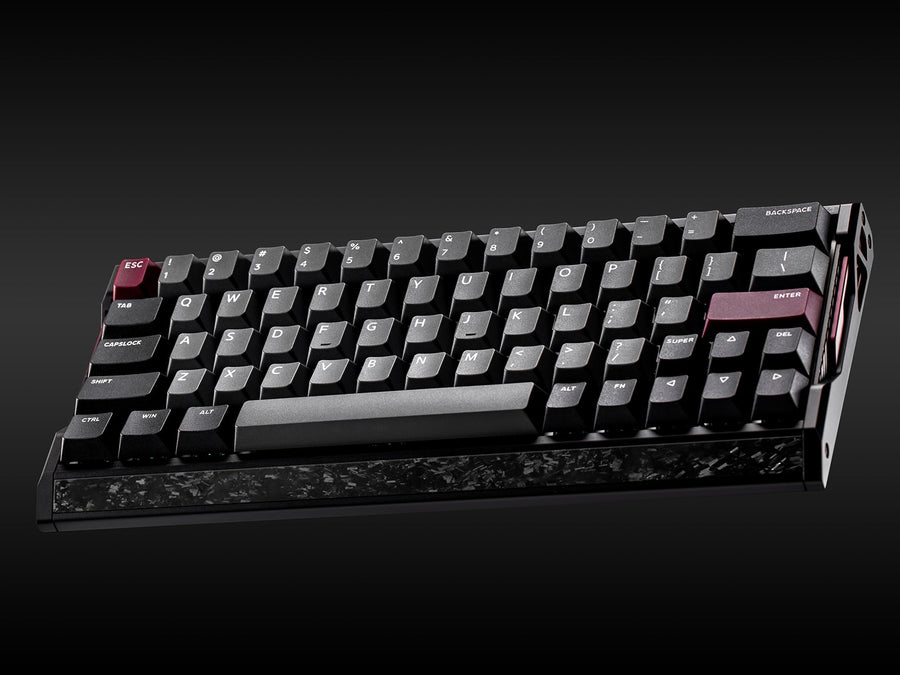
⚙️ Quick Specifications
Full IQUNIX EV63 specification table
| Spec | IQUNIX EV63 |
|---|---|
| Layout | 63% compact (arrow keys and Delete included) |
| Case | CNC machined aluminum with forged carbon fiber front trim |
| Dimensions | 300.9 x 126 x 18.6 mm (front height) |
| Weight | 1206 g (official); about 1,171 g measured in the video |
| Switches | Magnetic X Pro (default) or Magnetic X Ultra, hot-swappable |
| Actuation range | Adjustable, down to 0.01 mm |
| Rapid trigger | 0.01 mm sensitivity |
| Polling rate / scan rate | 8000 Hz / 16000 Hz |
| Claimed latency | 0.125 ms (manufacturer figure) |
| Sensors | Third-generation rail-to-rail Hall sensors (manufacturer claim) |
| Keycap options | Double-shot PBT or frosted translucent PC |
| Colors | Violet, Dark Knight, Silver Knight |
| Features | SOCD, Rapid Snappy, Mod Tap, DKS, Toggle key, macros, N-key rollover toggle |
| Software | EV Software V3 in the browser, three customizable profiles |
| Connection | Wired USB-C (no wireless, no gamepad mode) |
| Price | $169 (Violet, X Pro) up to $209 (Knight, X Ultra) |
The Good and the Bad
👍 The Good
- ✔ The forged carbon and aluminum case looks and feels far more premium than the price suggests.
- ✔ The Magnetic X Pro switches sound smooth and creamy, with quiet, well-lubed stabilizers.
- ✔ The video latency test measured 0.737 ms, which it called the fastest non-TMR Hall effect result on its chart.
- ✔ EV Software V3 is web based and easy to use, with three fully customizable profiles.
- ✔ The compact layout keeps the arrow keys and Delete key, so daily use is easier than on a strict 60%.
👎 The Bad
- ✘ It is wired only, and there is no gamepad mode like some rivals offer.
- ✘ Lighting cannot be saved per profile, and ProSettings found some RGB colors a little washed out.
- ✘ ProSettings found the carbon fiber front plate loose on its unit, so fit and finish may vary.
- ✘ The Knight versions cost up to $40 more than the base Violet model.
- ✘ There are no spare switches in the box, and the official warranty details are inconsistent.
The EV63 is one of the best-looking and best-sounding Hall effect keyboards you can buy for under $200. If you want pure raw speed with a very good typing feel, it is an easy recommendation. The main downsides are wired-only use and some software polish.
Design and Build Quality
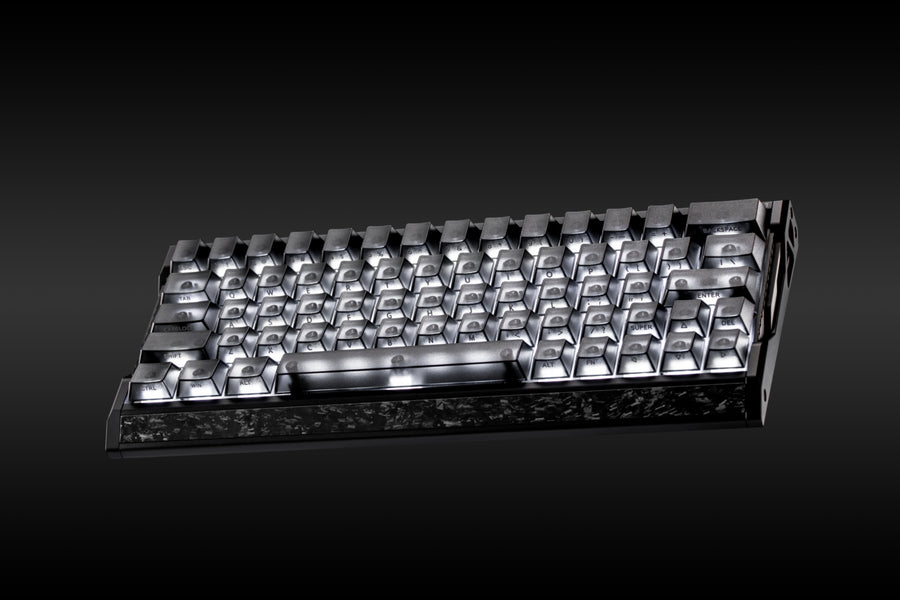
The first thing the reviewer noticed was the look. In the video, Migss calls the side and front profile “so good” and points to the forged carbon fiber trim as the star of the design. The rest of the body is CNC machined aluminum. IQUNIX mixes the two materials so the board feels dense and clean rather than flashy.
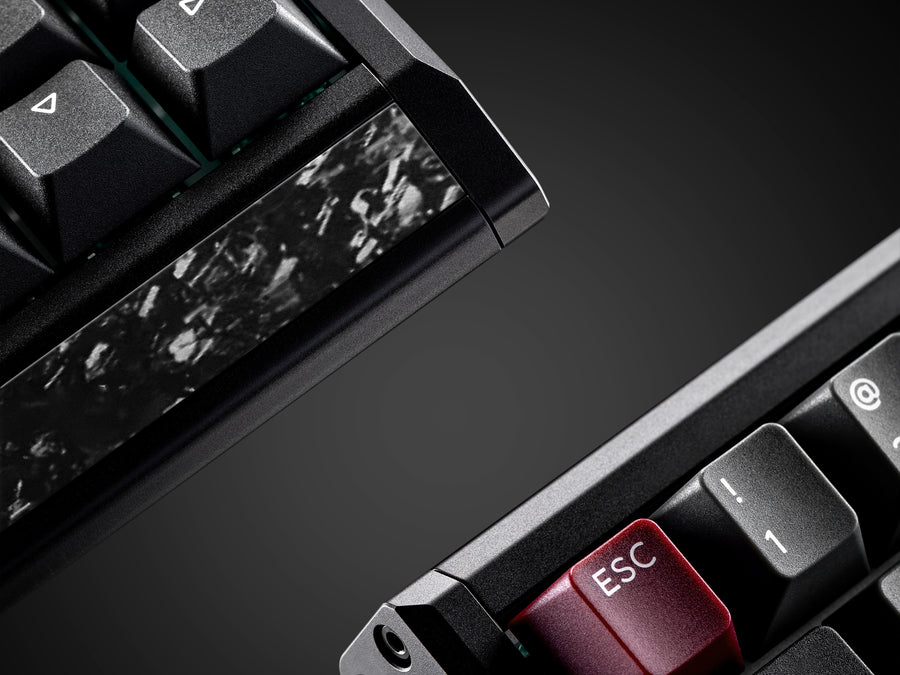
Weight backs up that impression. IQUNIX lists the EV63 at 1206 g, while Migss quotes about 1,171 g for his unit. Either way, this is a heavy board that stays put on a desk during fast flicks and mouse swipes. The footprint is 300.9 x 126 mm, with an 18.6 mm front height.
Colors and variants
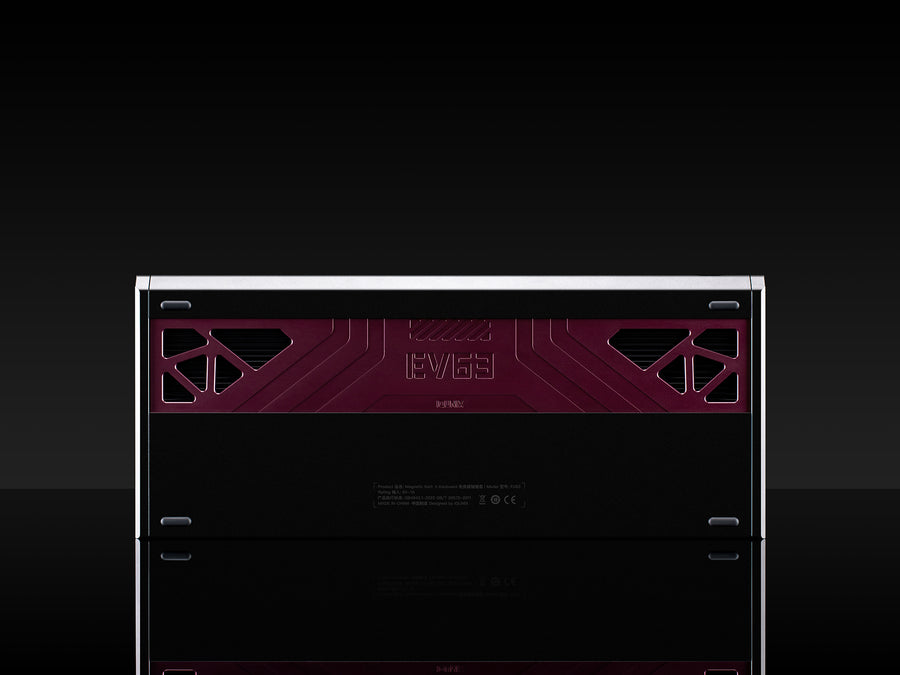
There are three finishes. The Violet model is the dark purple version with double-shot PBT keycaps. The Dark Knight and Silver Knight models use frosted translucent PC keycaps, which Migss says resist fingerprints because of the frosted finish. IQUNIX marketing images also label these as Dark Side RS and Silver Blade RS. Pick based on your desk setup, because the performance is the same across the range.
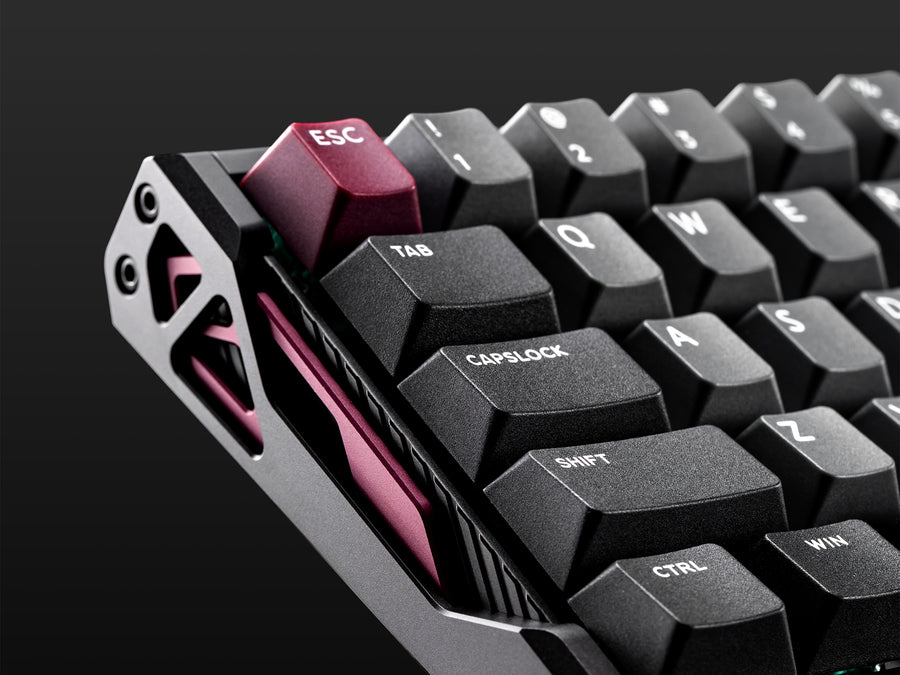
ProSettings praises the heavy, solid feel but calls the design “aggressive”, with race-car-style cutouts on the sides. That look will not suit everyone. It also reported that the carbon fiber front plate on the Violet and Dark Knight versions was loose on its unit. Treat that as a possible quality-control issue and test the board as soon as it arrives.
What is in the box
Migss describes the packaging as simple and secure. The box holds more cleaning accessories than most people will need. ProSettings lists a brush, a combined switch and keycap puller, a USB-C to USB-A cable and documentation. Neither review mentions spare switches, which would have been a welcome extra for a hot-swap board.
Switches, Keycaps and Hot-Swap
The EV63 ships with Magnetic X Pro switches by default. A Magnetic X Ultra option adds about $20. Migss reviewed the X Pro version and remembered the X Ultra from the earlier IQUNIX EZ80. The X Pro switch feels smooth, with a closed bottom and very little stem wobble. IQUNIX claims a 30% stronger magnetic flux than its standard magnetic switches.
That flux claim matters for sensing accuracy. A stronger magnet gives the Hall sensor a cleaner signal, which helps with fine 0.01 mm adjustments. Treat the number as a manufacturer claim.
Hot-swap compatibility
The PCB is hot-swappable. Migss says the switches are structured much like Gateron Jade Pro and TTC KOM types, so similarly structured Hall effect switches should also work. Always check a switch pinout and stem design before buying a set, because magnetic switches are not interchangeable with regular mechanical ones.
Keycaps
The frosted translucent PC keycaps make the RGB glow brighter and look great on a dark desk. The double-shot PBT set on the Violet version is the better pick if you prefer a classic textured feel. ProSettings notes that the Knight versions print the legends on the front of the keycaps.
Sound and Typing Feel
Sound is where the EV63 impressed the reviewer most. In the video, Migss calls it IQUNIX’s best-sounding magnetic keyboard so far and “very smooth and on the softer side”. He credits a mix of the new X Pro switches, the well-lubed stabilizers and the aluminum and forged carbon case.
Stabilizers and plate
The stabilizers are not rattly, and Migss could see silicone and a good amount of lube inside. He also likes the reflective plate, which should make the RGB look brighter. ProSettings agrees on the sound and stabilizer quality and reports no case ping.
A different view on feel
Typing feel is subjective. ProSettings praised the stabilizers and sound, but described the overall feel as stiff. That fits a dense aluminum case. If you like a soft, bouncy board, try a rubber-dampened competitor instead. If you want a solid, thocky board, the EV63 should be a good fit.
Performance and Latency
On paper, the EV63 has everything a competitive player wants. It offers adjustable actuation, a 0.01 mm rapid trigger step, 8000 Hz polling and a 16000 Hz scan rate. IQUNIX also claims a 0.125 ms latency figure. Marketing numbers like that are not measured the same way as third-party tests, so the video test is more useful.
The OSLTT result
Migss measured the keyboard with the Open Source Latency Testing Tool (OSLTT). The tool times the gap between keycap contact and the moment the computer receives the signal. He recorded 0.737 ms. In his chart, that made the EV63 the fastest non-TMR Hall effect keyboard he had tested, and slightly faster than the Wooting 60HE ATE he lists, which he expects to perform much like the 60HE v2.
He also adds a sensible caveat. You will not feel a difference of a fraction of a millisecond. Unless a gap is around 5 to 10 ms, players will not notice it, and modern magnetic keyboards are already very close. He also warns that results can vary with test conditions.
Valorant gameplay
In the gameplay section, Migss played Valorant in a Radiant and Immortal ranked lobby. His verdict is that keys actuate as soon as he presses and release as soon as he lets go. He reported no issues and no double clicks on the space bar, even with sensitive settings on his gaming profile. That is useful, because very low actuation points can cause accidental inputs on poorly tuned boards.
Some games and events restrict SOCD features such as Snappy Tappy. PC Gamer warns that this kind of setting can get you banned in certain games, CS2 among them. Check the rules of your game and event before enabling them.
EV Software V3 and Features
The EV63 uses IQUNIX’s web-based EV Software V3, so there is nothing to install. You open the IQUNIX site, go to the user guide and software page, pick the EV63 and click Get Started. The keyboard is detected over USB, and the key map screen appears. IQUNIX lists support for Windows and macOS.
Profiles, remapping and actuation
Migss calls this the best software version IQUNIX has shipped. All three profiles can now be customized, where earlier versions only let you edit the custom profile. You can remap keys, assign profile-switching combinations and toggle SOCD. For actuation, you can switch modes and go as low as 0.01 mm, then add a bottom safety zone to avoid unwanted bottom-out triggers.
Pro keys, macros and calibration
The Pro Keys tab covers SOCD, Rapid Snappy, Mod Tap, a toggle key and DKS (dynamic keystrokes). ProSettings notes that up to four actions can be bound to a single key, and that macros and three onboard profiles are supported. There is also a quick calibration tool, an N-key rollover toggle and a firmware update check. Migss ran a quick calibration before his tests.
Software limits
The software is not perfect. ProSettings found the pro presets unfinished and the crosshair section unrelated to a keyboard. Lighting cannot be saved per profile, and RGB effects cannot be layered. Colors also looked slightly desaturated to ProSettings, even though Migss found the lighting “very bright and vibrant” through the translucent keycaps. Neither reviewer found a gamepad mode, which Wooting offers.
Daily Use: Layout, Typing and Gaming
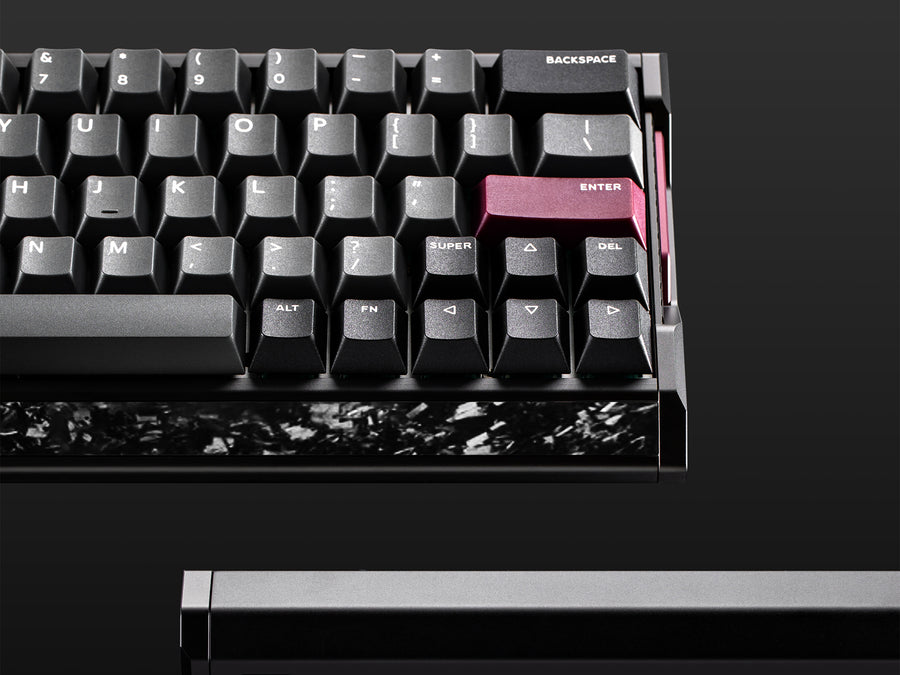
The layout is a big part of why the EV63 works as a daily driver. A strict 60% board forces you to use Fn layers for arrows and Delete. The EV63 keeps both keys on the main layer. Migss uses the arrow keys and the Delete key a lot when editing and browsing, so he appreciated them.
He also found the board comfortable for typing. In his words, the sound and the stabilizers made typing a pleasure, and the case helped. For office work, a heavy and quiet board with a soft sound profile is a real bonus. ProSettings reached a similar conclusion on typing quality, even if it found the feel stiff.
Who benefits from the compact 63% layout
Players with limited desk space and large mouse swipes get the biggest gain. A narrower board leaves more room for your mouse arm. If you need a function row or a numpad, look at a 75% or full-size alternative instead. We cover several in our reviews of the MCHOSE Ace 75, the AULA AG75 Pro and the AULA F99.
Price and Competition
Price is where the video and the market have moved apart. Migss quoted about $160 for the Violet model and $179 for the Dark Side RS version with his code, and compared it to the Wooting 60HE+. He also said the Wooting 60HE v2 price was not out yet. As of October 2026, the IQUNIX store lists the EV63 at $169 for Violet with X Pro switches, and up to $209 for the Knight models with X Ultra switches.
| Variant | Switch | Official price |
|---|---|---|
| Violet | Magnetic X Pro | $169 |
| Violet | Magnetic X Ultra | $189 |
| Dark Knight | Magnetic X Pro | $189 |
| Dark Knight | Magnetic X Ultra | $209 |
| Silver Knight | Magnetic X Pro | $189 |
| Silver Knight | Magnetic X Ultra | $209 |
Stock can change quickly, and some variants showed as unavailable on the IQUNIX store when we checked. Verify availability on the store or on Amazon before you plan a purchase.
IQUNIX EV63 vs Wooting 60HE v2
The Wooting 60HE v2 is now on sale. PC Gamer scored it 93 and called it Wooting’s best keyboard yet, with a great typing feel and the Wootility software. It costs more than the EV63, though.
| Feature | IQUNIX EV63 | Wooting 60HE v2 |
|---|---|---|
| Price | $169 to $209 | $139.99 module, $179.99 ABS, $239.99 aluminum |
| Case | CNC aluminum with forged carbon trim | Aluminum or ABS, FR4 plate and Poron foam |
| Layout | 63% with arrow keys and Delete | 60%, layers for some keys |
| Polling | 8000 Hz | 8 kHz through Tachyon Mode (disables RGB) |
| Software | EV Software V3 (web) | Wootility |
| Hot-swap | Yes | Yes, DIY push-fit assembly |
| Wireless | No | No |
| Independent rating | 4.5 out of 5 (ProSettings) | 93 (PC Gamer) |
Migss argued in the video that the EV63 was a “Wooting 60HE killer” at the time of filming, because it offered more aluminum, more weight and a better stock sound at the same price as the older 60HE+. The v2 changes that comparison. Wooting’s pitch is now software polish and a strong typing feel, but at a clearly higher price for the aluminum version.
PC Gamer also points out that if all you need is rapid trigger, cheaper Hall effect boards will do. That applies to the EV63 too. Its real advantage is the case, the sound and the layout, not just the Hall sensors.
Other alternatives
Among other Hall effect or rapid trigger boards, PC Gamer lists the Keychron Q5 HE at $230, the NZXT Function Elite MiniTKL at $190 and the NuPhy Air60 HE at $110. For a lower budget, the YUNZII RT75 Pro and the YUNZII IF68 are worth a look. If you want a Hall effect TKL from a big brand, read our Logitech G Pro X TKL Rapid review, and for another aluminum-class option see the ATK RS6 Ultra review.
Who Should Buy the IQUNIX EV63?
| ✅ Buy it if you want | ❌ Skip it if you need |
|---|---|
| Top-tier latency with a premium aluminum case | Wireless or Bluetooth connection |
| A compact board that keeps arrow keys | A gamepad mode or controller emulation |
| A creamy, quiet sound out of the box | Per-profile RGB saving |
| A web-based tool with no install | A guaranteed perfect fit and finish |
| A price under $200 for the base model | The cheapest possible Hall effect board |
If you are still deciding how much to spend, our guide on how much to spend on a mechanical keyboard helps set a budget. To complete a competitive setup, check our gaming mouse buying guide, the Logitech G Pro X Superlight 2 review and the OLED gaming monitor comparison.
Our Verdict on the IQUNIX EV63
The EV63 delivers what most players want from a Hall effect keyboard: fast response, flexible actuation, a heavy and attractive case and a sound that beats many pricier boards. The 0.737 ms OSLTT result in the video backs up the speed claim, while Migss reported no issues during his ranked Valorant play and daily use. That last point comes from a single reviewer, so keep it in perspective.
It is not flawless. You cannot use it wirelessly, the lighting settings are limited and one independent reviewer found a loose trim piece. If those points do not bother you, the EV63 is easy to recommend, and it makes the most sense against a Wooting 60HE v2 if budget and looks matter as much as software polish.
IQUNIX EV63 FAQ
Is the IQUNIX EV63 worth buying?
Yes, for most players who want a fast, wired Hall effect keyboard. It offers 0.01 mm rapid trigger, 8000 Hz polling, a heavy aluminum and forged carbon case and a smooth sound, starting at $169. ProSettings rated it 4.5 out of 5. The main trade-offs are the lack of wireless and limited lighting options.
Is the IQUNIX EV63 better than the Wooting 60HE v2?
It depends on your priorities. The EV63 costs less ($169 to $209 against $139.99 to $239.99 for the Wooting) and keeps the arrow keys. The Wooting 60HE v2 scored 93 at PC Gamer and is praised for Wootility software and typing feel. Choose the EV63 for price, case design and layout, and the Wooting for software polish.
How low can the EV63 rapid trigger go?
IQUNIX lists a rapid trigger sensitivity of 0.01 mm and an adjustable actuation point that can also go as low as 0.01 mm in the software. In the video, Migss used a very sensitive profile and had no double-click problems on the space bar.
What is the difference between Magnetic X Pro and Magnetic X Ultra switches?
Magnetic X Pro is the default switch, and Magnetic X Ultra is a higher-tier option that adds about $20 to the price. IQUNIX claims the X Pro has a 30% stronger magnetic flux than its standard magnetic switches. Migss reviewed the X Pro and did not test the Ultra on this board.
Is the IQUNIX EV63 wireless?
No. The EV63 is wired only and connects over USB-C. The keyboard ships with a USB-C to USB-A cable, and it does not have a Bluetooth or 2.4 GHz mode or a gamepad mode.
Does the EV63 software work on Mac?
IQUNIX lists EV Software V3 for Windows and macOS. It runs in a web browser, so you do not install any program. You open the IQUNIX software page, choose the EV63 and connect the keyboard to start customizing.
Can I change the switches on the EV63?
Yes. The PCB is hot-swappable, so you can replace switches without soldering. Migss says it should accept switches with a similar structure to Gateron Jade Pro or TTC KOM types. Check compatibility before buying a switch set.
How much does the IQUNIX EV63 weigh?
IQUNIX lists 1206 g for every variant. Migss quoted about 1,171 g for his unit in the video, so weight can vary slightly between sources. Either way, it is a heavy and stable keyboard.