AULA Neos 75 Review: Is the $299 Hi-Fi Deck Keyboard Worth It?
The AULA Neos 75 is a $299 low-profile 75% keyboard with a one-piece CNC aluminum body, aluminum keycaps, a 2.3-inch color screen and a small hi-fi style console of metal knobs and round buttons on the right. It is the first product from AULA.New Renaissance, an in-house team that wants to move the brand well beyond its budget boards, and it looks unlike anything else in the 75% category.
This guide covers the specs, the design, the screen and knobs, the switches, software, battery, pricing and availability, and how the Neos 75 compares with AULA’s cheaper boards such as the AULA F75 Pro and AULA F99.
How we built this review. It combines the official listing on AULA’s store, product-page details from AULA’s regional sites, the launch coverage from Yanko Design, a preview from Poto, and the Specs In Reality Short on the keyboard’s console, plus two longer videos from AULA and The Best Picked. Every specification and opinion below is credited to its source, and hands-on testing of production units is still limited, so we flag where reports differ.
AULA Neos 75: Specs and Quick Verdict
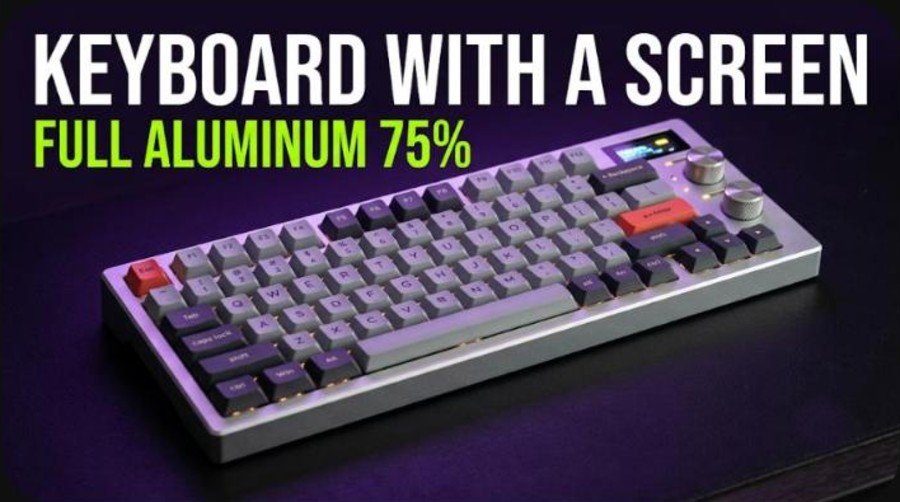
⚙️ Quick Specifications
AULA Neos 75 specifications
| Spec | Details |
|---|---|
| Layout | 75% compact, 84 keys |
| Dimensions | 372.8 x 122.3 x 29.65 mm (console included) |
| Weight | About 1,077 g |
| Case | One-piece CNC-machined aluminum; Venus Silver, Selene Gray, Hades Black, Athena White |
| Keycaps | Custom low-profile aluminum |
| Switches | AULA x Kailh custom low-profile: Feiyun Linear, Chayun Long-Pole (tactile), Jingyun Light-Sound (silent) |
| Switch details | 2.8 +/- 0.25 mm total travel; actuation force 35 to 50 gf depending on switch and key |
| Hot-swap | All keys |
| Mounting and sound | Gasket mount with PORON, IXPE and PET layers |
| Screen | 2.3-inch color display, 480 x 360, proximity wake-up |
| Controls | Removable damped metal volume knob (press to mute), screen knob, rewind, pause and skip buttons, NEOS button |
| Connectivity | 2.4 GHz receiver (magnetic storage), Bluetooth, USB-C |
| Polling rate | 1,000 Hz wired and 2.4 GHz; 125 Hz Bluetooth |
| Battery | 4,200 mAh with NTC charging protection |
| Software | A HUB 3.0 and VIA; Windows, macOS, Linux, Android |
| Price | $299 at AULA’s store; about 1,299 yuan China pre-order price |
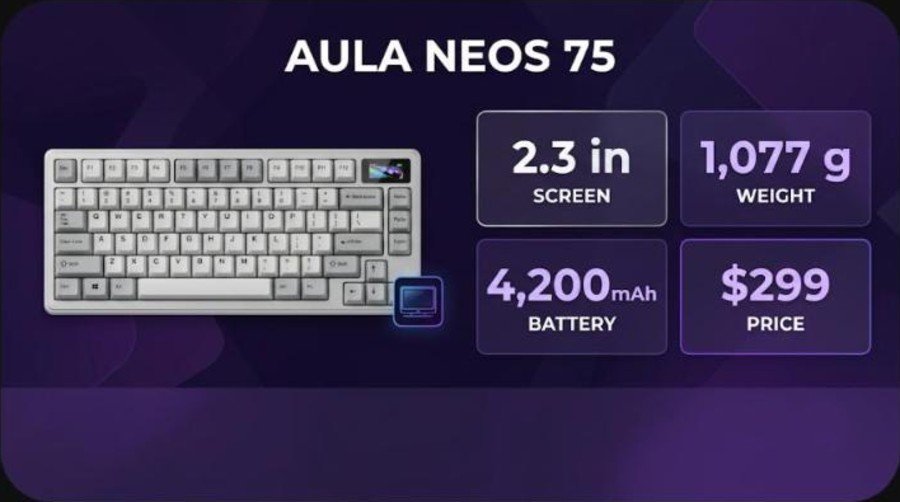
The Good and the Bad
👍 The Good
- ✔ A one-piece CNC aluminum body and aluminum keycaps feel like a different class from AULA’s plastic budget boards.
- ✔ The 2.3-inch screen shows the clock, battery, your own pictures and even a calculator without any software open.
- ✔ Three connection modes, a 4,200 mAh battery and VIA support make it practical for daily work.
- ✔ Hot-swap sockets and three Kailh low-profile switch types give some room to tune the feel.
- ✔ Gasket mounting with six dampening layers aims for a controlled sound.
👎 The Bad
- ✘ At $299 it costs several times more than AULA’s usual boards, and the brand has little track record at this price.
- ✘ The console is fixed, so you pay for the screen and knobs whether you want them or not, and you cannot add a numpad.
- ✘ Stock is tight: AULA says the first batch of 200 units sold out in 16 minutes and most colors were sold out on its store.
- ✘ Reviews of production units are scarce, so typing feel, sound and battery life still need independent confirmation.
- ✘ Some Chinese forum users described the console as a lump, and the Renaissance-themed marketing divides opinion.
The Neos 75 is for people who want a desk object first and a keyboard second. If you only want a great low-profile 75%, cheaper boards deliver most of the typing experience, but none of them has an aluminum shell and a hi-fi console.
Neos 75 vs AULA’s Other 75% Keyboards
AULA built its name on affordable gasket-mount boards such as the F75 Pro, which our review pegs at around $70 for a wireless 75% keyboard. The Neos 75 is the brand’s first four-figure product in yuan, and its global price of $299 puts it in premium territory shared by NuPhy and Lofree rather than by the usual AULA rivals.
| Feature | Neos 75 | AULA budget 75% boards |
|---|---|---|
| Case | One-piece CNC aluminum | Typically plastic or mixed materials |
| Keycaps | Low-profile aluminum | Plastic keycaps |
| Display and knobs | 2.3-inch screen, metal knobs, media buttons | None |
| Mounting | Gasket with 6 dampening layers | Gasket or standard mounts |
| Price | $299 | Typically under $100 |
| Availability | Limited batches | Widely stocked |
Yanko Design compares it with the NuPhy Air75 and Lofree Flow and points out that neither combines a screen, metal knobs and aluminum keycaps. If you want a less expensive AULA with magnetic switches, our AULA AG75 Pro review covers a different approach.
What Is in the Box
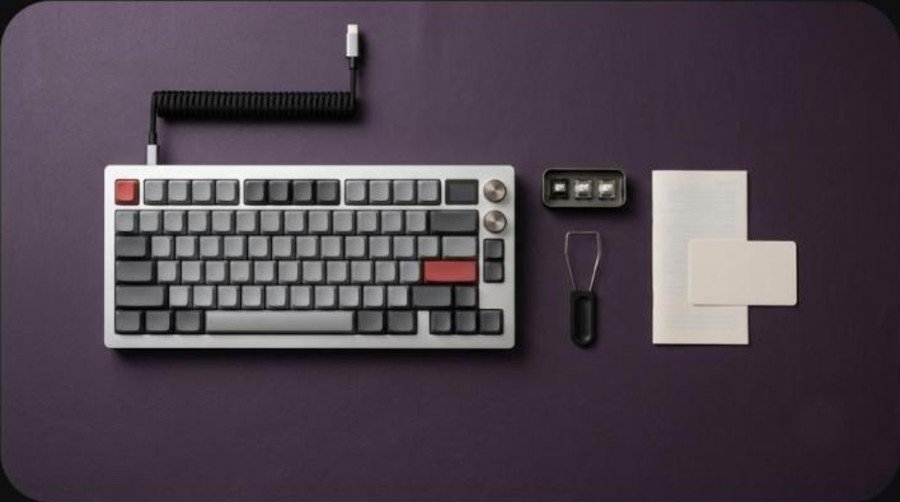
AULA’s official store lists the contents clearly: the keyboard, three spare switches of the same type, a 1.5 m USB-C cable, a keycap puller, a user manual, a warranty card and a quality inspection certificate. The 2.4 GHz receiver is stored in a magnetic compartment inside the keyboard, so it is not a separate box item.
The warranty is one year for orders placed through the official store, and AULA promises a free brand-new replacement if a unit becomes unusable within 15 days of delivery. Buying from third-party sellers may not carry the same terms.
Design and Build Quality
One block of aluminum
The chassis is CNC-machined from a single piece of aluminum. AULA offers four finishes named after deities: Venus in anodized silver, Hades in anodized black, Selene in anodized gray and Athena in electrophoretic white. Yanko Design notes that Venus is a Roman name rather than a Greek one, which tells you how much of the launch is about storytelling.
At about 1,077 g and 372.8 mm wide, this is a heavy low-profile board. The body is only 29.65 mm thick including the console, and AULA says a custom curve runs across the letter keys. Fold-out feet adjust the typing angle.
Aluminum keycaps and playful legends
The keycaps are aluminum as well, with flat edges and a gentle curve in the center. Yanko Design points to playful lowercase legends such as ho.me and p.up, an Enter key that reads Reason and Emotion, and text running along the spacebar. The look draws on Braun, Teenage Engineering’s OP-1 and museum-style minimalism. If you are curious how metal compares with PBT, our keycap materials guide explains the trade-offs between hard materials and plastic.
Video: AULA’s own teaser for the Neos 75. This is the manufacturer’s film, so read it as marketing rather than a test.
The Hi-Fi Console: Screen, Knobs and Buttons
The right side carries what Specs In Reality calls a tiny hi-fi deck, though there is no speaker in it. It is a keyboard first, and the console handles quick actions instead of sound.
The 2.3-inch color screen
The display measures 2.3 inches with a 480 by 360 resolution. It shows the clock, the battery level, artwork or your own picture, and a built-in calculator, and a proximity sensor wakes the screen and lighting when your hand approaches after a period of inactivity. AULA’s regional page lists the visible area as 46.75 by 35.06 mm, so think of it as a glance-at screen rather than a second monitor.
Two knobs and three round buttons
The upper slotted metal knob is removable and damped and controls system volume, and pressing it mutes. The lower knob cycles screen pages and opens the calculator. Three round metal buttons handle rewind, pause and skip, alongside a pill-shaped NEOS button, and every control is remappable in AULA’s driver.
Poto’s preview says the console apparently cannot be removed, so you cannot swap it for a numpad. Some Chinese forum users also described it as a lump, which is the most divisive part of the design.
Switches, Typing Feel and Sound
AULA developed custom low-profile switches with Kailh in three flavors. Feiyun Linear is smooth with no tactile bump, Chayun Long-Pole is the tactile option with a more pronounced bottom-out, and Jingyun Light-Sound is the quiet option for shared spaces. All three have 2.8 mm of total travel, with actuation forces between 35 and 50 gf depending on the switch and the key size.
The store listing lists the colors as Venus (Linear), Selene (Tactile), Athena (Linear) and Hades (Silent), while the product page describes the three switch names separately, so the exact mapping between color and switch is not fully clear. Check the switch type on the page before you order.
Gasket mount and dampening
The typing assembly sits on a gasket mount, and AULA stacks PORON foam, an IXPE switch pad and PET sheets, which the store counts as six layers. The Specs In Reality Short mentions five layers of foam, so the count differs between sources. Poto reports that people who handled engineering samples described the feel as excellent, while cautioning that production units may not match.
Low-profile switches have a shorter stem and a lower key height than standard ones. That means a flatter wrist angle and a crisper, shallower sound than a tall custom board. If you have not used low-profile keys before, our guide on how much to spend on a mechanical keyboard explains where the money goes.
Software, Connectivity and Battery
A HUB 3.0 and VIA
The Neos 75 works with AULA’s A HUB 3.0 software for key remapping, shortcuts and lighting on Windows and macOS, and it is VIA compatible. AULA also lists Linux and Android support but warns that available functions vary by operating system. The screen, knobs and buttons are all remappable.
2.4 GHz, Bluetooth and wired
The board connects over a 2.4 GHz receiver, Bluetooth or a 1.5 m USB-C cable. The receiver lives in a magnetic compartment. Polling is 1,000 Hz over wired and 2.4 GHz and 125 Hz over Bluetooth, according to AULA’s regional page, so keep competitive games on the receiver.
4,200 mAh battery
A 4,200 mAh cell sits in its own compartment and has NTC charging protection. AULA does not publish a runtime, and says real battery life depends on the connection mode, the screen settings and how you use the keyboard. Because the screen and the proximity wake-up draw power, expect shorter runtimes than a similar board without a display.
Price, Availability and Alternatives
AULA’s own store lists the Neos 75 at $299, while another AULA regional page shows $279.90 and says pre-orders ship from mid-November to early December. China pre-orders opened October 23 at about 1,299 yuan, roughly $180, down from a list price near 1,599 yuan, according to Yanko Design. The global launch followed in early November, and the Specs In Reality Short gives the launch date as November 2.
Stock is the bigger problem than price. AULA’s blog says the first batch of 200 units sold out in 16 minutes, and the store page showed only the Athena linear model in stock at the time of writing, with the other finishes sold out and a restock subscription offered.
Video: The Best Picked walks through what AULA has announced about the Neos 75. It is an overview of announced features, not a long-term test. The channel earns commission from tagged products.
| Keyboard | Style | Why you might pick it |
|---|---|---|
| AULA Neos 75 | Aluminum low-profile 75% with screen | You want a statement desk piece |
| NuPhy Air75 | Low-profile 75% | Compared with the Neos 75 by Yanko Design |
| Lofree Flow | Low-profile 75% | Compared with the Neos 75 by Yanko Design |
| AULA F75 Pro | Budget gasket 75% | See our review |
| AULA F99 | Budget wireless | See our review |
If you prefer standard-height switches in a premium aluminum shell, the IQUNIX EC75, the Wobkey Rainy 75 Pro and the MCHOSE Ace 75 are other 75% boards we have reviewed, and the Yunzii IF68 covers a smaller layout.
Verdict: Who Should Buy the AULA Neos 75?
| Buy it if | Skip it if |
|---|---|
| You want an all-aluminum low-profile 75% that doubles as a desk centerpiece. | You only need great typing at a fair price, because AULA’s own cheaper boards cover that. |
| You like the idea of a screen and volume knob without extra software. | You want a numpad option or a console you can remove. |
| You are happy to buy an early product from a brand moving upmarket. | You need proven reliability and long-term support at this price. |
| You value 2.4 GHz, Bluetooth and VIA support in one board. | You cannot wait for restocks of a limited batch. |
The Neos 75 is a bold first attempt at a premium board, and the hardware list is impressive for $299. What is missing is time: independent testing of production units, real battery numbers and a record of quality control at this price. If those matter, waiting for a few more hands-on reviews is the safer move; if the design alone sells you, it is one of the most distinctive keyboards you can buy.
Frequently Asked Questions (FAQ)
What is the AULA Neos 75?
It is a 75% low-profile mechanical keyboard from AULA with a one-piece CNC aluminum body, aluminum keycaps, a 2.3-inch color screen and a console of metal knobs and media buttons. It costs $299 at AULA’s store.
How much does the AULA Neos 75 cost?
AULA’s store lists it at $299. Another AULA regional page shows $279.90, and China pre-orders opened at about 1,299 yuan, roughly $180.
What switches does the AULA Neos 75 use?
It uses AULA and Kailh custom low-profile switches in three types: Feiyun Linear, Chayun Long-Pole tactile and Jingyun Light-Sound silent, all hot-swappable with 2.8 mm of travel.
Does the AULA Neos 75 have a screen?
Yes. It has a 2.3-inch color display with 480 by 360 resolution that shows the time, battery level, pictures and a calculator, plus a proximity sensor that wakes it as your hand approaches.
Is the AULA Neos 75 wireless?
Yes. It supports 2.4 GHz, Bluetooth and wired USB-C connections, with a 4,200 mAh battery. Polling is 1,000 Hz wired and 2.4 GHz and 125 Hz over Bluetooth.
Can I remove the console on the AULA Neos 75?
The console appears to be fixed to the keyboard, according to a preview from Poto, so you cannot swap it for a numpad. All its controls can be remapped in AULA’s software.
Does the Neos 75 support VIA?
Yes. AULA lists A HUB 3.0 and VIA compatibility for remapping, shortcuts and lighting, with some functions varying by operating system.
Is the AULA Neos 75 in stock?
Stock is limited. AULA says its first batch of 200 units sold out in 16 minutes, and its store showed only one finish in stock with a restock subscription for the others.