Keychron K8 HE All-Wood Edition Review: Is the $199.99 Walnut Keyboard Worth It?
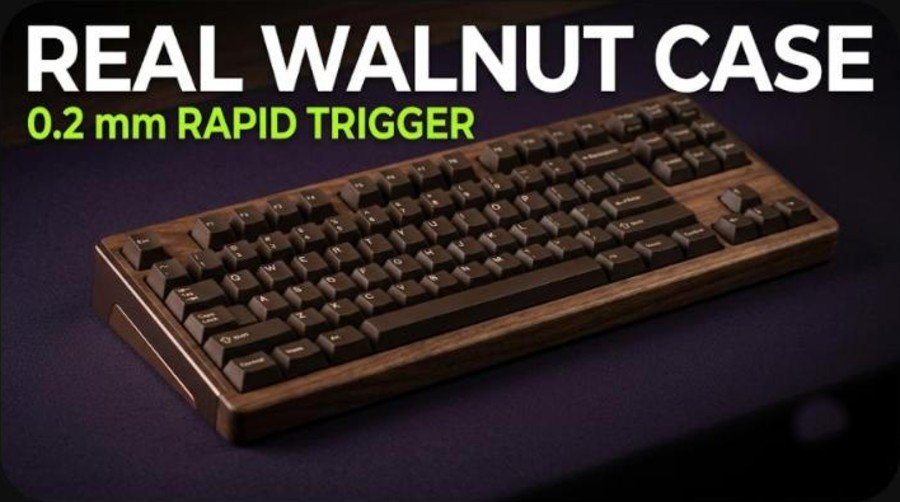
The Keychron K8 HE All-Wood Special Edition takes one of the most popular magnetic-switch tenkeyless boards of the past two years and swaps its metal case for a solid walnut frame. It costs $199.99, weighs 1,009 g, and keeps the Gateron double-rail magnetic switches, Rapid Trigger and wireless options of the standard K8 HE. The question is whether a wooden body is worth roughly $60 to $70 over the regular models.
This guide covers the specs, the design, how the switches and software behave, battery life, the price, and how the board stacks up against other Hall effect keyboards we have covered, such as the IQUNIX EV63 and Wooting 60HE+ and the Attack Shark X68 HE.
How we built this review. It combines the official specifications on Keychron’s product page, launch coverage from Notebookcheck, Yanko Design and The Gadgeteer, the Windows Central review of the standard K8 HE, and two videos: Keychron’s own walkthrough and an owner overview from the AZ Logan Gaming channel. Every measurement and opinion below is credited to its source, and since independent tests of the walnut model are still thin, the standard K8 HE reviews fill in the typing and software experience.
Keychron K8 HE All-Wood Edition: Specs and Quick Verdict
⚙️ Quick Specifications
Keychron K8 HE All-Wood Special Edition specifications
| Spec | Details |
|---|---|
| Model | Keychron K8 HE Wireless Magnetic Switch Custom Keyboard, All-Wood Special Edition (K8H-F1W) |
| Layout | 80% TKL, ANSI |
| Dimensions | 365.94 x 133.13 mm |
| Height | Front 35.82 mm with keycaps (27.34 mm without); rear 43.38 mm with keycaps (34.21 mm without) |
| Typing angle | 4 degrees, fixed feet |
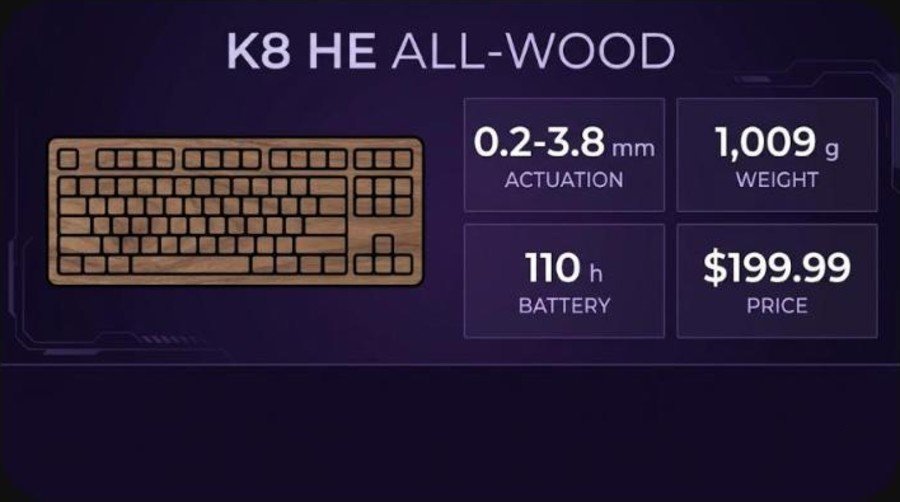
| Weight | 1,009 g |
| Case | Walnut frame and bottom case, CNC aluminum side panels, aluminum plate |
| Switches | Gateron double-rail magnetic Nebula, pre-lubed, hot-swappable (Keychron magnetic switches only) |
| Actuation range | 0.2 to 3.8 mm, 0.1 mm steps |
| Features | Rapid Trigger, Dynamic Keystrokes (up to 4 actions per key), Analog Mode, Last Key Priority, Snap Click |
| Keycaps | OSA-profile double-shot PBT, deep brown, not shine-through; extra Mac and Windows keycaps |
| Stabilizers | Screw-in PCB stabilizers |
| Sound dampening | 3.5 mm EVA foam, EPDM foam, PET film |
| Connectivity | 2.4 GHz, Bluetooth 5.2 (up to 3 devices), wired USB-C |
| Polling rate | 1,000 Hz (wired, 2.4 GHz), 125 Hz (Bluetooth) |
| Battery | 4,000 mAh Li-polymer, up to 110 hours (backlight off) |
| Backlight | North-facing RGB, 22+ modes |
| Firmware and software | QMK, Keychron Launcher (Chrome, Edge or Opera, wired mode) |
| Price | $199.99 |
The Good and the Bad
👍 The Good
- ✔ A real walnut frame and bottom case make this one of the most distinctive Hall effect boards at its size.
- ✔ At 1,009 g it is lighter than the standard K8 HE, which Notebookcheck lists at about 1,185 g.
- ✔ Per-key actuation from 0.2 to 3.8 mm and Rapid Trigger match the gaming features of far more expensive boards.
- ✔ Three connection modes, three Bluetooth profiles and a 4,000 mAh battery make it a flexible daily driver.
- ✔ Windows Central and The Gadgeteer both rate the standard K8 HE highly for typing feel, sound and build.
👎 The Bad
- ✘ At $199.99 it costs $60 to $70 more than the standard and wood-trim K8 HE models.
- ✘ The aluminum side panels make the name All-Wood a slight stretch, as Yanko Design points out.
- ✘ Hot-swap works only with Keychron magnetic switches, so third-party switch experiments are limited.
- ✘ The Launcher software needs a wired connection and a Chromium browser, and Windows Central found it frustrating.
- ✘ The keycaps are opaque, so the legends do not light up, and the included cable is short.
The K8 HE All-Wood is for people who want a magnetic-switch keyboard that looks like furniture. If you only care about Rapid Trigger and sound, the $129.99 standard model delivers the same switches for far less.
K8 HE All-Wood vs the Standard K8 HE: What Changed
The All-Wood edition is a case swap, not a new platform. Keychron launched the standard K8 HE at $129.99 and a wood-trim Special Edition at $139.99 in May 2025, according to Notebookcheck. The new All-Wood model replaces the standard case with a walnut body and keeps the switches, features and wireless hardware.
| Feature | K8 HE Standard | K8 HE Special Edition (wood trim) | K8 HE All-Wood |
|---|---|---|---|
| Price | $129.99 | $139.99 | $199.99 |
| Case | Aluminum frame | Aluminum with wood trim on each end | Walnut frame and bottom, aluminum side panels |
| Weight | About 1,185 g | Not listed in our sources | 1,009 g |
| Switches | Gateron double-rail magnetic Nebula | Same | Same |
| Layout | 80% TKL | 80% TKL | 80% TKL |
| Wireless | 2.4 GHz, Bluetooth, USB-C | Same | Same |
The weight gap is the surprising part. Most buyers would expect a wooden board to feel lighter than a full aluminum one, and that is exactly what the numbers say: 1,009 g against roughly 1,185 g. It is still a heavy keyboard by any normal standard, so it will not slide around the desk.
What Is in the Box
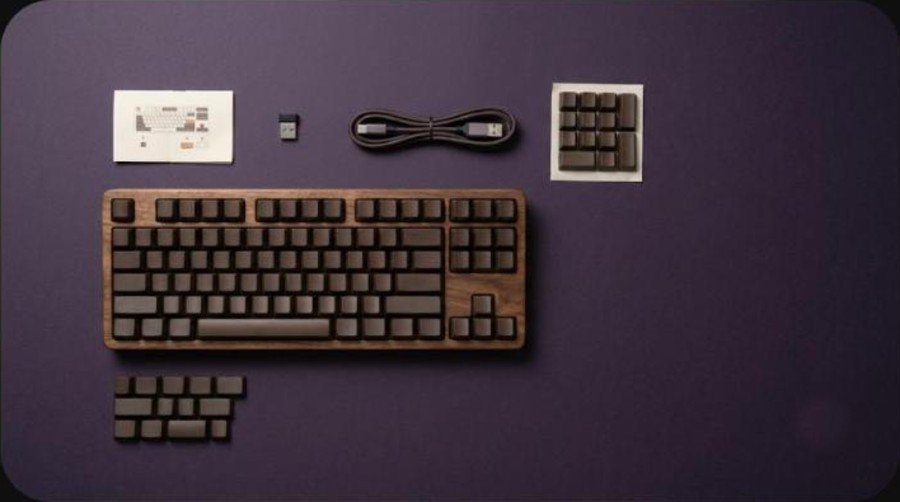
Keychron’s product page has a What’s in the Box heading but does not list the contents in the text we could read. Launch coverage confirms deep-brown OSA keycaps plus extra Mac and Windows keycaps and a system toggle for switching between the two layouts. Windows Central notes that the USB cable bundled with the standard K8 HE is on the short side, and the 2.4 GHz mode relies on a USB receiver, so expect a cable, a receiver, the extra keycaps and the quick start paperwork.
Keychron also says the boards ship with the double-rail magnetic switches already installed and pre-lubed. Because hot-swapping is limited to Keychron’s own magnetic switches, there is no point looking for a switch puller to use with third-party parts.
Design and Build Quality
Walnut frame, aluminum accents
The frame and bottom case are walnut, finished with a coating that Notebookcheck says resists sweat and moisture and will develop a patina over time. Brown CNC-machined aluminum panels sit along the sides, and an aluminum plate sits inside the case. Keychron points out that the grain differs from board to board, so no two units look quite the same.
Yanko Design liked the walnut look but raised two fair objections. The aluminum sides make the All-Wood name a stretch, and the dark brown opaque keycaps will not show legends in a dark room. The same piece notes that the tenkeyless layout drops the number pad, which matters for spreadsheet work.
Size, weight and typing angle
The board measures 365.94 by 133.13 mm. The front edge is 27.34 mm tall without keycaps and 35.82 mm with them, rising to 43.38 mm at the back with keycaps. The feet are fixed at 4 degrees, so there is no flip-out adjustment. At 1,009 g it is a substantial desktop object, though lighter than the aluminum K8 HE.
The Gadgeteer called the standard K8 HE tanky and praised the solid aluminum frame, and the owner in the AZ Logan Gaming video also describes the metal frame as nice and heavy. The wood model trades some of that metal feel for warmth, and Keychron’s page offers no care instructions beyond the note about unique grain.
Keycaps and stabilizers
The keycaps are OSA-profile double-shot PBT in deep brown, and Keychron states that they are not shine-through. If PBT versus ABS matters to you, our keycap materials guide explains why double-shot PBT stays smooth longer. The stabilizers are screw-in PCB units, which is what enthusiasts prefer for a rattle-free spacebar.
Video: Keychron presents the K8 HE All-Wood Special Edition. This is the manufacturer’s own video, so read it as marketing rather than an independent test.
Typing Feel and Sound
The switches are Keychron’s pre-lubed Gateron double-rail magnetic Nebula type. Inside the case Keychron stacks 3.5 mm EVA foam, EPDM foam and PET film to deaden the hollow ping that many tenkeyless boards have. The owner in the AZ Logan Gaming video describes the standard model as a smooth linear key that sounds pretty good and feels very good, and he notes that Keychron itself calls the sound creamy.
Windows Central praised the typing experience and acoustics of the K8 HE family and said the 80% layout feels well balanced. The Gadgeteer reviewer found the keypresses satisfying and the overall feel premium, and said the board would be a main keyboard for anyone who can live without a number pad. The only gripe in that review was that volume lives on function keys instead of a knob.
What the walnut changes
Both reviews above cover the aluminum K8 HE, so the walnut body is the new variable. Wood generally gives a softer, slightly duller note than metal, and the thick foam stack should keep the sound controlled either way. If a rich, thocky sound is the main reason for buying this version, listen to a sound test of the exact All-Wood model before you commit, because case material is only part of what shapes the acoustics.
Rapid Trigger, Actuation and Performance
Video: AZ Logan Gaming reviews the standard K8 HE after a few months of daily use. The reviewer says the video is not sponsored. It covers the aluminum model, so treat it as a view on the switch and software.
Adjustable actuation and Rapid Trigger
Every switch has a magnet and a sensor beneath it, so the board reads travel continuously instead of waiting for a contact to close. Keychron lets you set actuation anywhere from 0.2 to 3.8 mm in 0.1 mm steps. Rapid Trigger resets a key the moment you begin to lift it, which helps with strafing in shooters and fast repeated taps.
The AZ Logan Gaming owner plays Fortnite and runs almost every key at 1 mm, with Rapid Trigger at 0.3 mm. He sets Tab, Caps Lock and the Windows key to the maximum depth so he never fat-fingers a key mid-match, and he says he can feel the difference the Hall effect switches make. Windows Central likewise credits Hall effect switches with reduced latency, better wireless stability and instant response.
Dynamic Keystrokes, Analog Mode and Last Key Priority
Dynamic Keystrokes assigns up to four actions to one key depending on how deep you press, and Analog Mode lets a key behave like a joystick axis for racing or sports games. Last Key Priority and Snap Click are off by default and are switched on in the software. The Gadgeteer found the web configurator easy to use for the actuation point, analog gamepad mode and Rapid Trigger.
The 1,000 Hz polling rate applies to wired and 2.4 GHz connections only. Over Bluetooth the board drops to 125 Hz, so keep competitive gaming on the receiver or the cable.
Gamers who prefer a different footprint can compare this board with the IQUNIX EV63 for a compact 60 percent option or the Logitech G Pro X TKL Rapid for another tenkeyless layout, both of which we reviewed.
Keychron Launcher Software and Customization
The K8 HE runs QMK firmware and is configured through the Keychron Launcher web app, so there is nothing to install. It needs a recent Chrome, Edge or Opera, and the board has to be plugged in by cable. The AZ Logan Gaming owner confirms that it does not work in Firefox, and Windows Central lists the wired-only requirement among its complaints.
Opinions on the interface differ. The Gadgeteer found it simple, and the AZ Logan Gaming owner says the interface is easy and that other keyboard reviewers rank it close to Wooting’s, which he considers the best. Windows Central, on the other hand, called Keychron Launcher a point of frustration. Keychron has also added an AI assistant to Launcher that turns plain-language requests into settings.
Remapping, macros and lighting
Launcher handles key remapping, layers, macros, the actuation and Rapid Trigger settings, and the north-facing RGB backlight. Keychron lists 22+ lighting modes, while the AZ Logan Gaming owner recalls 24 effects and 32 solid colors on his standard board, so the exact count depends on the firmware version. He also found the backlight settings very easy to adjust.
There is a Mac and Windows toggle, extra keycaps for each system and two saved layouts, which makes the board easy to share between a work Mac and a gaming PC. Keep in mind that Keychron does not mention VIA support on this model.
Connectivity, Battery and Layout
2.4 GHz, Bluetooth and wired
You can connect by 2.4 GHz receiver, Bluetooth 5.2 for up to three devices, or USB-C. N-key rollover works wired and wireless. The Gadgeteer mentions that Bluetooth needs an extra pairing step compared with the receiver, and Windows Central says the included cable is too short for many desks.
Battery life
Keychron rates the 4,000 mAh battery at up to 110 hours with the backlight off. Both Notebookcheck and The Gadgeteer point out that this is the manufacturer’s figure, and Windows Central says battery life on the K8 HE is not impressive because per-key RGB drains it. The AZ Logan Gaming owner simply leaves his board plugged in and does not use the wireless modes at all.
The 80 percent layout
The tenkeyless layout keeps the arrow and navigation cluster and drops the number pad. The AZ Logan Gaming owner calls 80 percent his preferred layout because he likes the insert, delete, home, end and page keys, and says 60 percent is the practical choice only when desk space is tight. If you want an even smaller footprint, the AULA F75 Pro and Wobkey Rainy 75 Pro are two 75 percent boards worth a look.
Price, Alternatives and How It Compares
At $199.99 the All-Wood edition costs $60 more than the wood-trim Special Edition and $70 more than the standard K8 HE. Keychron’s own page showed the board as backordered when we checked, with US orders shipping from October 2 and global orders from October 7 according to Notebookcheck. Windows Central’s preferred alternative to the standard K8 HE is the Razer BlackWidow V4 Pro 75 percent, which it says is slightly better.
| Keyboard | Layout | Type | Where it fits |
|---|---|---|---|
| Keychron K8 HE All-Wood | 80% TKL | Hall effect, wireless | Walnut look, 1,009 g, $199.99 |
| Keychron K8 HE Standard | 80% TKL | Hall effect, wireless | Same switches for $129.99 |
| IQUNIX EV63 and Wooting 60HE+ | 60% | Hall effect | See our head-to-head |
| Attack Shark X68 HE | 65-68% | Hall effect | See our review |
| Logitech G Pro X TKL Rapid | TKL | Magnetic | See our review |
If you are still working out how much to spend, read our guide on how much to spend on a mechanical keyboard. For other premium options, the Logitech PRO X2 Rapid, MelGeek Made68 Pro and IQUNIX EC75 reviews show what else the money buys.
Verdict: Who Should Buy the K8 HE All-Wood?
| Buy it if | Skip it if |
|---|---|
| You want a magnetic-switch TKL that doubles as a desk centerpiece. | You only care about Rapid Trigger, which the $129.99 standard model also offers. |
| You split time between Mac and Windows and like the toggle and extra keycaps. | You need backlit legends, because the keycaps are opaque. |
| You want 2.4 GHz and Bluetooth in a heavy, stable board. | You want to experiment with third-party magnetic switches. |
| You like a hands-on web configurator that needs no install. | You often tweak settings wirelessly, since Launcher needs a cable. |
Nothing here changes the core strengths of the K8 HE platform: adjustable actuation, Rapid Trigger, a solid wireless setup and a lot of tuning options for the price. What the wood adds is character, not performance. If that appeals to you, the K8 HE All-Wood is one of the better-looking boards in this class, and our Yunzii IF68 and AULA F99 reviews cover other layouts and price points.
Frequently Asked Questions (FAQ)
What is the Keychron K8 HE All-Wood Edition?
It is a special edition of the Keychron K8 HE tenkeyless Hall effect keyboard with a walnut frame and bottom case, brown CNC aluminum side panels and an aluminum plate. It costs $199.99 and weighs 1,009 g.
How much does the K8 HE All-Wood cost?
Keychron lists it at $199.99. That is $60 more than the wood-trim Special Edition at $139.99 and $70 more than the standard K8 HE at $129.99.
Is the K8 HE All-Wood fully made of wood?
Not entirely. The frame and bottom case are walnut, but the side panels are CNC-machined aluminum and the plate inside the case is aluminum.
What switches does the K8 HE All-Wood use?
It uses pre-lubed Gateron double-rail magnetic Nebula switches with actuation adjustable from 0.2 to 3.8 mm in 0.1 mm steps, plus Rapid Trigger, Dynamic Keystrokes and Analog Mode.
Can I swap the switches on the K8 HE All-Wood?
The board is hot-swappable, but only with the double-rail magnetic switches sold by Keychron. Many third-party magnetic switches are not compatible with its sensor layout.
How long does the K8 HE battery last?
Keychron rates the 4,000 mAh battery at up to 110 hours with the backlight off. Windows Central says real battery life is weaker with RGB on, so expect less with lighting enabled.
What polling rate does the K8 HE All-Wood have?
It polls at 1,000 Hz over USB-C and the 2.4 GHz receiver and at 125 Hz over Bluetooth.
Does the Keychron K8 HE work on Mac and Windows?
Yes. It includes extra keycaps for each system, a system toggle and two saved layouts, and the Launcher web app works with macOS, Windows and Linux.