Best TV and Monitor for GTA 6 on PS5 Pro: Why HDR Beats Hz
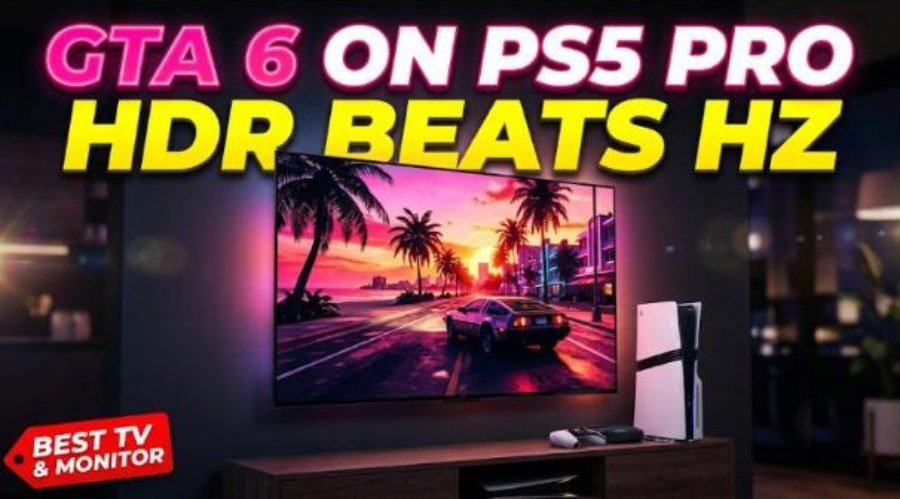
Finding the best TV for GTA 6 on PS5 Pro is not about chasing 120Hz or 165Hz. Grand Theft Auto VI launched on November 19, 2026 with a 30fps target on every console, including the PS5 Pro. That changes the shopping list. HDR brightness, contrast and motion handling now matter far more than refresh rate.
This guide explains why, then picks the best TVs and monitors for GTA 6 at every budget. It also covers the settings that make the biggest difference once your new screen is on the wall.
How we built this guide: the picks and test figures come from RTINGS’ current best TV and best monitor lists for PS5 and PS5 Pro, and from its new GTA VI motion interpolation investigation. Frame rate and graphics details come from gta6.house and The Droid Guy, which cite Rockstar statements reported by Kotaku, Push Square and others. Every claim is credited to its source.
⚙️ Quick Specifications
👍 The Good
- ✔ OLED and bright Mini LED make GTA 6 HDR look stunning
- ✔ A 60Hz signal means input lag is like a normal 60fps game
- ✔ Some TVs offer low-lag motion interpolation in game mode
- ✔ You can skip paying extra for 240Hz on a console-only setup
👎 The Bad
- ✖ 30fps shows stutter and persistence blur on fast OLED panels
- ✖ Motion interpolation adds lag and occasional artifacts
- ✖ LG and Sony only interpolate outside game mode, with big lag
- ✖ Rockstar has not published official resolution figures
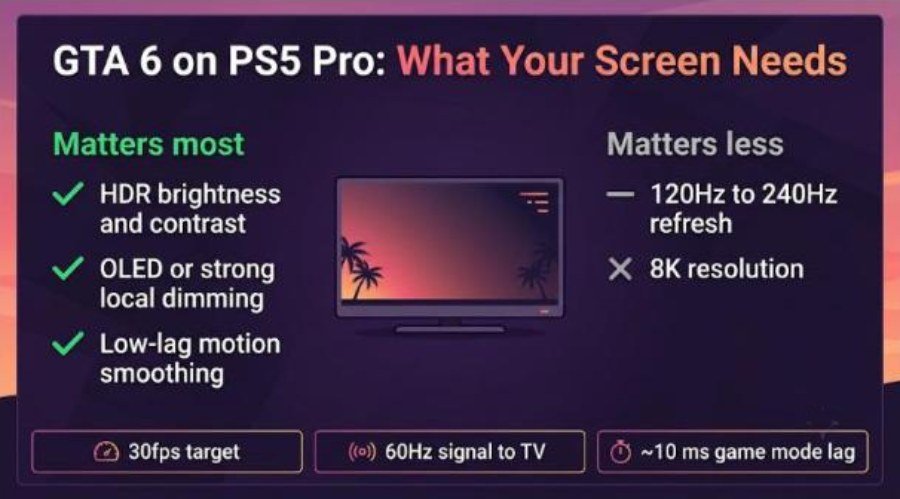
For GTA 6 on PS5 Pro, put your money into HDR and contrast. A Samsung S95H or LG C6 OLED gives the best picture. If 30fps judder bothers you, consider a TCL or Hisense TV, which RTINGS found handle motion interpolation best in game mode.
LG C6 OLED (65-inch) on AmazonASUS PG27UCDM on Amazon
Why HDR Beats Hz for GTA 6 on PS5 Pro
According to gta6.house, GTA 6 targets 30fps on PS5, PS5 Pro, Xbox Series X and Series S. There is no 40fps, 60fps or performance mode. The site quotes Rockstar’s Marc Chambers telling Kotaku that the CPU is not powerful enough for higher frame rates. The Droid Guy, citing Push Square and Pure Xbox, reports the same 30fps target with no mode choice.
That means a 165Hz TV runs GTA 6 at the same frame rate as a 60Hz TV. A high refresh rate still helps in other PS5 games that hit 120fps. For Vice City, though, it adds nothing.
The input lag myth
Many players worry that 30fps means terrible input lag. RTINGS explains that the console still sends a 60Hz signal to the TV. So the TV’s input lag is the same as with any 60fps game. A good TV in game mode stays around 10ms at 4K60.
What the PS5 Pro adds
gta6.house reports that the PS5 Pro uses PSSR 2 upscaling for a cleaner 4K image and swaps shadow maps for ray-traced shadows. It lists a 1440p internal resolution upscaled to 4K. The Droid Guy notes that Rockstar has not published resolution figures, so treat those numbers as reported rather than official.
The extra detail and ray-traced lighting shine on a screen with deep blacks and bright highlights. gta6.house also cites Digital Foundry praising HDR highlights above 1,500 nits. That is exactly where OLED contrast and strong Mini LED brightness pay off.
The 30fps Problem: Stutter, Blur and Motion Interpolation
Fast panels have a downside at low frame rates. RTINGS found that the near-instant response time of OLEDs turns into a weakness at 30fps. Each frame stays on screen longer, which causes persistence blur and visible stutter during camera pans.
Which TV brands can smooth 30fps in game mode
| Brand | Interpolation in game mode | RTINGS finding |
|---|---|---|
| TCL | Yes (Motion Clarity, Custom) | Among the best experiences, low added lag |
| Hisense | Yes (Motion Processing, Custom) | Among the best experiences, low added lag |
| Samsung | Yes (Game Motion Plus, 60Hz input) | Often appeared to stop interpolating |
| LG | No, only outside game mode | Large input lag increase |
| Sony | No, only outside game mode | Large input lag increase |
The input lag cost, measured
| TV | Game mode @ 4K60 | With interpolation |
|---|---|---|
| Samsung QN80F | 10.0 ms | 24.2 ms |
| TCL QM8L | 14.5 ms | 24.5 ms |
| TCL M8LF | 9.9 ms | 24.6 ms |
| Hisense UR9SG | 12.8 ms | 32.9 ms |
| Samsung S95H OLED | 10.0 ms | 48.8 ms |
| LG C6 OLED | 10.3 ms | 86.0 ms (outside game mode) |
| Sony BRAVIA 3 II | 9.7 ms | 132.4 ms (outside game mode) |
RTINGS’ advice is practical. If choppy motion bothers you, a TCL or Hisense TV with game mode interpolation is worth a look, at the cost of slightly higher lag and some artifacts. If you are not sensitive to stutter, keep interpolation off for the most consistent image and the lowest lag.
Video: Compare Clearly walks through GTA 6 picture settings for each major TV brand. Opinions in the video belong to the creator, so treat it as another point of view.
Best TVs for GTA 6 on PS5 Pro
These picks follow RTINGS best TVs for PS5 and PS5 Pro list, updated October 21, 2026. We have ordered them by how well they serve a 30fps, HDR-heavy game.
| Pick | Panel | Refresh | Sizes | Why it suits GTA 6 |
|---|---|---|---|---|
| Samsung S95H OLED | QD-OLED, matte | 165Hz | 55 to 83 in | Vivid colour, inky blacks, handles bright rooms |
| LG C6 OLED 2026 | WOLED, glossy | 165Hz | 42 to 65 in | OLED contrast for less money |
| Hisense U7SG | VA LCD, local dimming | 165Hz | 55 to 100 in | Very bright, game mode interpolation brand |
| TCL QM6K | VA LCD, local dimming | 144Hz | 55 to 98 in | Budget HDR with interpolation in game mode |
| Hisense QD6QF | VA LCD | 60Hz | 43 to 100 in | Cheap, and 60Hz is enough for 30fps |
1. Samsung S95H OLED: best overall
RTINGS names the S95H the best TV for PS5 it has tested. Its QD-OLED panel delivers bright, vivid colour and inky blacks at the same time. That helps show the detailed shadows and reflections from the PS5 Pro’s ray tracing. The matte coating and high brightness also fight glare in bright rooms.
It has four HDMI 2.1 ports, VRR and very low input lag. The one limitation is that blacks can look a bit greyish under strong ambient light. It also skips Dolby Vision, but the PS5 does not use Dolby Vision anyway.
2. LG C6 OLED 2026: best upper mid-range
The LG C6 gives you the same OLED blacks for less. RTINGS says bright colours are not quite as vivid as on the Samsung, and HDR highlights such as sunlight pop a little less. Its glossy screen also shows mirror-like reflections from lamps facing it. Keep it in a moderately lit room.
It still has four HDMI 2.1 ports, VRR and very low lag. Note that the 77- and 83-inch versions are sold as the LG C6H, which RTINGS says is brighter with more vivid colour. One caveat for GTA 6: LG only offers motion interpolation outside game mode, with a big lag penalty.
3. Hisense U7SG: best mid-range
If you do not need perfect OLED blacks, the U7SG is a bright, glare-resistant choice. RTINGS praises its local dimming, which keeps blacks deep with only minor haloing. The trade-off is much worse motion handling, with more blur around fast objects. Hisense is also one of the two brands that impressed RTINGS with low-lag interpolation in game mode.
4. TCL QM6K: best budget
The QM6K is the value play. It has two HDMI 2.1 ports for 4K at up to 144Hz, VRR and low input lag. Its local dimming creates deep blacks, though bright objects in dark scenes show more blooming than the Hisense. It is better suited to evening play than bright daytime rooms.
5. Hisense QD6QF: best cheap
This TV lacks HDMI 2.1 and local dimming, so HDR looks flat and blacks look greyish. Yet for GTA 6 specifically, its 60Hz panel is not a real handicap, and RTINGS says input lag at 4K60 is decently low. It is a stopgap, not an HDR showcase.
LG C6 OLED 65-inchTCL QM6K 55-inch
Best Monitors for GTA 6 on PS5 Pro
Playing at a desk? RTINGS’ best monitors for PS5 list, updated October 14, 2026, focuses on HDMI 2.1, VRR and picture quality. For GTA 6, HDR quality again matters more than 240Hz.
| Pick | Panel | Key strength | Main weakness |
|---|---|---|---|
| ASUS ROG Swift OLED PG27UCDM | 27-inch 4K QD-OLED, 240Hz | Accurate, vivid HDR, HDMI 2.1 | Blacks look purple in bright rooms |
| Dell Alienware AW2725Q | 27-inch 4K QD-OLED | Same OLED contrast for less | HDR less accurate, no audio jack |
| Acer Nitro XV275K P5 | 27-inch 4K Mini LED | Local dimming in HDR | Black crush in dark scenes |
| Dell S2725QS | 27-inch 4K IPS, 120Hz | Cheap 4K with HDMI 2.1 and VRR | No local dimming, weak HDR |
ASUS ROG Swift OLED PG27UCDM: best monitor
RTINGS calls it the best monitor for PS5 and PS5 Pro. It accepts 4K at 120Hz over HDMI 2.1, and its QD-OLED panel makes HDR games look fantastic. The 240Hz refresh rate is overkill for a console, but useful if a gaming PC shares the desk. RTINGS notes that deep blacks look purple in a bright room.
Dell Alienware AW2725Q: OLED for less
Another 4K QD-OLED with the same deep blacks and fast response. RTINGS says it shows most HDR content brighter than intended and does not get as bright as the ASUS. It also lacks an audio jack, so plan for a headset that connects to the controller or console instead.
Acer Nitro XV275K P5 and Dell S2725QS: budget routes
The Acer uses Mini LED local dimming in HDR to deepen blacks, but RTINGS saw black crush that hides shadow detail. The Dell S2725QS is an office-style 4K monitor with a 120Hz panel, HDMI 2.1 and VRR. It lacks local dimming, so HDR is underwhelming, but it is a cheap way to see the PS5 Pro’s 4K output.
Want a deeper look at OLED panels? Our OLED gaming monitor comparison for 2026 breaks down QD-OLED vs WOLED in detail. The Alienware AW3426DW review covers an ultrawide QD-OLED, and our ASUS TUF VG247Q1A review shows what a budget panel can and cannot do.
Video: SEB GAMING REVIEWS compares HGiG and dynamic tone mapping for GTA 6 HDR on PS5. Opinions in the video belong to the creator, so treat it as another point of view.
Best Settings for GTA 6 on Your New TV
A great panel still needs the right setup. These steps follow advice reported by The Droid Guy and RTINGS.
| Step | Setting | Why |
|---|---|---|
| 1 | Turn on Game Mode first | Lowest input lag and fewer processing delays |
| 2 | Enable HGiG tone mapping if available | Lets the console and game control HDR brightness |
| 3 | Run the PS5 HDR calibration | Sets correct black and peak levels for your TV |
| 4 | Adjust in-game HDR and brightness last | Fine-tunes the look after system calibration |
| 5 | Try game mode interpolation on TCL or Hisense | Smoother 30fps, with some extra lag |
On LG TVs, HGiG appears under HDR Tone Mapping. If you own an LG or Sony, RTINGS recommends against using interpolation outside game mode, because the added lag is large.
Sound and comfort for long Vice City sessions
TV speakers rarely do a city this busy justice. Our Creative Pebble Pro vs Stage Pro comparison covers an affordable soundbar, while the Sony INZONE H9 II review and Turtle Beach Stealth Pro 2 review cover premium headsets. Running low on space for the 212GB install? See our best SSD for PS5 guide. Still hunting the themed pad? Read our GTA 6 DualSense controller buying guide.
Verdict: Which Screen Should You Buy for GTA 6?
Buy an OLED such as the Samsung S95H or LG C6 if picture quality is your priority. GTA 6 is built around rich lighting, and OLED contrast shows it best.
Buy a TCL or Hisense if 30fps judder drives you mad. Their low-lag interpolation in game mode is the closest thing to smoother motion on console today.
Skip paying extra for 240Hz on a console-only setup. For GTA 6, those extra hertz sit unused, while HDR quality is on screen every second.
More setup reading: our best standing desk for gaming and the Secretlab Titan Evo review.
Frequently Asked Questions (FAQ)
Does GTA 6 run at 60fps on PS5 Pro?
No. Reports citing Rockstar statements say GTA 6 targets 30fps on every console, including the PS5 Pro, with no 60fps or performance mode at launch.
Do I need a 120Hz TV for GTA 6?
Not for GTA 6 itself. The game runs at 30fps over a 60Hz signal. A 120Hz TV still helps in other PS5 games that support 120fps.
What is the best TV for GTA 6 on PS5 Pro?
RTINGS names the Samsung S95H OLED the best TV for PS5 and PS5 Pro. The LG C6 OLED is a cheaper OLED alternative.
Should I use motion interpolation for GTA 6?
Only if stutter bothers you and your TV supports it in game mode. RTINGS found TCL and Hisense handle it best with low added lag. On LG and Sony, it only works outside game mode with much higher lag.
Is OLED or Mini LED better for GTA 6?
OLED gives the best contrast and inky blacks for HDR. Bright Mini LED or local dimming LCD TVs suit bright rooms and cost less, but show some blooming.
What is the best monitor for GTA 6 on PS5?
RTINGS picks the ASUS ROG Swift OLED PG27UCDM, a 27-inch 4K QD-OLED with HDMI 2.1. The Dell S2725QS is a budget 4K option.