The sim racing hardware market is evolving at a breakneck pace, and MOZA Racing continues its relentless pattern of releasing new products faster than the community can keep up. Today, we are taking an exhaustive, in-depth look at two highly anticipated steering wheels: the MOZA KS Pro and the MOZA CS Pro.
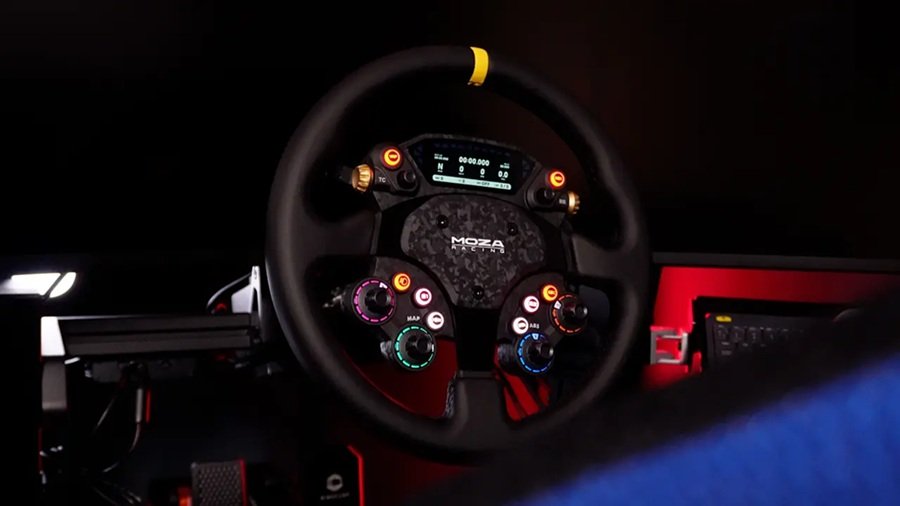
At face value, these might look like slight iterations of previous MOZA wheels, but the reality is much more complex. With the prominent addition of a 2.99-inch full-color digital display, structural tweaks, and advanced software integration, MOZA is making a serious play for the mid-to-high-end sim racing market. Many sim racers are already comparing the KS Pro to the Fanatec ClubSport Formula V3. But which ecosystem truly offers the best bang for your buck?
In this comprehensive review, based on extensive hands-on testing and community feedback (including insights from leading hardware analysts like Boosted Media), we will break down compatibility, pricing, build materials, software functionality, and the overall driving experience to help you decide if these wheels belong on your rig.
1. Ecosystem and Compatibility: PC vs. Console
Before pulling the trigger on a new sim racing wheel, compatibility is the most crucial factor. Both the MOZA KS Pro and CS Pro are strictly PC-compatible. They do not feature native support for PlayStation or Xbox consoles.
To understand why, you need to understand how console security chips function in modern sim racing hardware. Generally, Xbox compatibility requires a specialized security chip housed inside the steering wheel rim itself. Conversely, PlayStation compatibility is usually dictated by a chip located inside the wheelbase. Because the KS Pro and CS Pro lack this internal Xbox chip, you cannot use them on an Xbox, regardless of the wheelbase you attach them to.
For PC users, these wheels are designed to thrive within the MOZA ecosystem. However, MOZA does offer a third-party lifeline. By purchasing an external MOZA USB hub adapter, you can connect the RJ port located at the bottom of the wheels directly to your PC via USB. This allows you to mount the wheel on a third-party wheelbase (such as a Simagic or Fanatec base), provided you purchase the correct quick-release adapter. Even so, these wheels make the most financial and practical sense for racers already invested in a MOZA wheelbase.
Video: Hands-on Review of the MOZA KS Pro and CS Pro
/p>
A deep dive into the hardware and software configuration of MOZA’s new Pro line.
Wheelbase and Hub Kit Details
MOZA’s product pages say both wheels work with every MOZA wheelbase currently on sale. Third-party bases connect through the MOZA hub kit, which uses the industry-standard 6×70 bolt pattern, per the CS Pro page. Traxion priced the Universal Hub Kit at about 35 pounds. MOZA also says the CS Pro connects through a conductive slip ring.
Console players need another route. If you want a PC that sits near the TV, our ROG Xbox Ally X review and our best handheld gaming PCs guide cover the portable options.
2. Pricing and Market Competitors
Pricing is where MOZA often excels, striking a delicate balance between premium features and accessibility. Both the MOZA KS Pro and the MOZA CS Pro retail for $329 USD. Considering the inclusion of a full-color telemetry screen and magnetic shifters, this is a highly aggressive price point.
Let’s contextualize this by comparing it to the closest market rivals:
| Steering Wheel | Price (USD) | Key Strengths | Key Weaknesses |
|---|---|---|---|
| MOZA KS / CS Pro | $329 | Full-color screen, excellent software integration, versatile forms. | Plastic composite builds, no SimHub compatibility. |
| Fanatec ClubSport Formula V3 | $349 | Genuine carbon fiber faceplate, premium materials. | Basic OLED screen (not full color), locked tightly to Fanatec ecosystem. |
| Conspit 300 GT | $399 | Direct PC USB connection out of the box, superior build rigidity. | Noticeably more expensive, software is less mature. |
| Simagic GT Neo | ~$289 | Incredible value, excellent tactile buttons, great rigidity. | No built-in telemetry screen. |
The MOZA Pro line occupies a sweet spot. While the Fanatec V3 offers a slightly more premium material finish (genuine carbon fiber), its screen is a simplistic white-pixel display. The MOZA wheels trade a bit of that material luxury for vastly superior visual functionality and telemetry feedback.
3. Design, Diameter, and Ergonomics
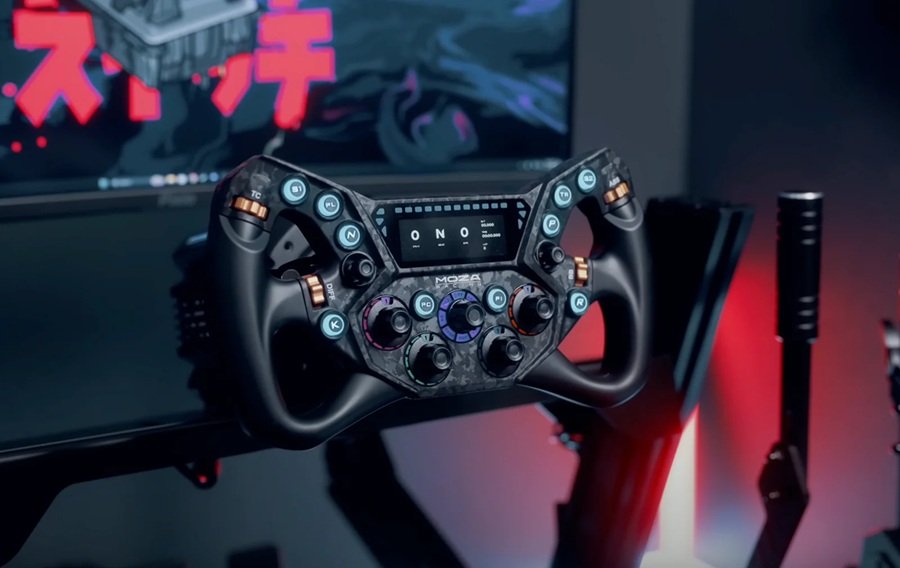
MOZA made a brilliant strategic decision by releasing two distinctly different wheel shapes simultaneously. Together, these two rims cover every single discipline in sim racing.
The MOZA KS Pro: The Track Specialist
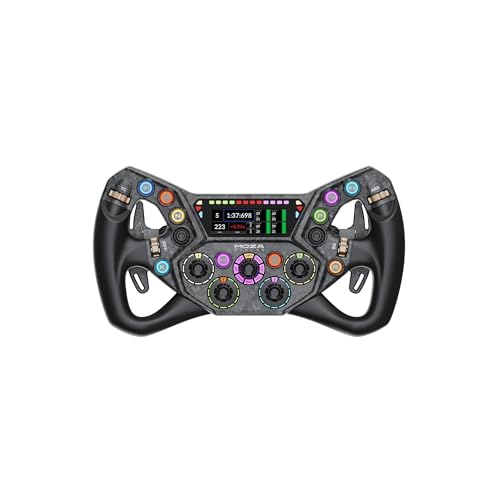
The KS Pro features a 300mm diameter butterfly/formula-style rim. This size is the absolute sweet spot for GT3, GT4, LMP, and Formula racing. The 300mm width provides enough leverage for heavier direct drive wheelbases (like the MOZA R12 or R16) while remaining compact enough to execute rapid direction changes without crossing your arms.
The MOZA CS Pro: The Versatile All-Rounder
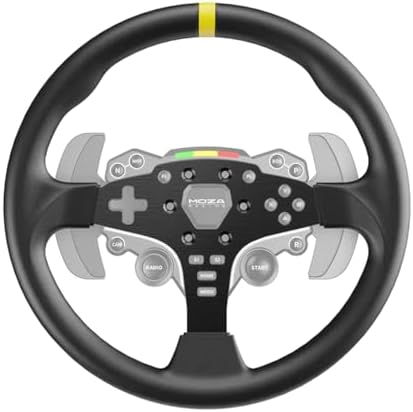
The CS Pro is a perfectly round 325mm wheel. Unlike D-shaped wheels, a completely round rim allows the wheel to slip smoothly through your fingers. This makes the CS Pro the mandatory choice if your primary disciplines include drifting, rally racing (like EA Sports WRC or Richard Burns Rally), or driving standard street cars. At 325mm, it offers a wider rotational arc, which naturally dampens highly aggressive force feedback spikes, making the ride feel slightly smoother and more authentic to road cars.
KS Pro vs CS Pro: Specs at a Glance
This table pulls the official figures from MOZA’s KS Pro page and CS Pro page, plus launch pricing from Traxion.
| Spec | MOZA KS Pro | MOZA CS Pro |
|---|---|---|
| Rim shape and size | 300 mm butterfly | 325 mm round |
| Display | 2.99-inch | 2.99-inch, 268 x 800 at 60Hz |
| Backlit buttons | 10 | 8 |
| Rotary encoders | 5 | 4 (twelve-position) |
| Thumb encoders | 2 | 2 |
| Seven-way switches | 2 | 2 |
| Rear buttons | 2 | 2 |
| Paddles | Magnetic forged carbon, Hall sensors, add-on available | Magnetic forged carbon, Hall sensors, expandable to six |
| Grip | TPE soft rubber | Microfiber leather |
| Plates | Carbon fiber-reinforced composite | Carbon fiber-reinforced composite |
| Price (USD) | $329 | $329 |
4. Build Quality and Materials
To keep the price at $329 despite the addition of a digital display, MOZA had to make specific material choices. Instead of using expensive sheets of forged or woven carbon fiber, both the KS Pro chassis and the CS Pro button box enclosure are constructed from a carbon fiber-reinforced plastic composite. Visually, it features a forged carbon aesthetic (reminiscent of Lamborghini interiors), which looks fantastic on a rig.
Rigidity and Flex
In terms of structural integrity, the KS Pro is a tank. There is zero discernible flex when pushing or pulling heavily on the grips. It feels as solid as wheels that cost double the price.
The CS Pro, however, has a noticeable caveat. Because it features a large, hollow cavity in the lower half of the rim without a supporting central spoke, applying heavy twisting torque reveals some flex. If you grab the wheel and intentionally warp it, it will bend slightly. While you will rarely apply this type of unnatural twisting force during standard racing, it is a point of distinction for purists who demand zero flex.
Grip Materials
The KS Pro utilizes TPE (Thermoplastic Elastomer) rubber grips. These grips are quite firm with almost no squish. The major benefit here is hygiene; unlike softer, sticky rubber grips that attract dust, dog hair, and dead skin cells, the TPE remains clean and smooth. It does not feel quite as premium as alcantara, but it requires zero maintenance and won’t wear out your racing gloves.
The CS Pro utilizes a faux leather wrap. It feels standard and durable, with ergonomic indentations on the rear to support your fingers. One minor critique is the stitching on the inside rim—it can feel slightly abrasive if you let the wheel aggressively slip through your hands while drifting. However, MOZA thoughtfully kept the stitching away from the primary thumb-resting areas, mitigating most of the discomfort.
5. The 2.99-inch Display and RGB LED Features
The undeniable star of the show is the 2.99-inch full-color digital display. This screen is crisp, vibrant, and highly responsive. However, there is a massive elephant in the room that every potential buyer must be aware of: It is NOT SimHub compatible.
SimHub is the industry standard third-party software for configuring telemetry screens and tactile transducers. By locking these wheels exclusively into the MOZA Pit House software, MOZA controls the ecosystem. While you cannot download the thousands of community-made dashboards available for SimHub, MOZA’s proprietary dashboard creator is surprisingly robust (more on this in the software section).
RPM and Flag LEDs
Above the screen, you will find 10 vibrant RGB LEDs serving as your RPM indicator, flanked by additional LEDs on the sides for flag warnings. These are exceptionally bright and fully programmable. You can set specific telemetry triggers to these lights. For example, you can program the left and right LEDs to flash yellow when a car is in your blind spot (acting as a digital spotter), or flash blue when your traction control (TC) or Anti-Lock Braking System (ABS) engages.
6. Button Layout, Shifters, and Encoders
The tactile inputs on both wheels are plentiful and designed to mimic real-world motorsport controls. The buttons on both wheels feature RGB backlighting, which can be color-customized or programmed to flash upon activation.
- KS Pro Layout: 10 backlit push buttons, 2 seven-way “funky” switches (capable of up, down, left, right, rotate left, rotate right, and push), 3 rotary encoders, and 2 anodized aluminum thumb encoders.
- CS Pro Layout: 8 backlit push buttons, 2 seven-way switches, 2 rotary encoders, and 2 thumb encoders. Furthermore, the CS Pro includes two easily reachable buttons on the rear casing.
The Seven-Way Switches
Historically, MOZA used analog hat switches that emulated digital inputs, which felt clunky. They have finally upgraded to true seven-way mechanical switches. Having two of these on each wheel is a godsend. You can assign one to navigate in-game pit menus (like the iRacing black box) and the other to adjust brake bias or engine maps on the fly.
Magnetic Shifters and Dual Clutch
Flipping the wheels over reveals MOZA’s proven Quick Release system (which remains one of the absolute best, slop-free quick releases on the market) and the shifter assemblies.
The magnetic shifters are snappy, responsive, and relatively quiet. MOZA installed small rubber dampeners to prevent the loud metal-on-metal “clack” found on older wheels. If you live in an apartment or race late at night, your family will deeply appreciate this feature.
Both wheels feature analog dual-clutch paddles. These are essential for executing flawless standing starts in F1 or GT racing. By finding the exact bite point of your car’s clutch, you can drop one paddle to instantly launch without wheel spin, slowly releasing the second paddle to merge into gear.
7. MOZA Pit House Software Integration
Because you are locked out of SimHub, the MOZA Pit House software must do the heavy lifting—and for the most part, it succeeds.
The Multi-Mode Thumb Dial (KS Pro Exclusive)
The KS Pro features a unique software trick. The center rotary encoder acts as a “page selector.” Depending on what position the center dial is in, the functions of the two top thumb encoders change.
For example:
• Page 1: Thumb encoders control Traction Control and ABS.
• Page 2: Thumb encoders control Front and Rear Anti-Roll Bars.
• Page 3: Thumb encoders control Brake Bias and Engine Mapping.
This effectively multiplies your inputs. The only downside? The physical screen-printed labels on the KS Pro’s center dial do not match the custom functions you might assign to it, which can cause minor visual confusion.
Dashboard Customization
The Pit House software allows you to tweak screen brightness, set idle sleep timers, and choose from a dozen pre-made dashboard layouts. If you want more control, the Dashboard Library tool lets you build a dash from scratch. You can drag and drop text boxes, RPM gauges, tire temperature widgets, and even a relative radar system. It is highly intuitive, though it lacks the infinite open-source depth of SimHub.
Display Specs and Pit House Download
MOZA lists the CS Pro display at 268 x 800 pixels and 60Hz. The wheel also carries 10 RGB rev lights and 6 flag lights. You can grab Pit House from MOZA’s download center. Be aware that Traxion found the CS Pro screen duller than its buttons, which made some warning lights hard to read.
8. The Major Flaw: Screen Durability
No product is perfect, and the MOZA Pro wheels have one glaring weakness: The screen cover is incredibly prone to scratching.
Unlike premium smartphones or high-end wheels that utilize tempered Corning Gorilla Glass, MOZA seems to have opted for a softer plastic or acrylic lens over the digital display. Reviewers have noted that gently wiping dust off the screen with a brand-new, clean microfiber cloth is enough to leave visible micro-scratches and gouges in the surface.
If you purchase this wheel, you must treat the screen with extreme caution. Avoid wiping it dry. Use compressed air to blow off dust, or apply a dedicated sim racing screen protector before you even mount the wheel to your rig. It is a highly disappointing oversight on an otherwise stellar piece of hardware.
9. The Driving Experience: Which One Should You Buy?
At the end of the day, hardware specs only matter if they translate into a better driving experience. On track, both the KS Pro and CS Pro deliver immense value.
The ergonomics are brilliant, the buttons provide satisfying tactile feedback through racing gloves, and the RGB integration offers genuine competitive advantages (like knowing exactly when your tires are locking up via the ABS telemetry lights).
👍 The Pros
- Vibrant, highly responsive 2.99-inch color displays.
- Incredible value for money at $329.
- Rock-solid KS Pro chassis with zero flex.
- Quiet, refined magnetic shifters with dual analog clutches.
- Powerful telemetry-based RGB LED programming.
- Industry-leading zero-slop quick release system.
👎 The Cons
- Screen lens scratches incredibly easily (requires immediate protection).
- Strictly locked out of SimHub integration.
- Minor flex in the round rim of the CS Pro.
- Clutch bite point cannot be adjusted directly on the wheel.
- Static printed labels on the KS Pro limit aesthetic customization.
The Final Verdict
If you are already inside the MOZA Racing ecosystem, upgrading to the KS Pro or CS Pro is a no-brainer. They represent a massive leap in functionality over MOZA’s entry-level rims.
If you race GT3, Formula, or prototypes, the KS Pro is the undisputed champion of the two. Its rigid structure, smart multi-page encoder system, and perfect 300mm width make it a formidable weapon on the track.
If you prefer rally, drifting, or casual street driving, the CS Pro offers the necessary 325mm round shape required to let the wheel slide through your hands safely, while still providing advanced telemetry data right in your field of view.
MOZA hasn’t just released another generic wheel update; they have redefined the baseline expectations for a $300 sim racing wheel. As long as you immediately buy a screen protector, the MOZA Pro line will not disappoint.
What Other Reviewers Found
Traxion praised the KS Pro as almost unrivaled for the money. It also listed flaws that our review does not stress. The composite body feels plasticky, the TPE grips feel slightly greasy, and the seven-way switches show a lot of play. The screen adds weight, so the wheel feels top-heavy.
Traxion made similar comments about the CS Pro. Its reviewer found that most buttons need a hand reposition to reach. Treat these points as a balance to the glowing price-to-feature story above.
Who Should Buy These Wheels
- Racers who already own a MOZA wheelbase and want a color display and richer inputs.
- GT3, GT4 and Formula drivers who want the compact 300 mm KS Pro.
- Rally and drift fans who prefer the round 325 mm CS Pro.
- Buyers who can live inside Pit House and do not need SimHub.
Who Should Skip Them
- Console racers, because neither wheel supports Xbox or PlayStation natively.
- SimHub users who rely on community dashboards.
- Anyone unwilling to buy a screen protector for a lens that scratches easily.
- Purists who want a zero-flex round rim.
Building the Rest of the Rig
A wheel is only one part of the setup. Screen size and refresh rate shape what you see, so compare our Dell Alienware AW3426DW review with our ASUS TUF Gaming VG247Q1A review. Engine and tire sounds also help you catch grip loss, so see our Turtle Beach Stealth Pro 2 review and Logitech G PRO X3 LIGHTSPEED review. Long stints also need a supportive seat, and our Herman Miller x Logitech Embody review looks at a high-end chair.
Menus and setup screens still need a mouse and keyboard. Our gaming mouse buying guide, Logitech G PRO X SUPERLIGHT 2 review and mechanical keyboard spending guide can help you pick them.
Frequently Asked Questions
Are the MOZA KS Pro and CS Pro compatible with Xbox or PlayStation?
No. Both wheels are strictly PC-compatible because they lack the internal security chip Xbox requires. You can adapt them to a third-party wheelbase over USB with a MOZA hub adapter, but native console support isn’t available.
Do the MOZA KS Pro and CS Pro support SimHub?
No — both wheels are locked exclusively into MOZA’s own Pit House software, so you can’t use the thousands of community dashboards built for SimHub.
What’s the difference between the KS Pro and CS Pro?
The KS Pro is a rigid 300mm butterfly/formula-style rim built for GT3, GT4, and Formula racing. The CS Pro is a fully round 325mm rim better suited to rally, drifting, and street-car driving, though it has slightly more flex under heavy twisting force.
Is the display on the MOZA Pro wheels durable?
Not really — the screen’s plastic lens scratches very easily, even from a clean microfiber cloth. Plan on adding a dedicated screen protector as soon as you unbox it.
How much do the MOZA KS Pro and CS Pro cost?
Can I use the MOZA KS Pro or CS Pro on a non-MOZA wheelbase?
Yes, with the MOZA hub kit. MOZA states that both wheels work with third-party wheelbases through the kit, which uses the standard 6×70 bolt pattern. You may also need the correct quick-release adapter for your base. The wheels work natively with every MOZA wheelbase currently on sale.
Can I add more paddles to the MOZA KS Pro or CS Pro?
Yes. MOZA’s CS Pro page says the wheel expands to a six-paddle layout, and the KS Pro page lists a paddle add-on option. Both wheels ship with magnetic forged carbon paddles that use Hall sensors, so the add-ons extend the same setup.
What resolution is the MOZA CS Pro display?
MOZA lists the CS Pro display at 268 x 800 pixels with a 60Hz refresh rate on a 2.99-inch panel. You can edit the dashboard layout in Pit House. Traxion found the screen dimmer than the wheel’s buttons, which can make some warning lights harder to see.
Where do I download MOZA Pit House?
Pit House is listed on MOZA’s official download center. It is the software that controls both wheels, including button functions, dashboard layouts and LED settings. Neither wheel supports SimHub, so Pit House is the only way to customize the display.
Both wheels retail for $329 USD.